
Physics with matter.js in p5.js
From falling boxes to slingshots

Tested with p5.js 2.3.4 and matter.js 0.20.0 (October 2026).
Make a box fall, bounce off a ramp or knock down a tower, and you need a physics engine: code that works out how solid objects move, collide and push each other. This post explains how one works, using matter.js, then walks through twelve p5.js sketches, from a single falling box to a slingshot. Each sketch is in my p5.js Web Editor collection Physics with matter.js (p5.js 2.x). Key presses switch between the different effects in each sketch.
What a physics engine does
A physics engine doesn't animate anything by hand. You describe bodies (shape, position, mass, bounciness), and the engine moves time forward in small, equal steps. In each step it adds forces such as gravity, moves every body a little, finds bodies that now overlap and pushes them apart, and works out new velocities. Do that 60 times a second and you get falling, sliding, stacking and bouncing.
Physics engines have been used in games for decades. The method matter.js uses to move bodies, Verlet integration, was first used by Jean Baptiste Delambre in 1791 and rediscovered by Loup Verlet in the 1960s for molecular dynamics (Wikipedia). For 2D games, Erin Catto's Box2D became the best-known engine: it started as "Box2D Lite", a demonstration engine for his talk at GDC 2006, was released in September 2007, and has been used in Angry Birds, Limbo and Crayon Physics Deluxe, among many others (Wikipedia).
matter.js is a 2D rigid-body physics engine for the web by Liam Brummitt (MIT licence, first released in 2014). Its README calls it "an original JavaScript physics implementation (not a port)", and its References page lists the methods it uses: a time-corrected position Verlet integrator, an iterative impulse and position solver, an approximate Coulomb friction model, and resting contacts from Erin Catto's GDC 2008 talk. Daniel Shiffman's The Nature of Code uses matter.js in its physics libraries chapter, partly because it measures everything in pixels. matter.js is a separate library, not part of p5.js: matter.js does the physics, p5.js draws.
One step, in order
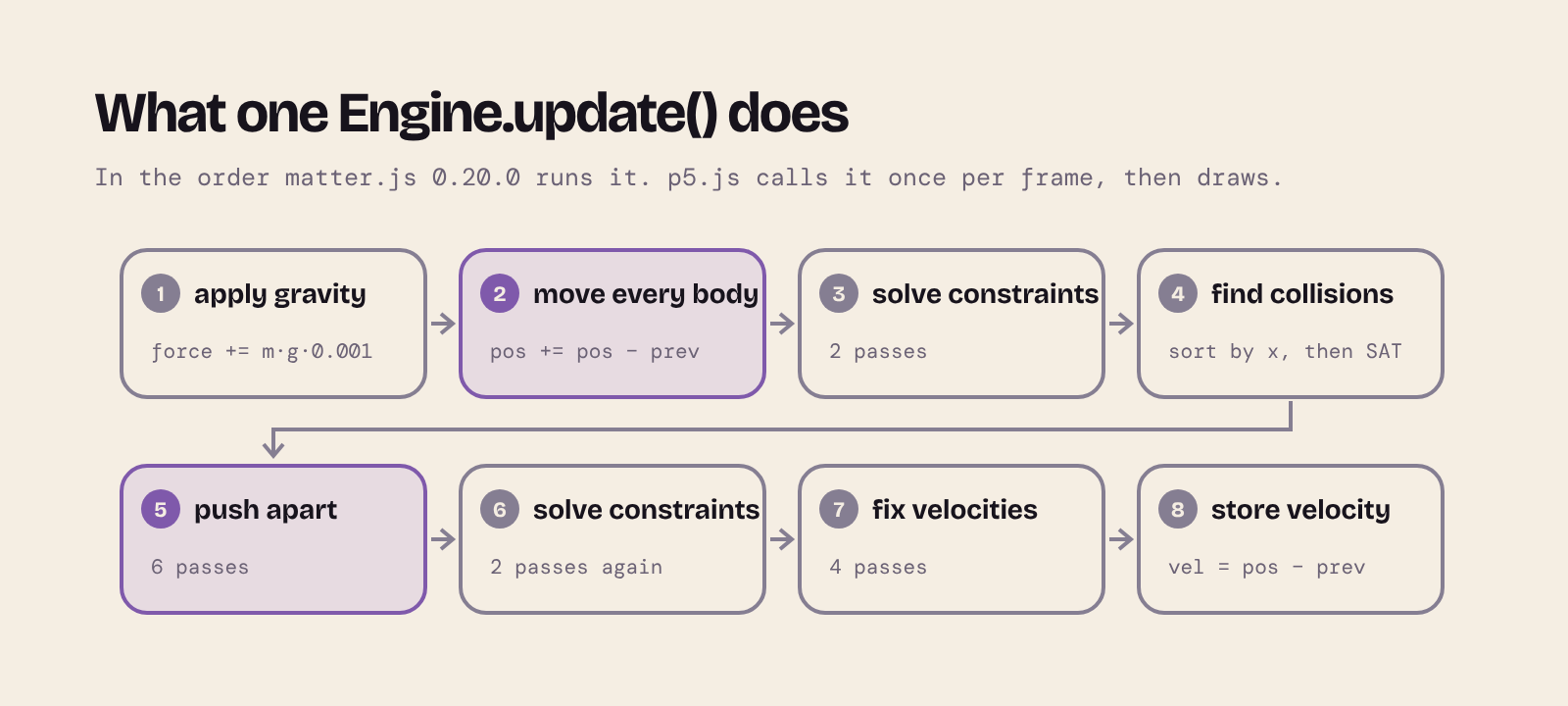
Each call to Matter.Engine.update(engine, delta) runs these eight stages, in this order (from the matter.js 0.20.0 source). Stage 4 doesn't test every pair of bodies against every other: it sorts the bodies by their left edge, only tests pairs whose boxes overlap, and then checks their exact shapes with the separating axis theorem (SAT). Stages 5 and 7 don't solve the collisions exactly. They make a few correcting passes (6 for positions and 4 for velocities by default; engine.positionIterations and engine.velocityIterations), which is why a tall stack can wobble a little before it settles.
Pixels and steps, not metres and seconds
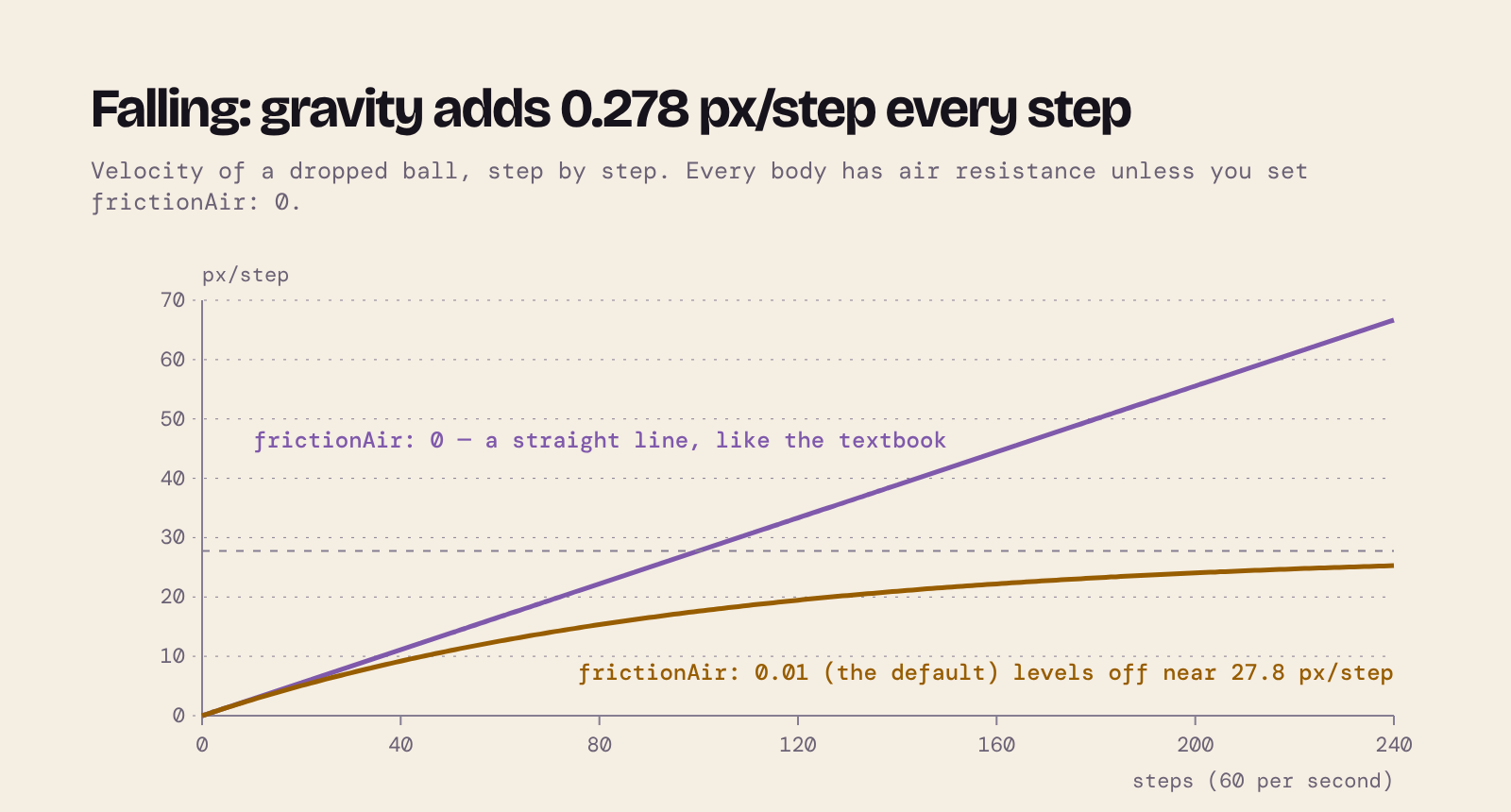
matter.js measures distance in pixels and velocity in pixels per step. Gravity is a force of mass × gravity.y × gravity.scale, with gravity.y = 1 and gravity.scale = 0.001 by default. At 60 steps a second (16.67 ms each), that adds 0.278 px/step to a falling body's velocity every step. With frictionAir: 0, the velocity climbs in a straight line, as in the textbook. But every body has frictionAir: 0.01 unless you change it, which takes 1% of its speed away every step, so a falling body levels off near 27.8 px/step: a terminal velocity.
Where matter.js differs from the textbook
A physics engine for games trades accuracy for speed and stability. I measured these by running matter.js 0.20.0 itself; the diagrams use those numbers.
- No stored velocity. In a simple hand-made system you keep a velocity and add it to the position (
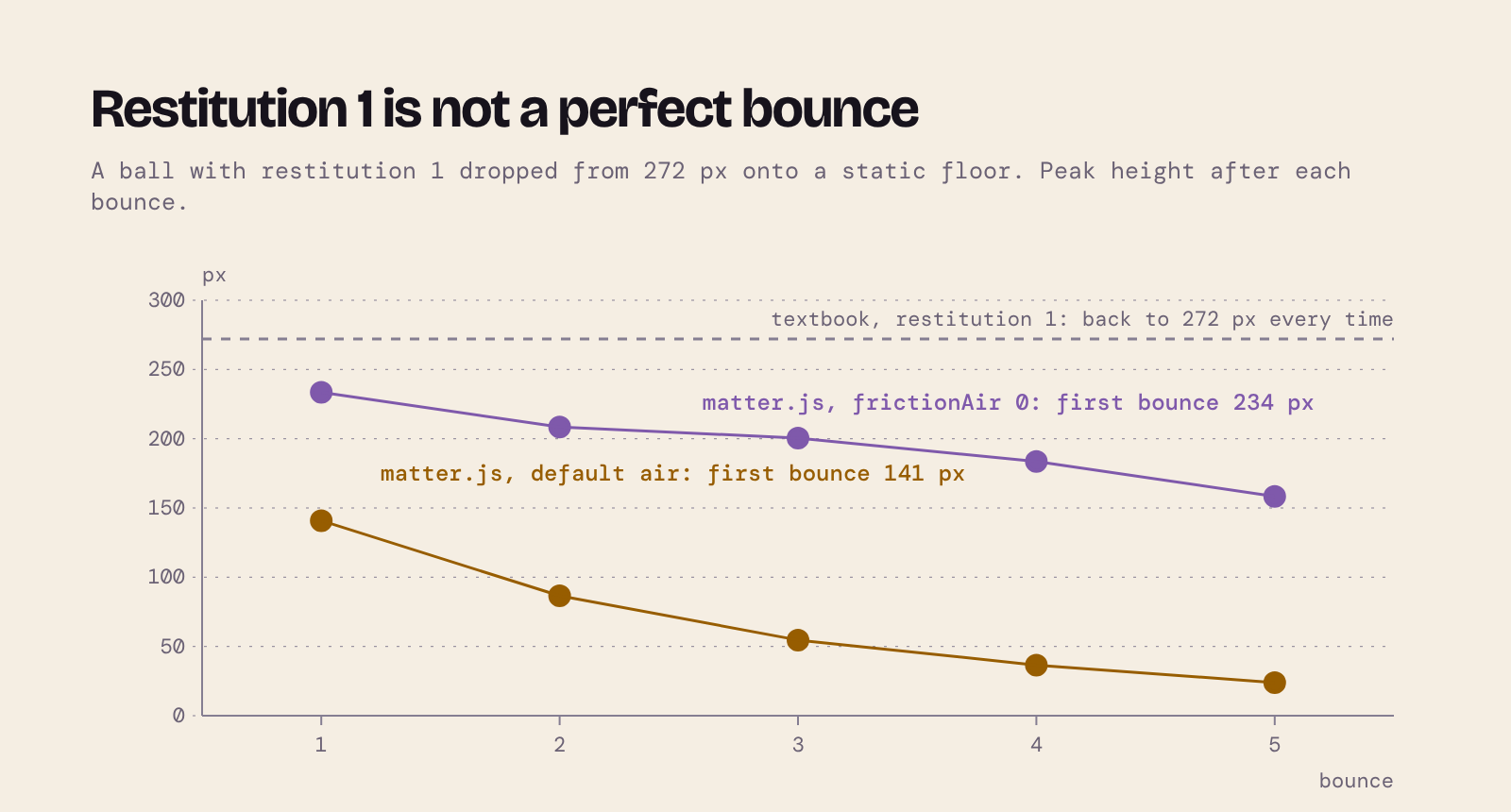
pos += vel). matter.js keeps the current and previous positions; the velocity is the difference between them (Verlet). Collisions change the previous position to change the velocity. - Restitution 1 is not a perfect bounce. In theory, a ball with restitution 1 bounces back to the height it fell from. In matter.js, even with air resistance off, the first bounce reaches 234 px of the original 272 px, and the default air resistance brings it down to 141 px.
- When two bodies touch, matter.js combines their materials using the higher restitution and the lower friction of the pair. A bouncy ball on a dead floor still bounces.
- Static bodies get restitution 0 and friction 1, whatever options you pass (
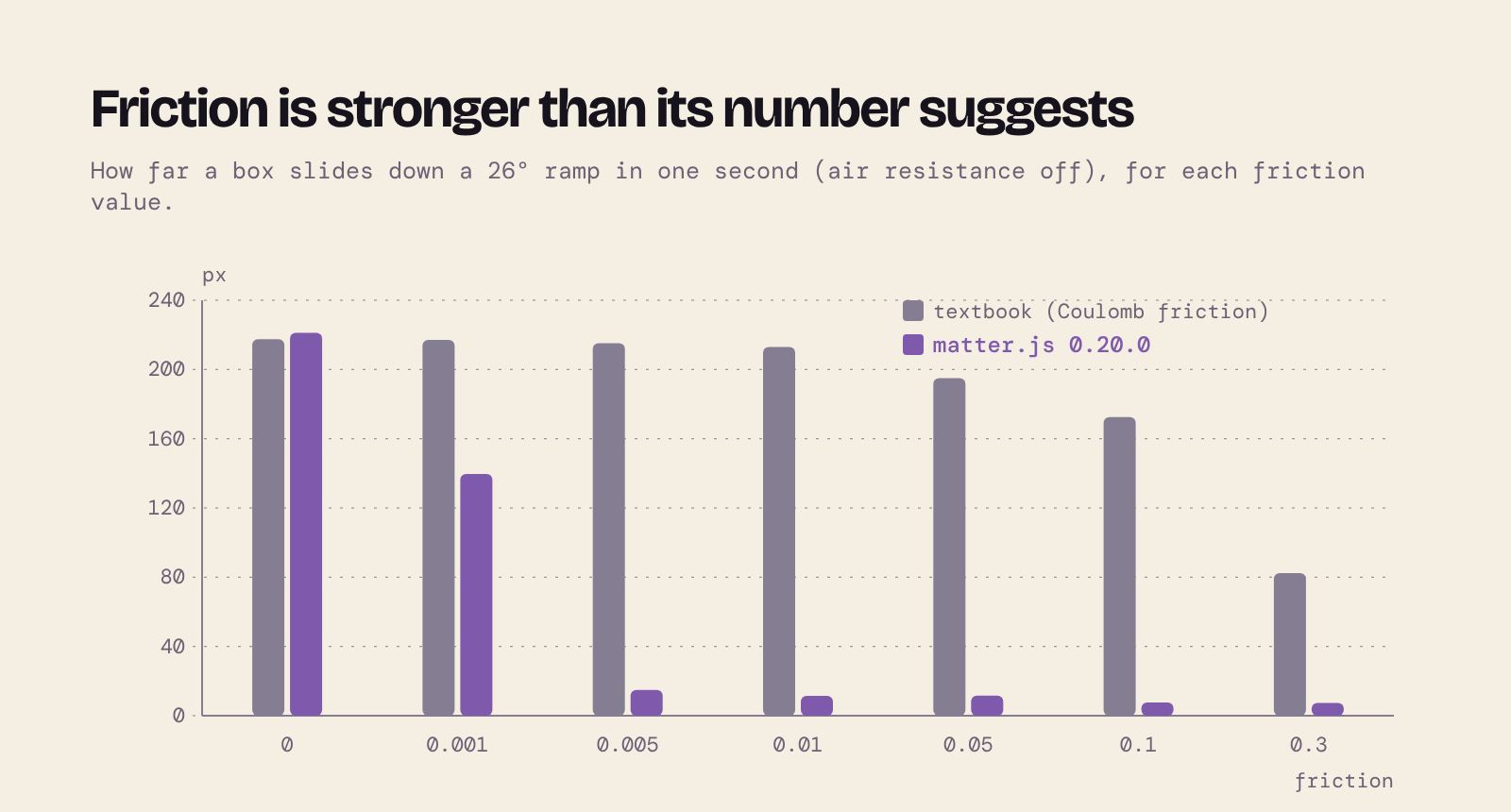
Body.setStatic()sets them). To make a bouncy or slippery floor, set the property after the body is made. - Friction is approximate. By Coulomb's law, a box with friction 0.1 on a 26° ramp should slide about 170 px in a second. In matter.js it creeps 7 px. Only values close to 0 let a box slide freely, so use small numbers (0.001–0.01) for slippery surfaces.
- Constraints aren't springs. A constraint's
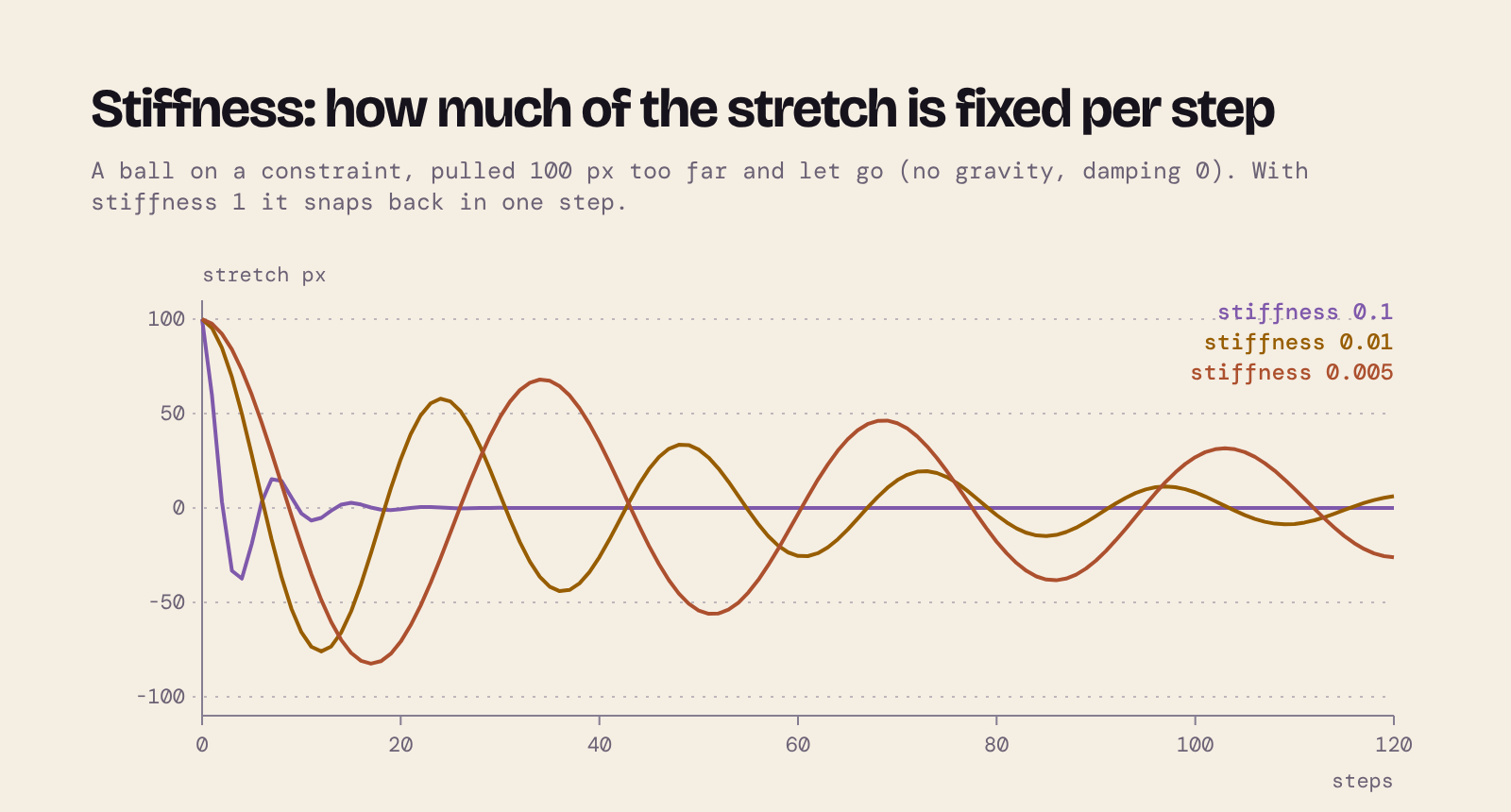
stiffnessis the fraction of the stretch corrected in each step, not a spring constant: 1 snaps back at once, small values stretch and bounce like a spring. Some energy is lost even withdamping: 0.
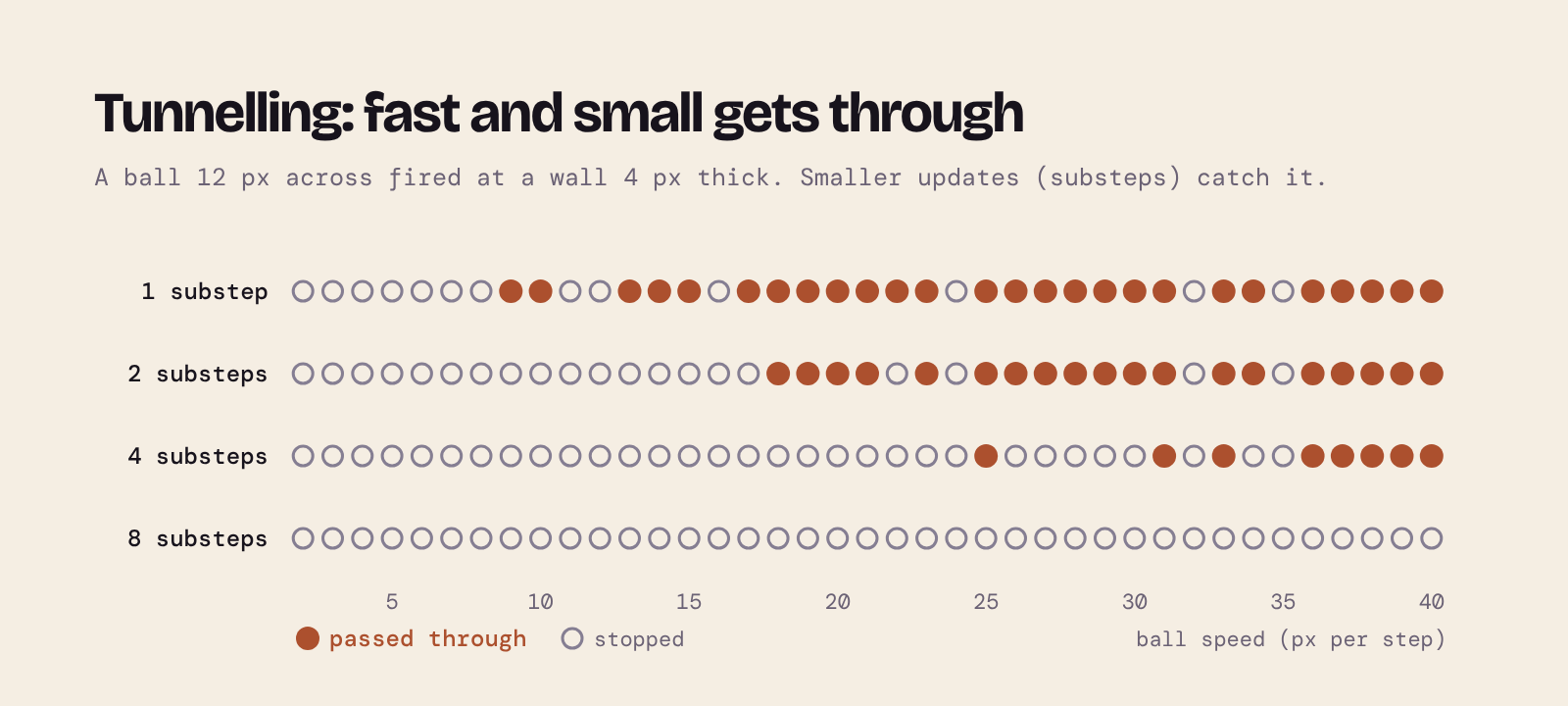
- Fast, small bodies can tunnel. matter.js checks for overlaps after each update, not along the path in between. A ball 12 px across, fired at a wall 4 px thick, gets through at speeds from about 9 px per step. That is less than the 16 px you might expect, because a ball caught more than halfway through is pushed out forwards. Splitting each frame into smaller updates (substeps) catches it.
How p5.js and matter.js fit together
Every sketch below uses the same small set of classes, copied into each sketch's classes/ folder:
PhysicsWorldwraps the engine.step()callsEngine.update()with a fixed 1/60 s (split into substeps if needed), so the simulation runs the same on fast and slow computers.PhysicsThingpairs a matter.js body with its drawing.Box,BallandPolygonextend it, andGroundextendsBoxas a static body.MouseDrag,BodyViewandConstraintViewhandle mouse dragging and drawing;KeyboardControllerturns key presses into actions and writes the help line at the bottom of the canvas.- Every number is in a frozen
CONFIGobject inconfig.js, and each sketch has a README with its file tree.
matter.js places bodies by their centre, but p5.js draws rect() from the top-left corner by default, so every class draws around (0, 0) after moving to the body's position and turning to its angle.
The sketches
00 How a physics step works
Open sketch 00. The sketch starts paused: each press of Space runs one Engine.update(). A faint circle marks where the ball was one step ago, and an arrow shows the velocity (the difference). The graphs add one point per step: while the ball falls, the velocity line rises by the same amount each step.
function gravityPerStep() {
  const { gravity } = world.engine;
  return gravity.y * gravity.scale * CONFIG.physics.stepMs ** 2;
}
01 Engine, world and a body
Open sketch 01. The smallest matter.js sketch: an engine, a box and a static ground. Press D to draw the same body three ways: with rect() turned to the body, from the body's own vertices, and (wrong on purpose) with rectMode(CORNER) and no rotation.
draw() {
  const p = this.p;
  p.push();
  this.moveToBody();
  BodyView.applyStyle(this.style, p);
  p.rectMode(p.CENTER);
  p.rect(0, 0, this.#w, this.#h);
  p.pop();
}
02 Shapes and static bodies
Open sketch 02. Click to drop boxes, balls, polygons or trapezoids (keys 1–4) onto two slippery ramps. Shapes that fall off the bottom are removed from the world and from the array.
function removeFallen() {
  things = things.filter((thing) => {
    if (thing.isBelow(height)) {
      thing.removeFromWorld();
      return false;
    }
    return true;
  });
}
03 Bounce, friction and air
Open sketch 03. Five identical bodies with five values of restitution, friction, frictionAir or density (keys 1–4). Press B to give the floor restitution 1, which makes every ball bounce. Ground sets it after the body is made, because static bodies start with restitution 0:
constructor(world, { options = {}, bounce = {}, ...rest }, p = globalThis) {
  super(world, { ...rest, options: { ...options, isStatic: true } }, p);
  Object.assign(this.body, bounce);
}
04 Many bodies and clean-up
Open sketch 04. A stream of bodies, with a live count. Press C to switch the clean-up off and watch the count climb.
if (playback.running) {
  if (spawner.tick()) {
    spawn();
  }
  world.step();
  if (cleanUp) {
    removeFallen();
  }
}
05 Constraints
Open sketch 05. A pendulum, a rigid rod, a spring, a chain and a balance scale (keys 1–5); ↑/↓ change the stiffness. The scale's plank is pinned at its centre by a constraint of length 0:
const plank = keep(new Box(world, { x, y: pivotY, w: plankW, h: plankH, style: BODY_STYLE }));
// A constraint of length 0 pins the plank's centre to one point: it can
// turn, but not fall.
addConstraint({ pointA: { x, y: pivotY }, bodyB: plank.body, length: 0, stiffness });
06 Dragging with the mouse
Open sketch 06. Drag any shape. MouseConstraint attaches one end of a constraint to the mouse and the other to the body you click. S switches between a firm and a soft grip, G switches gravity off. On high-density screens, matter.js needs to know p5's pixel density:
const mouse = Matter.Mouse.create(canvas.elt);
// On a high-density screen the canvas has more pixels than CSS pixels;
// without this, the grab point drifts away from the pointer.
mouse.pixelRatio = p.pixelDensity();
// matter.js also listens for the mouse wheel and stops the page scrolling
// over the canvas. These sketches don't use the wheel, so let it scroll.
canvas.elt.removeEventListener('wheel', mouse.mousewheel);

this.#mouseConstraint = Matter.MouseConstraint.create(world.engine, {
  mouse,
  constraint: { stiffness: settings.stiffness, damping: settings.damping },
});
world.add(this.#mouseConstraint);
07 Composites
Open sketch 07. Composites.stack(), Composites.pyramid(), a rope bridge built with Composites.chain(), and a chain reaction: a ball rolls down a ramp, hits a pendulum, and the pendulum knocks over a tower (keys 1–4).
const group = Matter.Body.nextGroup(true);
const bridge = Matter.Composites.stack(x, y, planks, 1, gap, 0, (bx, by) =>
  Matter.Bodies.rectangle(bx, by, plankW, plankH, { collisionFilter: { group } }),
);
// Join each plank's right end to the next one's left end.
Matter.Composites.chain(bridge, rightEnd, 0, leftEnd, 0, { stiffness, length: linkLength });
addComposite(bridge);
08 Collisions
Open sketch 08. collisionStart events, collision filters (amber and blue balls pass through each other), a sensor, and tunnelling with substeps (keys 1–4). A filter is a category bit and a mask of the categories a body may hit:
function filterFor(colour) {
  if (!filtersOn) {
    return {};
  }
  return {
    category: CATEGORIES[colour],
    mask: CATEGORIES.ground | CATEGORIES[colour],
  };
}
09 Moving a static body
Open sketch 09. Marbles roll onto a paddle that turns by itself; a sensor in the bucket counts the catches. The paddle is static, so the sketch turns it every step. Press V: with updateVelocity false, the engine thinks the paddle is standing still and marbles are only pushed aside.
turn(updateVelocity) {
  Matter.Body.setAngle(this.body, this.body.angle + this.#speed, updateVelocity);
}
10 Slingshot
Open sketch 10. Drag the ball back and let go. The band is a soft constraint; the sketch removes it as the ball passes the fork, and the ball flies at a tower. Press C to build the tower from plain boxes or from crates: Crate extends Box and overrides only draw(), to show a picture painted with createGraphics().
update() {
  if (!this.#armed) {
    return;
  }
  const { position, velocity } = this.#ball.body;
  const awayX = position.x - this.#settings.x;
  const awayY = position.y - this.#settings.y;
  // A positive dot product means the ball is moving away from the fork.
  if (awayX * velocity.x + awayY * velocity.y > 0) {
    this.#cut();
  }
}
11 Instance mode
Open sketch 11. Two Newton's cradles on one page, one with restitution 1 and one with 0.6, each in its own p5 instance with its own engine. The drawing classes are the same files as before: each takes an optional p, which global mode leaves out.
CONFIG.sketches.forEach((settings) => {
  new p5(createCradleSketch(settings), document.getElementById(settings.container));
});
Further reading
- matter.js documentation and demos
- The Nature of Code, chapter 6: Physics Libraries by Daniel Shiffman
- Global and instance mode on the p5.js wiki
About the author
- Head of eLearning at the University of Cambridge Language Centre, full-stack developer and AI engineer, and online tutor on the BSc Computer Science from Goldsmiths, University of London, on Coursera. I started out in neuroscience research before moving into web development, and have spent over twenty years building digital learning at Cambridge. This blog is my supplementary material for students on the BSc: set-up guides, explanations of the ideas that trip people up, and worked examples. New here? Click Website above for my Start here page and module guides.
Comments
Join the discussionNo comments yet. Be the first to comment.
Graphics Programming (CM2030)
This module aims to show you how to work with images in a variety of ways. You will learn how to synthesise graphics and how to process visual signals.