Linked data for SQL developers: RDF, Turtle and SPARQL with the planets database

In a relational database, the data and its meaning live in one place. The Planets table knows what a planet is because you created it, and a foreign key only points to rows in the same database. Linked data gives up that boundary. Every thing gets a web address, every fact is a small statement that links one thing to another, and anyone can add facts about your things, or link your data to theirs, from anywhere on the web.
This tutorial explains linked data for someone who already knows SQL. We'll take the planets database from my earlier posts, export it from MySQL to RDF, write it in the main RDF syntaxes, link it to Wikidata, give it meaning with RDFS and OWL, check it with SHACL, and query it with SPARQL: first on our own machine, then on Wikidata and DBpedia. Every SPARQL query that has a SQL twin is run against both and the answers compared.
This is part 3 of my posts on database topics beyond the relational model. Part 1 covered distributed databases, and part 2, MongoDB for SQL developers, turned the same planets data into documents. You don't need to read them first.
Tested with Python 3.13.18, rdflib 7.6.0, owlrl 7.6.2, pySHACL 0.40.2, Oxigraph 0.5.13, MySQL 9.7.4 LTS and MySQL Connector/Python 26.10.0 on Linux, 28 November 2026. Every command and every output below comes from that run. The Wikidata, DBpedia and JSON-LD examples were run in a web browser the same day; their results change as people edit the data.
Contents
- Rows, documents and triples
- The RDF model
- Setting up
- From MySQL tables to triples
- Writing RDF: Turtle, N-Triples, JSON-LD and RDF/XML
- Linking to the world
- Adding meaning: RDFS and OWL
- Rules you can enforce: SHACL
- Querying with SPARQL
- From SQL to SPARQL: a phrasebook
- A SPARQL endpoint of your own
- Querying Wikidata and DBpedia
- When a fact has parts, give it its own node
- Linked data in web pages: schema.org
- Can you trust linked data?
- Strengths, weaknesses and choosing
- Check your understanding
- Further reading and sources
1. Rows, documents and triples
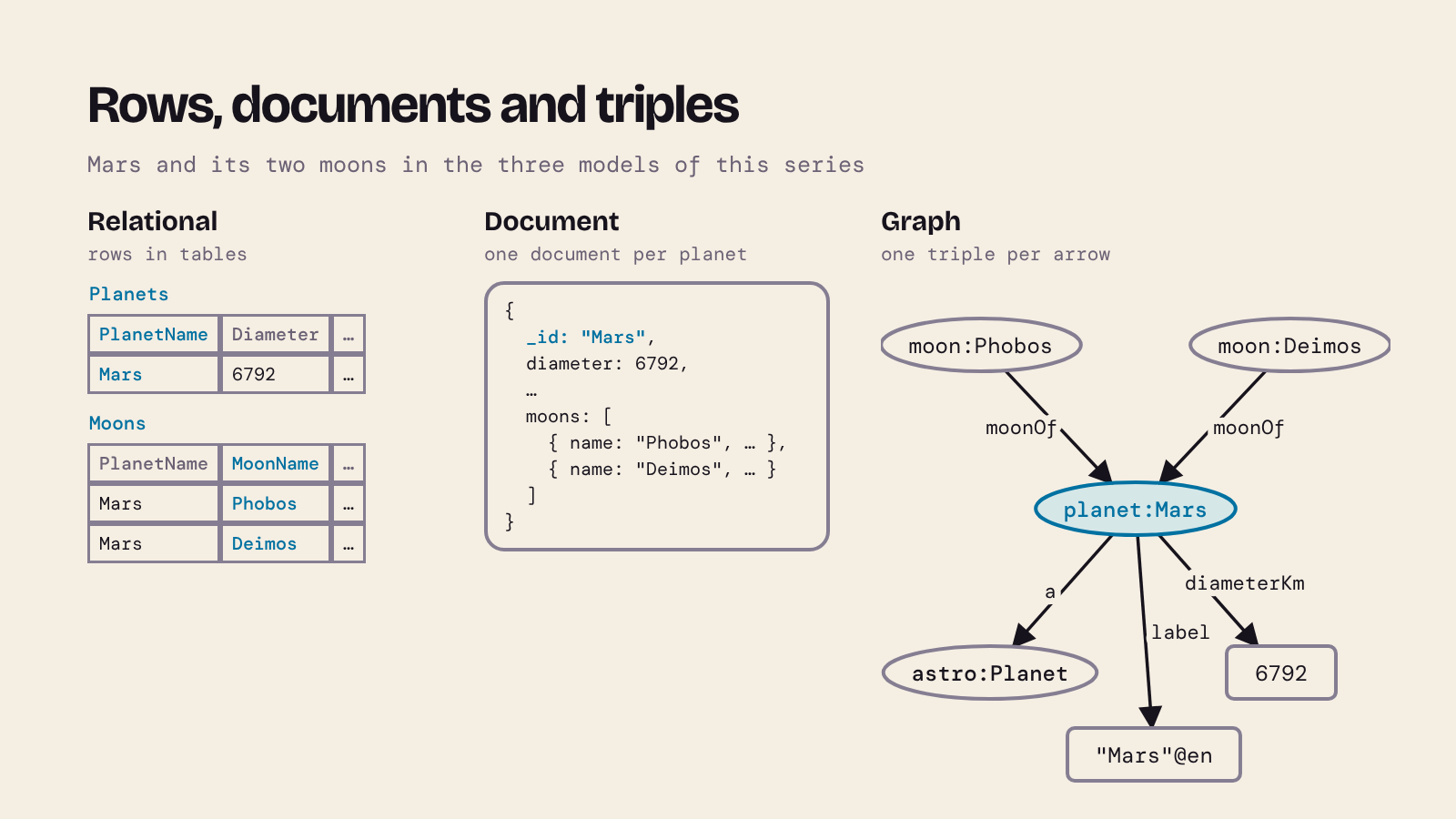
Here is Mars in each of the three models we've met in this series.
- Relational (MySQL): one row in
Planets, plus two rows inMoonsthat point back to it with a foreign key. The schema decides the shape of every row in advance, and the database checks it. - Document (MongoDB): one document for Mars, with its moons nested inside as a list. The shape is flexible, and a whole planet is read in one go.
- Graph (RDF): many small statements. "Mars is a planet." "Mars has a diameter of 6792 km." "Phobos is a moon of Mars." Each statement is a triple: a subject, a predicate and an object. Put the triples together and you get a graph: things are the nodes, and predicates are the arrows between them.
What does the graph give you? Each triple stands on its own, so you can add facts nobody planned for without changing a schema, merge two datasets by putting their triples together, and, because the names are web addresses, link to data that lives somewhere else entirely. What does it cost? Less help from the database in keeping the data consistent, and a different way of asking questions. We'll see both sides.
2. The RDF model
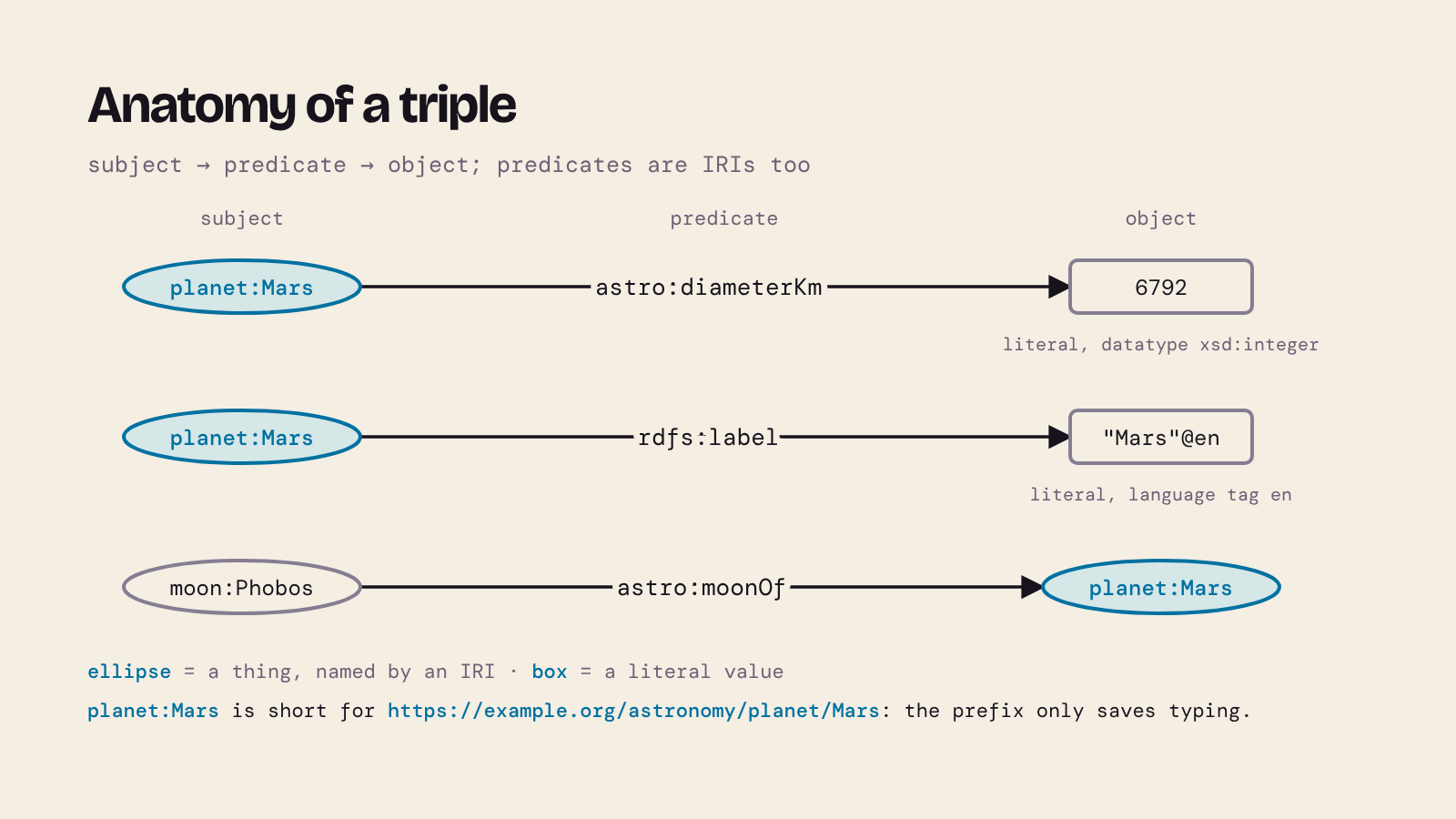
RDF, the Resource Description Framework, is the W3C standard data model for linked data. The current Recommendation is RDF 1.1 (2014); RDF 1.2 is on its way through the W3C process. The whole model fits in a few rules.
- Everything is a triple: subject, predicate, object. One triple is one fact, and one arrow in a drawing.
- Things are named by IRIs (International Resource Identifiers, web addresses that may contain any Unicode character).
https://example.org/astronomy/planet/Marsis our Mars. An IRI works like a primary key that is unique across the whole web, not just within one table. - The subject is an IRI (or a blank node, below). The predicate is always an IRI, so even the relationship "is a moon of" has a global name. The object is an IRI, a blank node or a literal.
- Literals are values: strings, numbers, dates. A literal can have a datatype, such as
6792as anxsd:integer, or a language tag, such as"Mars"@enand"Mars"@fr. - Blank nodes are nodes without a global name, for things that only matter as part of something else. We'll use them in section 13.
- A graph is a set of triples. There's no order (like rows in a table) and no hierarchy (unlike JSON or XML, a graph has no root). Merging two graphs simply means putting their triples together; where they use the same IRI, they join up.
A prefix is shorthand. If planet: stands for https://example.org/astronomy/planet/, then planet:Mars is just a shorter way of writing the full IRI. Prefixes don't change the data, and two files can use different prefixes for the same IRIs.
example.org is a domain reserved for examples. For real data you would use a domain you control, so the IRIs can one day return information about the things they name (section 6).
3. Setting up
You need Python 3.11 or later and the MySQL planets database. In a new folder:
python3 -m venv .venv
source .venv/bin/activate          # Windows: .venv\Scripts\activate
pip install rdflib==7.6.0 owlrl==7.6.2 pyshacl==0.40.2 oxigraph==0.5.13 mysql-connector-python==26.10.0
- rdflib reads, writes and queries RDF in Python (including SPARQL).
- owlrl is a reasoner: it adds the triples that follow from an ontology.
- pyshacl checks data against SHACL rules.
- oxigraph gives you a small triplestore with a SPARQL server, as a command-line tool.
- mysql-connector-python is Oracle's MySQL driver for Python.
The planets database is the one from part 2: eight planets, twenty moons and a real foreign key. Save this as planets.sql and load it with mysql -u root -p < planets.sql:
-- The planets database in MySQL
-- Planet figures: NASA Planetary Fact Sheet (diameter in km,
-- length of day in hours, orbital period in Earth days), rounded.
DROP DATABASE IF EXISTS Astronomy;
CREATE DATABASE Astronomy;
USE Astronomy;

CREATE TABLE Planets (
    PlanetName VARCHAR(25) PRIMARY KEY,
    Diameter   INT NOT NULL,
    DayLength  INT NOT NULL,
    YearLength INT NOT NULL
);

CREATE TABLE Moons (
    PlanetName     VARCHAR(25)  NOT NULL,
    MoonName       VARCHAR(100) NOT NULL,
    HasLiquidWater ENUM('Yes', 'No', 'Unknown', 'Suspected') NOT NULL,
    PRIMARY KEY (PlanetName, MoonName),
    FOREIGN KEY (PlanetName) REFERENCES Planets (PlanetName)
);

INSERT INTO Planets (PlanetName, Diameter, DayLength, YearLength) VALUES
    ('Mercury',   4879, 4223,    88),
    ('Venus',    12104, 2802,   225),
    ('Earth',    12756,   24,   365),
    ('Mars',      6792,   25,   687),
    ('Jupiter', 142984,   10,  4331),
    ('Saturn',  120536,   11, 10747),
    ('Uranus',   51118,   17, 30589),
    ('Neptune',  49528,   16, 59800);

INSERT INTO Moons (PlanetName, MoonName, HasLiquidWater) VALUES
    ('Earth',   'Moon',      'No'),
    ('Mars',    'Phobos',    'No'),
    ('Mars',    'Deimos',    'No'),
    ('Jupiter', 'Io',        'No'),
    ('Jupiter', 'Europa',    'Yes'),
    ('Jupiter', 'Ganymede',  'Yes'),
    ('Jupiter', 'Callisto',  'Suspected'),
    ('Saturn',  'Titan',     'Yes'),
    ('Saturn',  'Enceladus', 'Yes'),
    ('Saturn',  'Rhea',      'Unknown'),
    ('Saturn',  'Iapetus',   'Unknown'),
    ('Saturn',  'Dione',     'Suspected'),
    ('Uranus',  'Titania',   'Suspected'),
    ('Uranus',  'Oberon',    'Suspected'),
    ('Uranus',  'Umbriel',   'Suspected'),
    ('Uranus',  'Ariel',     'Suspected'),
    ('Neptune', 'Triton',    'Suspected'),
    ('Neptune', 'Nereid',    'Unknown'),
    ('Neptune', 'Proteus',   'Unknown'),
    ('Neptune', 'Larissa',   'Unknown');
The planet figures come from NASA's Planetary Fact Sheet, rounded; the liquid water categories are explained in Exploring the Cosmos.
Every file in this post goes in the same folder, and every command is run from it.
4. From MySQL tables to triples
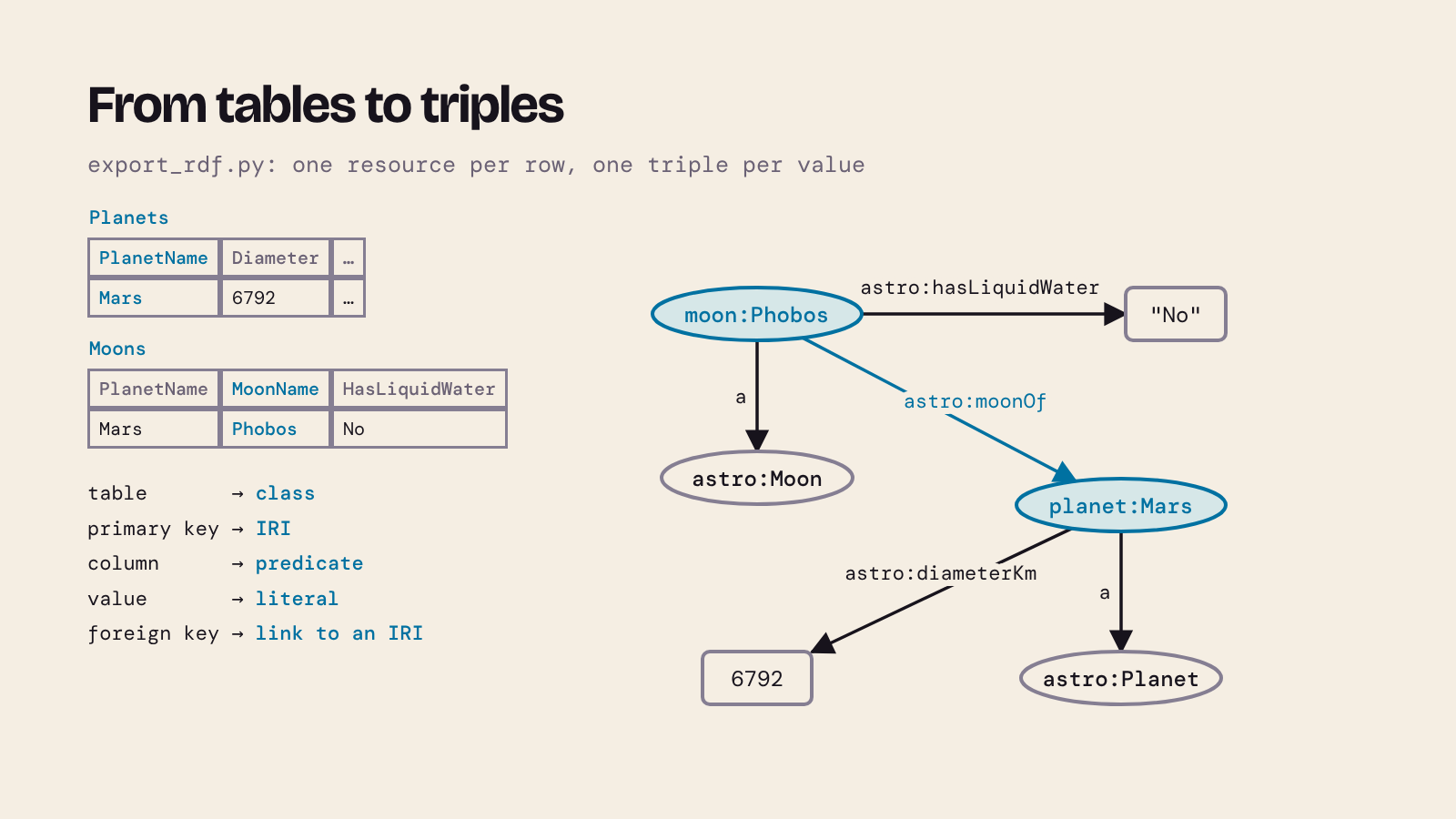
Turning a table into triples follows a simple recipe.
| Relational | RDF |
|---|---|
| table | class (astro:Planet, astro:Moon) |
| row | a resource with its own IRI |
| primary key | the IRI (planet:Mars) |
| column | a predicate (astro:diameterKm) |
| value | a literal with a datatype (6792) |
| foreign key | a link to another resource (astro:moonOf planet:Mars) |
We need two kinds of IRI: one set for our data (planet:Mars, moon:Phobos) and one for our vocabulary, the classes and predicates (astro:Planet, astro:moonOf).
One design decision: the Moons table's primary key is (PlanetName, MoonName). Moon names are unique in practice (the International Astronomical Union names them), so the IRI uses the moon's name alone: moon:Phobos. If names could repeat, both parts would go in the IRI. An IRI has to name one thing, for ever.
Save this as export_rdf.py:
"""Export the planets database from MySQL to RDF (Turtle).

Each table row becomes a resource with its own IRI, each column a predicate,
and the foreign key Moons.PlanetName a link between two resources.
"""
import os

import mysql.connector
from rdflib import Graph, Literal, Namespace
from rdflib.namespace import RDF, RDFS, XSD

ASTRO = Namespace("https://example.org/astronomy/vocab#")
PLANET = Namespace("https://example.org/astronomy/planet/")
MOON = Namespace("https://example.org/astronomy/moon/")

conn = mysql.connector.connect(
    host="127.0.0.1",
    user="root",
    password=os.environ.get("MYSQL_PWD", ""),
    database="Astronomy",
)
cur = conn.cursor()

g = Graph()
g.bind("astro", ASTRO)
g.bind("planet", PLANET)
g.bind("moon", MOON)

cur.execute("SELECT PlanetName, Diameter, DayLength, YearLength FROM Planets")
for name, diameter, day, year in cur:
    p = PLANET[name]                      # primary key -> IRI
    g.add((p, RDF.type, ASTRO.Planet))    # table -> class
    g.add((p, RDFS.label, Literal(name, lang="en")))
    g.add((p, ASTRO.diameterKm, Literal(diameter, datatype=XSD.integer)))
    g.add((p, ASTRO.dayLengthHours, Literal(day, datatype=XSD.integer)))
    g.add((p, ASTRO.yearLengthDays, Literal(year, datatype=XSD.integer)))

cur.execute("SELECT PlanetName, MoonName, HasLiquidWater FROM Moons")
for planet, name, water in cur:
    m = MOON[name]
    g.add((m, RDF.type, ASTRO.Moon))
    g.add((m, RDFS.label, Literal(name, lang="en")))
    g.add((m, ASTRO.moonOf, PLANET[planet]))  # foreign key -> link
    g.add((m, ASTRO.hasLiquidWater, Literal(water)))

conn.close()
g.serialize("planets.ttl", format="turtle")
print(f"Wrote {len(g)} triples to planets.ttl")
If your MySQL root user has a password, set it in the environment first (export MYSQL_PWD='…'), or change the connect() call. Then run it:
python export_rdf.py
Wrote 120 triples to planets.ttl
That's 8 planets × 5 triples plus 20 moons × 4 triples. Here is the part of planets.ttl about Mars and its moons, with the prefixes from the top of the file:
@prefix astro: <https://example.org/astronomy/vocab#> .
@prefix moon: <https://example.org/astronomy/moon/> .
@prefix planet: <https://example.org/astronomy/planet/> .
@prefix rdfs: <http://www.w3.org/2000/01/rdf-schema#> .
@prefix xsd: <http://www.w3.org/2001/XMLSchema#> .

moon:Deimos a astro:Moon ;
    rdfs:label "Deimos"@en ;
    astro:hasLiquidWater "No" ;
    astro:moonOf planet:Mars .

moon:Phobos a astro:Moon ;
    rdfs:label "Phobos"@en ;
    astro:hasLiquidWater "No" ;
    astro:moonOf planet:Mars .

planet:Mars a astro:Planet ;
    rdfs:label "Mars"@en ;
    astro:dayLengthHours 25 ;
    astro:diameterKm 6792 ;
    astro:yearLengthDays 687 .
Notice what changed on the way:
- The
PlanetNamecolumn has gone. It became part of the IRI, just as a primary key identifies a row. - The foreign key became a link:
astro:moonOf planet:Marspoints at the planet itself, not at a copy of its name. - The numbers kept their type (
25is written without quotes because it's anxsd:integer). - Nothing in the file says that a moon must have a planet. That knowledge lived in the MySQL schema, and we'll have to put it back another way (sections 7 and 8).
The W3C has two standards for this job: the Direct Mapping, which turns any relational database into RDF automatically, and R2RML, a language for writing your own mapping. For a small database, a short script is the easiest way to see what's going on.
5. Writing RDF: Turtle, N-Triples, JSON-LD and RDF/XML
RDF is a model, not a file format. The same graph can be written in several serialisations, and a good tool reads them all.
Turtle
Turtle (.ttl) is the format people write by hand, and the one used in most of this post. In the Turtle above:
@prefix(or SPARQL-stylePREFIX) declares a shorthand for the start of an IRI.- A statement ends with
. ;repeats the subject:planet:Mars a astro:Planet ; rdfs:label "Mars"@en .is two triples about Mars.,repeats the subject and the predicate:rdfs:label "Sun"@en, "Soleil"@fris two labels.ais short forrdf:type, "is an instance of".- Plain numbers are
xsd:integer(or decimal);"Mars"@enis a string in English.
There's no shorthand for several subjects at once. planet:Mars, planet:Venus astro:orbits star:Sun . is a syntax error (question 1 at the end).
N-Triples
N-Triples (.nt) is the simplest format: one complete triple per line, full IRIs in angle brackets, no prefixes and no shortcuts. It's hard to read but trivial to process, split and stream, so it's popular for large data dumps. Here's the same Mars excerpt (sorted, as the order means nothing):
<https://example.org/astronomy/moon/Deimos> <http://www.w3.org/1999/02/22-rdf-syntax-ns#type> <https://example.org/astronomy/vocab#Moon> .
<https://example.org/astronomy/moon/Deimos> <http://www.w3.org/2000/01/rdf-schema#label> "Deimos"@en .
<https://example.org/astronomy/moon/Deimos> <https://example.org/astronomy/vocab#hasLiquidWater> "No" .
<https://example.org/astronomy/moon/Deimos> <https://example.org/astronomy/vocab#moonOf> <https://example.org/astronomy/planet/Mars> .
<https://example.org/astronomy/moon/Phobos> <http://www.w3.org/1999/02/22-rdf-syntax-ns#type> <https://example.org/astronomy/vocab#Moon> .
<https://example.org/astronomy/moon/Phobos> <http://www.w3.org/2000/01/rdf-schema#label> "Phobos"@en .
<https://example.org/astronomy/moon/Phobos> <https://example.org/astronomy/vocab#hasLiquidWater> "No" .
<https://example.org/astronomy/moon/Phobos> <https://example.org/astronomy/vocab#moonOf> <https://example.org/astronomy/planet/Mars> .
<https://example.org/astronomy/planet/Mars> <http://www.w3.org/1999/02/22-rdf-syntax-ns#type> <https://example.org/astronomy/vocab#Planet> .
<https://example.org/astronomy/planet/Mars> <http://www.w3.org/2000/01/rdf-schema#label> "Mars"@en .
<https://example.org/astronomy/planet/Mars> <https://example.org/astronomy/vocab#dayLengthHours> "25"^^<http://www.w3.org/2001/XMLSchema#integer> .
<https://example.org/astronomy/planet/Mars> <https://example.org/astronomy/vocab#diameterKm> "6792"^^<http://www.w3.org/2001/XMLSchema#integer> .
<https://example.org/astronomy/planet/Mars> <https://example.org/astronomy/vocab#yearLengthDays> "687"^^<http://www.w3.org/2001/XMLSchema#integer> .
N-Triples is a subset of Turtle: every N-Triples file is also valid Turtle. Don't confuse it with N3 (Notation3), a different, more expressive language that adds rules and formulae on top of Turtle.
JSON-LD
JSON-LD (JSON for Linking Data) is ordinary JSON with a few keywords that start with @. It's the friendliest format for JavaScript developers, and the one search engines read in web pages (section 14). The @context maps plain JSON keys to IRIs, so the rest of the document looks like any other JSON. I wrote this one by hand; save it as mars.jsonld, and we'll check it against the other formats in a moment:
{
  "@context": {
    "astro": "https://example.org/astronomy/vocab#",
    "planet": "https://example.org/astronomy/planet/",
    "moon": "https://example.org/astronomy/moon/",
    "Planet": "astro:Planet",
    "Moon": "astro:Moon",
    "name": { "@id": "http://www.w3.org/2000/01/rdf-schema#label", "@language": "en" },
    "moonOf": { "@id": "astro:moonOf", "@type": "@id" },
    "hasLiquidWater": "astro:hasLiquidWater",
    "diameterKm": "astro:diameterKm",
    "dayLengthHours": "astro:dayLengthHours",
    "yearLengthDays": "astro:yearLengthDays"
  },
  "@graph": [
    { "@id": "planet:Mars", "@type": "Planet", "name": "Mars",
      "diameterKm": 6792, "dayLengthHours": 25, "yearLengthDays": 687 },
    { "@id": "moon:Phobos", "@type": "Moon", "name": "Phobos",
      "moonOf": "planet:Mars", "hasLiquidWater": "No" },
    { "@id": "moon:Deimos", "@type": "Moon", "name": "Deimos",
      "moonOf": "planet:Mars", "hasLiquidWater": "No" }
  ]
}
@idis the node's IRI, and@typeits class."name"maps tordfs:label, and the context adds the language tagento every name."moonOf"has"@type": "@id", which says its value is an IRI, not a string.- Plain JSON numbers become
xsd:integer.
RDF/XML
RDF/XML was the first official syntax (1999). It forces a graph into an XML tree, which makes it hard to read and write by hand, but you'll still meet it in older vocabularies and data dumps:
<?xml version="1.0" encoding="utf-8"?>
<rdf:RDF
   xmlns:astro="https://example.org/astronomy/vocab#"
   xmlns:rdf="http://www.w3.org/1999/02/22-rdf-syntax-ns#"
   xmlns:rdfs="http://www.w3.org/2000/01/rdf-schema#"
>
  <rdf:Description rdf:about="https://example.org/astronomy/planet/Mars">
    <rdfs:label xml:lang="en">Mars</rdfs:label>
    <rdf:type rdf:resource="https://example.org/astronomy/vocab#Planet"/>
    <astro:diameterKm rdf:datatype="http://www.w3.org/2001/XMLSchema#integer">6792</astro:diameterKm>
    <astro:yearLengthDays rdf:datatype="http://www.w3.org/2001/XMLSchema#integer">687</astro:yearLengthDays>
    <astro:dayLengthHours rdf:datatype="http://www.w3.org/2001/XMLSchema#integer">25</astro:dayLengthHours>
  </rdf:Description>
  <rdf:Description rdf:about="https://example.org/astronomy/moon/Phobos">
    <astro:moonOf rdf:resource="https://example.org/astronomy/planet/Mars"/>
    <rdfs:label xml:lang="en">Phobos</rdfs:label>
    <astro:hasLiquidWater>No</astro:hasLiquidWater>
    <rdf:type rdf:resource="https://example.org/astronomy/vocab#Moon"/>
  </rdf:Description>
  <rdf:Description rdf:about="https://example.org/astronomy/moon/Deimos">
    <rdfs:label xml:lang="en">Deimos</rdfs:label>
    <rdf:type rdf:resource="https://example.org/astronomy/vocab#Moon"/>
    <astro:moonOf rdf:resource="https://example.org/astronomy/planet/Mars"/>
    <astro:hasLiquidWater>No</astro:hasLiquidWater>
  </rdf:Description>
</rdf:RDF>
Same graph, four syntaxes
serialise.py writes the whole graph in three more formats, reads each file back and compares it with the original. rdflib's isomorphic() checks that two graphs contain the same triples. It also writes the Mars excerpt you've just seen and checks my hand-written JSON-LD against it:
"""Write the planets graph in four syntaxes and check they hold the same graph."""
from rdflib import Graph
from rdflib.compare import isomorphic

g = Graph().parse("planets.ttl")

formats = {
    "planets.nt": "nt",           # N-Triples
    "planets.jsonld": "json-ld",  # JSON-LD
    "planets.rdf": "xml",         # RDF/XML
}
for filename, fmt in formats.items():
    g.serialize(filename, format=fmt, encoding="utf-8")
    back = Graph().parse(filename, format=fmt)
    print(f"{filename:<15} {len(back)} triples, same graph: {isomorphic(g, back)}")

# A small excerpt to read: Mars and its two moons, in each syntax
mars = Graph()
mars.namespace_manager = g.namespace_manager
for s, p, o in g.query("""
    PREFIX astro:  <https://example.org/astronomy/vocab#>
    PREFIX planet: <https://example.org/astronomy/planet/>
    CONSTRUCT { ?s ?p ?o }
    WHERE {
      ?s ?p ?o .
      FILTER (?s = planet:Mars || EXISTS { ?s astro:moonOf planet:Mars })
    }"""):
    mars.add((s, p, o))
mars.serialize("mars.ttl", format="turtle")
lines = mars.serialize(format="nt", encoding="utf-8").decode().splitlines()
with open("mars.nt", "w") as f:              # order means nothing; sorted to read
    f.write("\n".join(sorted(line for line in lines if line)) + "\n")
mars.serialize("mars.rdf", format="xml")
print(f"mars excerpt: {len(mars)} triples")

# mars.jsonld was written by hand with a @context: is it the same graph?
by_hand = Graph().parse("mars.jsonld", format="json-ld")
print(f"mars.jsonld (by hand): {len(by_hand)} triples, same graph: {isomorphic(mars, by_hand)}")
planets.nt      120 triples, same graph: True
planets.jsonld  120 triples, same graph: True
planets.rdf     120 triples, same graph: True
mars excerpt: 13 triples
mars.jsonld (by hand): 13 triples, same graph: True
6. Linking to the world
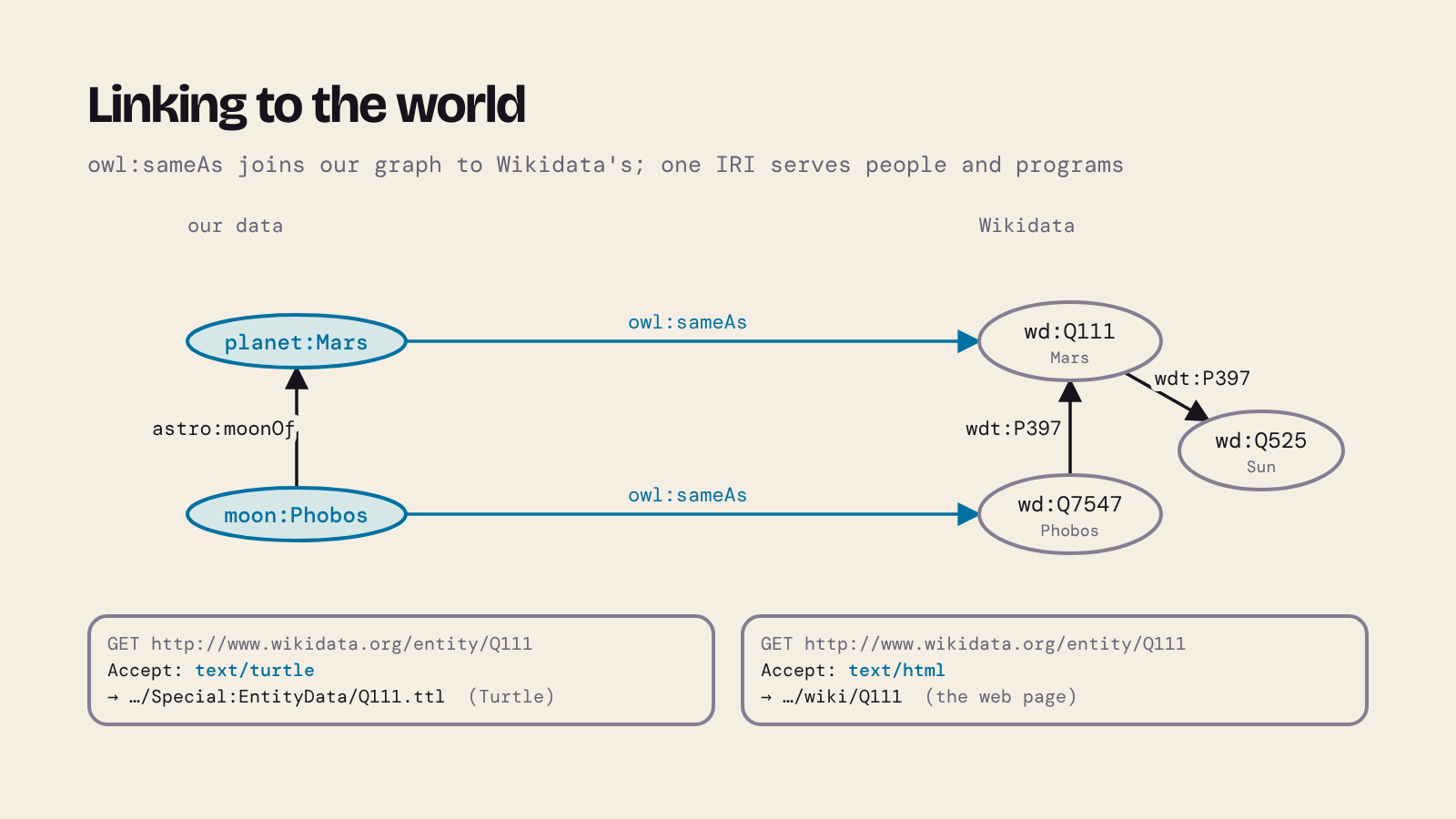
So far our IRIs are our own. The "linked" in linked data comes from reusing other people's IRIs, or from saying that ours mean the same thing as theirs.
Saying "the same thing as"
Wikidata is a free knowledge base that anyone can edit, and much of the web's linked data points to it. Mars is wd:Q111, where wd: stands for http://www.wikidata.org/entity/. Its IDs are opaque on purpose, so the name of a thing can change without changing its IRI. wikidata-links.ttl links our 28 planets and moons to Wikidata (I looked up each ID with a SPARQL query on Wikidata and checked its label, parent body and class):
# Links from our planets and moons to the same things in Wikidata.
# Wikidata's own RDF uses http:// URIs, so we do too.
PREFIX owl:    <http://www.w3.org/2002/07/owl#>
PREFIX wd:     <http://www.wikidata.org/entity/>
PREFIX planet: <https://example.org/astronomy/planet/>
PREFIX moon:   <https://example.org/astronomy/moon/>

planet:Mercury   owl:sameAs wd:Q308 .
planet:Venus     owl:sameAs wd:Q313 .
planet:Earth     owl:sameAs wd:Q2 .
planet:Mars      owl:sameAs wd:Q111 .
planet:Jupiter   owl:sameAs wd:Q319 .
planet:Saturn    owl:sameAs wd:Q193 .
planet:Uranus    owl:sameAs wd:Q324 .
planet:Neptune   owl:sameAs wd:Q332 .

moon:Moon        owl:sameAs wd:Q405 .
moon:Phobos      owl:sameAs wd:Q7547 .
moon:Deimos      owl:sameAs wd:Q7548 .
moon:Io          owl:sameAs wd:Q3123 .
moon:Europa      owl:sameAs wd:Q3143 .
moon:Ganymede    owl:sameAs wd:Q3169 .
moon:Callisto    owl:sameAs wd:Q3134 .
moon:Titan       owl:sameAs wd:Q2565 .
moon:Enceladus   owl:sameAs wd:Q3303 .
moon:Rhea        owl:sameAs wd:Q15050 .
moon:Iapetus     owl:sameAs wd:Q17958 .
moon:Dione       owl:sameAs wd:Q15040 .
moon:Titania     owl:sameAs wd:Q3322 .
moon:Oberon      owl:sameAs wd:Q3332 .
moon:Umbriel     owl:sameAs wd:Q3338 .
moon:Ariel       owl:sameAs wd:Q3343 .
moon:Triton      owl:sameAs wd:Q3359 .
moon:Nereid      owl:sameAs wd:Q16076 .
moon:Proteus     owl:sameAs wd:Q16081 .
moon:Larissa     owl:sameAs wd:Q19471 .
Three things to know:
owl:sameAsis strong. It says the two IRIs name exactly the same thing, so every statement about one is true of the other, in both directions. If our diameter for a planet disagreed with Wikidata's, a reasoner that merged the two would conclude the planet has both diameters. Use it only when you mean it. SKOS'sskos:exactMatchis a weaker "these are the same concept, for practical purposes".- The exact IRI matters. IRIs are compared as strings. In the browser, Wikidata's pages are at
https://www.wikidata.org/…, but its data useshttp://www.wikidata.org/entity/Q111. Link to thehttpsform and your triples won't join with Wikidata's. - A link is just another triple. Nothing in MySQL had to change; the links live in their own file, and you can add or drop them at any time.
Dereferencing: asking an IRI about itself
An IRI is a name, but it's also an address. Dereferencing means requesting the IRI over HTTP to find out more about the thing it names. With content negotiation, the same IRI gives a browser a web page and a program RDF, depending on the HTTP Accept header. I ran this in the browser's developer console on a Wikidata page. It uses the https form of the address, because a secure page can't fetch an http one; Wikidata answers both in the same way:
for (const accept of ["text/turtle", "text/html"]) {
  const response = await fetch("https://www.wikidata.org/entity/Q111", {
    headers: { Accept: accept },
  });
  console.log(accept, "->", response.url);
}
text/turtle -> https://www.wikidata.org/wiki/Special:EntityData/Q111.ttl
text/html -> https://www.wikidata.org/wiki/Q111
Asking for Turtle redirected to about half a megabyte of Turtle about Mars, including the line wdt:P397 wd:Q525: P397 is Wikidata's property parent astronomical body, and Q525 is the Sun. Asking for HTML gave the page you'd see in a browser. You can open https://www.wikidata.org/wiki/Special:EntityData/Q111.ttl directly to read it.
Every IRI in that Turtle can be dereferenced in turn: from Mars to the Sun, from the Sun to the kind of star it is, and so on. Building up a local graph by following links like this is called following your nose. It's slow (one HTTP request per step) but needs nothing more than ordinary web servers. Querying a database of triples with SPARQL, which we'll do next, is fast but needs someone to run a SPARQL server. These are the two ways of using linked data.
7. Adding meaning: RDFS and OWL
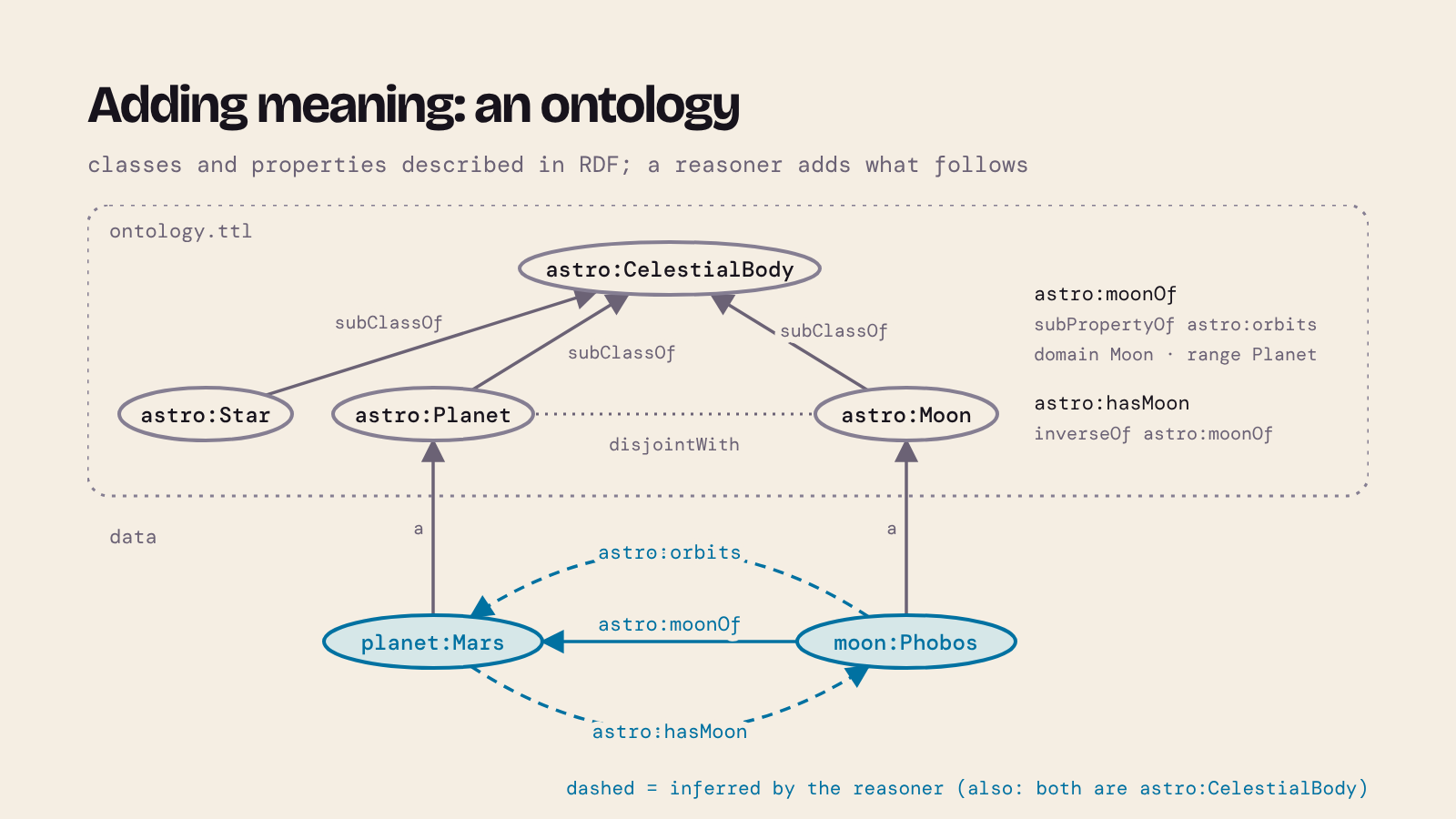
Our triples use astro:Planet and astro:moonOf, but nothing yet says what these mean. In SQL, meaning lives in the schema and in the code that uses it. In linked data, meaning is written down as more triples, in an ontology (a published vocabulary with rules), so any program can read it.
- RDF Schema (RDFS) gives the basics: classes and sub-classes, properties and sub-properties, and a property's domain (the class of its subject) and range (the class of its object). RDF Schema 1.1 is the current W3C Recommendation (2014).
- OWL (the Web Ontology Language, OWL 2 since 2009) adds logic on top: inverse properties, equivalent and disjoint classes,
owl:sameAs, and much more.
Save this as ontology.ttl:
# A small ontology for the planets data: classes, properties and their meaning.
PREFIX rdf:   <http://www.w3.org/1999/02/22-rdf-syntax-ns#>
PREFIX rdfs:  <http://www.w3.org/2000/01/rdf-schema#>
PREFIX owl:   <http://www.w3.org/2002/07/owl#>
PREFIX xsd:   <http://www.w3.org/2001/XMLSchema#>
PREFIX astro: <https://example.org/astronomy/vocab#>

# Classes
astro:CelestialBody a owl:Class ;
    rdfs:label "celestial body"@en .

astro:Star a owl:Class ;
    rdfs:subClassOf astro:CelestialBody .

astro:Planet a owl:Class ;
    rdfs:subClassOf astro:CelestialBody ;
    owl:disjointWith astro:Moon .        # nothing is both a planet and a moon

astro:Moon a owl:Class ;
    rdfs:subClassOf astro:CelestialBody .

# Object properties (link a thing to a thing)
astro:orbits a owl:ObjectProperty ;
    rdfs:domain astro:CelestialBody ;
    rdfs:range  astro:CelestialBody .

astro:moonOf a owl:ObjectProperty ;
    rdfs:subPropertyOf astro:orbits ;    # a moon orbits its planet
    rdfs:domain astro:Moon ;
    rdfs:range  astro:Planet .

astro:hasMoon a owl:ObjectProperty ;
    owl:inverseOf astro:moonOf .         # store one direction, infer the other

# Datatype properties (link a thing to a value)
astro:diameterKm     a owl:DatatypeProperty ; rdfs:range xsd:integer .
astro:dayLengthHours a owl:DatatypeProperty ; rdfs:range xsd:integer .
astro:yearLengthDays a owl:DatatypeProperty ; rdfs:range xsd:integer .
astro:hasLiquidWater a owl:DatatypeProperty ; rdfs:range xsd:string .
We'll also add some facts that were never in MySQL. Save this as extra.ttl:
# Facts the MySQL tables never had: the planets orbit the Sun.
# Adding them needs no ALTER TABLE: we just add triples.
PREFIX rdfs:   <http://www.w3.org/2000/01/rdf-schema#>
PREFIX astro:  <https://example.org/astronomy/vocab#>
PREFIX planet: <https://example.org/astronomy/planet/>
PREFIX star:   <https://example.org/astronomy/star/>

star:Sun a astro:Star ;
    rdfs:label "Sun"@en, "Soleil"@fr, "Sonne"@de .

planet:Mercury astro:orbits star:Sun .
planet:Venus   astro:orbits star:Sun .
planet:Earth   astro:orbits star:Sun .
planet:Mars    astro:orbits star:Sun .
planet:Jupiter astro:orbits star:Sun .
planet:Saturn  astro:orbits star:Sun .
planet:Uranus  astro:orbits star:Sun .
planet:Neptune astro:orbits star:Sun .
In SQL, adding "which star does each planet orbit" means ALTER TABLE or a new table. Here it's a new file of triples about the same IRIs, and the graphs merge.
Letting a reasoner infer new triples
A reasoner reads the data and the ontology and adds every triple that logically follows. owlrl implements the OWL 2 RL rules (a subset of OWL designed to be computed with simple rules):
"""Add the ontology and let an OWL RL reasoner infer new triples."""
import owlrl
from rdflib import Graph, URIRef
from rdflib.namespace import OWL

g = Graph()
for name in ("planets.ttl", "extra.ttl", "ontology.ttl"):
    g.parse(name)
before = set(g)

owlrl.DeductiveClosure(owlrl.OWLRL_Semantics).expand(g)
print(f"{len(before)} triples before reasoning, {len(g)} after")

# Show what was inferred about Mars and Phobos, skipping the trivial
# triples a reasoner adds to everything (x a owl:Thing, x owl:sameAs x).
new = Graph()
new.namespace_manager = g.namespace_manager
mars = URIRef("https://example.org/astronomy/planet/Mars")
phobos = URIRef("https://example.org/astronomy/moon/Phobos")
for s, p, o in set(g) - before:
    if s in (mars, phobos) and o != OWL.Thing and p != OWL.sameAs:
        new.add((s, p, o))
print(new.serialize(format="turtle").strip())
158 triples before reasoning, 558 after
@prefix astro: <https://example.org/astronomy/vocab#> .
@prefix moon: <https://example.org/astronomy/moon/> .
@prefix planet: <https://example.org/astronomy/planet/> .

moon:Phobos a astro:CelestialBody ;
    astro:orbits planet:Mars .

planet:Mars a astro:CelestialBody ;
    astro:hasMoon moon:Deimos,
        moon:Phobos .
None of these triples were in the data:
moon:Phobos astro:orbits planet:Mars, becausemoonOfis a sub-property oforbits.planet:Mars astro:hasMoon moon:Phobos, becausehasMoonis the inverse ofmoonOf. We stored one direction and got the other free, just as a foreign key can be read in both directions with a join.- Both are
astro:CelestialBody, becausePlanetandMoonare sub-classes of it.
The count jumped from 158 to 558 because the reasoner also adds many trivial or general triples, such as "every resource is an owl:Thing" and "every resource is the same as itself". The script hides those.
Domain and range don't reject anything
Coming from SQL, it's tempting to read rdfs:domain astro:Moon as a constraint: "only moons may use moonOf". It isn't. It's an inference rule: "anything that uses moonOf is a moon". Here's what happens when someone publishes a wrong triple, saying the Earth is a moon of the Sun:
"""Domain and range infer; they don't reject. A wrong triple shows why."""
import owlrl
from rdflib import Graph, URIRef
from rdflib.namespace import OWL, RDF

g = Graph()
for name in ("planets.ttl", "extra.ttl", "ontology.ttl"):
    g.parse(name)

# Someone publishes a triple that misuses astro:moonOf
g.parse(format="turtle", data="""
    PREFIX astro:  <https://example.org/astronomy/vocab#>
    PREFIX planet: <https://example.org/astronomy/planet/>
    PREFIX star:   <https://example.org/astronomy/star/>
    planet:Earth astro:moonOf star:Sun .
""")
owlrl.DeductiveClosure(owlrl.OWLRL_Semantics).expand(g)

nm = g.namespace_manager
for name in ("planet/Earth", "star/Sun"):
    thing = URIRef("https://example.org/astronomy/" + name)
    types = sorted(t.n3(nm) for t in g.objects(thing, RDF.type) if t != OWL.Thing)
    print(thing.n3(nm), "is a", ", ".join(types))

# owlrl records contradictions as error messages in the graph
ERROR = URIRef("http://www.daml.org/2002/03/agents/agent-ont#error")
for message in g.objects(None, ERROR):
    print("Inconsistent:", message)
planet:Earth is a astro:CelestialBody, astro:Moon, astro:Planet
star:Sun is a astro:CelestialBody, astro:Planet, astro:Star
Inconsistent: Disjoint classes https://example.org/astronomy/vocab#Planet and https://example.org/astronomy/vocab#Moon have a common individual https://example.org/astronomy/planet/Earth
The reasoner didn't refuse the triple. It concluded that the Earth is a moon (from the domain) and the Sun is a planet (from the range). Only because we also said that nothing can be both a planet and a moon (owl:disjointWith) did it find a contradiction. Without that line, the wrong triple would have quietly produced wrong conclusions.
This is the Open World Assumption. A SQL database assumes a closed world: the tables hold everything that's true, so a missing row means "false", and anything the schema forbids is rejected. Linked data assumes an open world: anyone may say anything about anything, a missing triple only means "not known here", and an ontology tells you what follows from the data rather than what's allowed in it.
8. Rules you can enforce: SHACL
Sometimes you do want the closed-world checks you're used to, at least for your own data before you publish it. That's what SHACL (Shapes Constraint Language, a W3C Recommendation since 2017) is for. A shape lists the rules that nodes of a class must follow: how many values a property has, its datatype, its class, a list of allowed values. Save this as shapes.ttl:
# SHACL shapes: rules our own data must follow (closed-world checks).
PREFIX sh:    <http://www.w3.org/ns/shacl#>
PREFIX xsd:   <http://www.w3.org/2001/XMLSchema#>
PREFIX rdfs:  <http://www.w3.org/2000/01/rdf-schema#>
PREFIX astro: <https://example.org/astronomy/vocab#>

astro:PlanetShape a sh:NodeShape ;
    sh:targetClass astro:Planet ;
    sh:property [
        sh:path rdfs:label ;
        sh:minCount 1 ;
    ] ;
    sh:property [
        sh:path astro:diameterKm ;
        sh:minCount 1 ; sh:maxCount 1 ;
        sh:datatype xsd:integer ;
        sh:minExclusive 0 ;
    ] .

astro:MoonShape a sh:NodeShape ;
    sh:targetClass astro:Moon ;
    sh:property [
        sh:path astro:moonOf ;               # like NOT NULL plus a foreign key
        sh:minCount 1 ; sh:maxCount 1 ;
        sh:class astro:Planet ;
    ] ;
    sh:property [
        sh:path astro:hasLiquidWater ;       # like the ENUM column
        sh:minCount 1 ; sh:maxCount 1 ;
        sh:in ( "Yes" "No" "Unknown" "Suspected" ) ;
    ] .
The square brackets are blank nodes (section 13): each property rule is a small node of its own. sh:in ( … ) is an RDF list, here doing the job of MySQL's ENUM. Now validate the data, then add a moon with two mistakes that MySQL would have refused:
"""Check our own data against SHACL shapes (closed-world rules)."""
from pyshacl import validate
from rdflib import Graph

data = Graph().parse("planets.ttl")
shapes = Graph().parse("shapes.ttl")

conforms, _, _ = validate(data, shacl_graph=shapes)
print("planets.ttl conforms:", conforms)

# Two mistakes a SQL schema would have refused
data.parse(format="turtle", data="""
    PREFIX astro: <https://example.org/astronomy/vocab#>
    PREFIX moon:  <https://example.org/astronomy/moon/>
    moon:Charon a astro:Moon ;
        astro:hasLiquidWater "Maybe" .
""")
conforms, _, report = validate(data, shacl_graph=shapes)
print("after adding Charon, conforms:", conforms)
for line in report.splitlines():
    if line.strip().startswith(("Constraint Violation", "Focus Node", "Result Path", "Message")):
        print(line.strip())
planets.ttl conforms: True
after adding Charon, conforms: False
Constraint Violation in InConstraintComponent (http://www.w3.org/ns/shacl#InConstraintComponent):
Focus Node: moon:Charon
Result Path: astro:hasLiquidWater
Message: Value Literal("Maybe") not in list ['Literal("No")', 'Literal("Unknown")', 'Literal("Yes")', 'Literal("Suspected")']
Constraint Violation in MinCountConstraintComponent (http://www.w3.org/ns/shacl#MinCountConstraintComponent):
Focus Node: moon:Charon
Result Path: astro:moonOf
Message: Less than 1 values on moon:Charon->astro:moonOf
SHACL found both: a water value that isn't in the list, and a moon with no planet (the NOT NULL and foreign key of the Moons table). OWL and SHACL do different jobs. OWL describes the world and infers what follows; SHACL checks that a particular graph has the shape you expect.
9. Querying with SPARQL
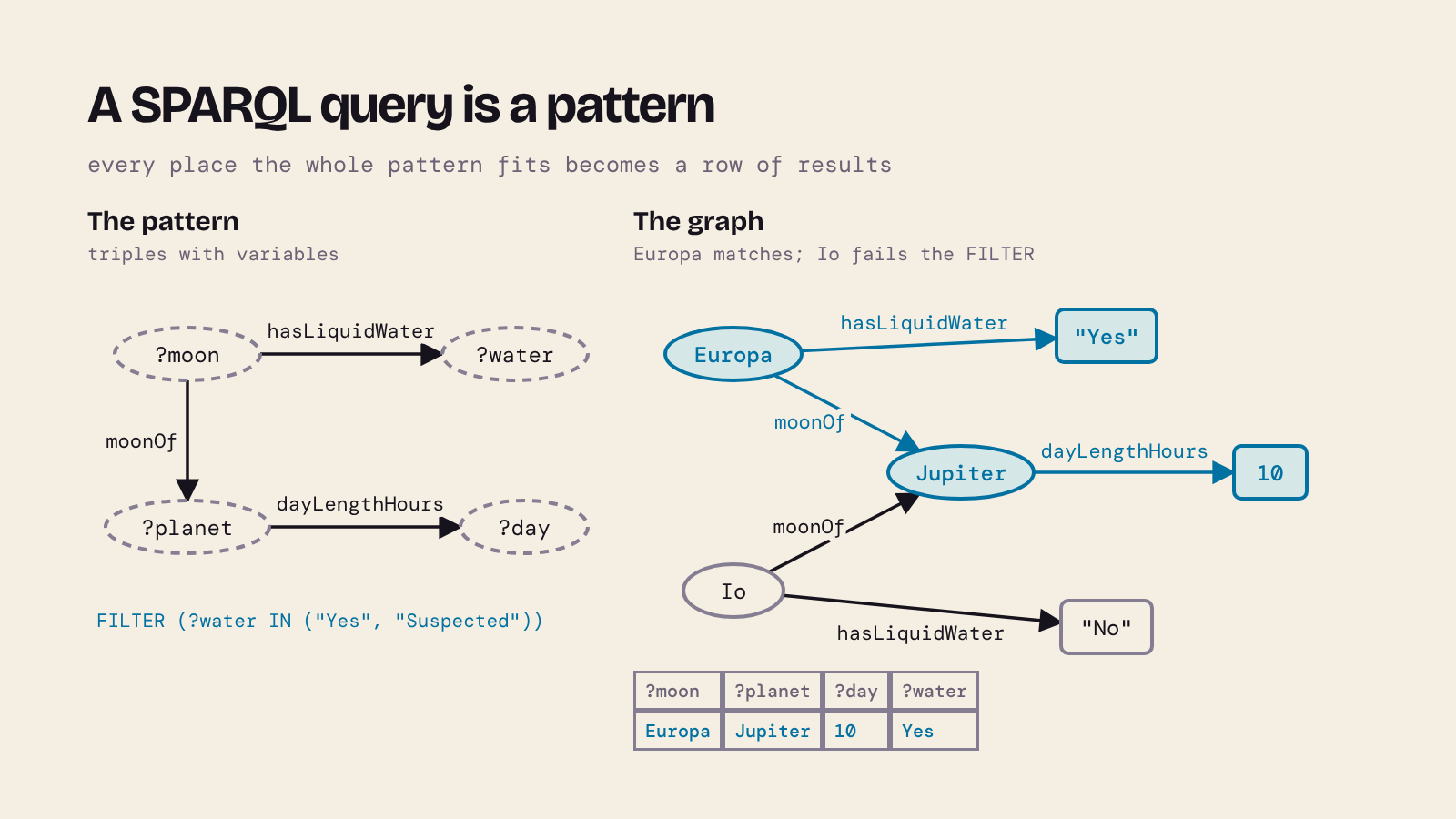
SPARQL (pronounced "sparkle", for SPARQL Protocol and RDF Query Language) is to RDF what SQL is to tables. SPARQL 1.1 (2013) is the current W3C Recommendation, and SPARQL 1.2 is in draft. A SPARQL query is a pattern: triples written like Turtle, where some parts are variables (?moon). The query engine finds every place in the graph where the whole pattern fits and returns one row per match. There's no FROM and no JOIN: the whole graph is one big table of triples, and a variable used in two triples joins them.
run_query.py loads our three files (the export, the extra facts and the Wikidata links, without reasoning) and prints the result of a query file as a table:
"""Run a SPARQL query file against the planets graph and print the result.

Usage: python run_query.py queries/q03-water.rq [data files...]
"""
import sys

from rdflib import Graph, Literal

g = Graph()
for name in sys.argv[2:] or ("planets.ttl", "extra.ttl", "wikidata-links.ttl"):
    g.parse(name)
g.bind("star", "https://example.org/astronomy/star/")
g.bind("wd", "http://www.wikidata.org/entity/")


def show(term):
    """Prefixed names for IRIs, plain values for literals."""
    if term is None:
        return ""
    if isinstance(term, Literal):
        return str(term)
    return term.n3(g.namespace_manager)


with open(sys.argv[1]) as f:
    result = g.query(f.read())

if result.type == "ASK":
    print(result.askAnswer)
elif result.type == "CONSTRUCT":
    out = result.graph
    for prefix, namespace in g.namespaces():
        out.bind(prefix, namespace)
    print(out.serialize(format="turtle").strip())
else:
    names = [str(v) for v in result.vars]
    rows = [[show(row[v]) for v in result.vars] for row in result]
    widths = [max(len(x) for x in [n] + [r[i] for r in rows])
              for i, n in enumerate(names)]
    print("  ".join(n.ljust(w) for n, w in zip(names, widths)).rstrip())
    for r in rows:
        print("  ".join(x.ljust(w) for x, w in zip(r, widths)).rstrip())
    print(f"({len(rows)} rows)")
Save each query below in a queries folder and run it with, for example, python run_query.py queries/q01-moons-of-jupiter.rq. Each query that has a SQL twin is shown with it; every SQL query was run on MySQL 9.7 against the tables from section 3.
A first pattern
Which moons orbit Jupiter?
PREFIX astro:  <https://example.org/astronomy/vocab#>
PREFIX planet: <https://example.org/astronomy/planet/>

SELECT ?moon
WHERE {
  ?moon astro:moonOf planet:Jupiter .
}
ORDER BY ?moon
moon
moon:Callisto
moon:Europa
moon:Ganymede
moon:Io
(4 rows)
SELECT MoonName FROM Moons WHERE PlanetName = 'Jupiter' ORDER BY MoonName;
The pattern says "something that is astro:moonOf Jupiter", and ?moon takes each value that fits. The results are IRIs (shown with their prefix), because a moon is its IRI.
Filtering
Which planets are more than 50,000 km across?
PREFIX astro: <https://example.org/astronomy/vocab#>

SELECT ?planet ?diameter
WHERE {
  ?planet a astro:Planet ;
          astro:diameterKm ?diameter .
  FILTER (?diameter > 50000)
}
ORDER BY DESC(?diameter)
planet          diameter
planet:Jupiter  142984
planet:Saturn   120536
planet:Uranus   51118
(3 rows)
SELECT PlanetName, Diameter FROM Planets WHERE Diameter > 50000 ORDER BY Diameter DESC;
FILTER is SPARQL's WHERE clause; the curly brackets after SPARQL's WHERE hold the pattern. The comparison works because the diameters are xsd:integer literals. If the export had written them as strings, "142984" > 50000 would be an error and the row would be dropped.
The two questions from part 2
In part 2 we asked two questions of the planets database in SQL and MongoDB. Here they are in SPARQL.
Question 1: which moons have, or may have, liquid water, and how long is a day on their planet?
PREFIX rdfs:  <http://www.w3.org/2000/01/rdf-schema#>
PREFIX astro: <https://example.org/astronomy/vocab#>

SELECT ?moonName ?planetName ?dayLength ?water
WHERE {
  ?moon   astro:moonOf ?planet ;
          rdfs:label ?moonName ;
          astro:hasLiquidWater ?water .
  ?planet rdfs:label ?planetName ;
          astro:dayLengthHours ?dayLength .
  FILTER (?water IN ("Yes", "Suspected"))
}
ORDER BY ?dayLength ?moonName
moonName   planetName  dayLength  water
Callisto   Jupiter     10         Suspected
Europa     Jupiter     10         Yes
Ganymede   Jupiter     10         Yes
Dione      Saturn      11         Suspected
Enceladus  Saturn      11         Yes
Titan      Saturn      11         Yes
Triton     Neptune     16         Suspected
Ariel      Uranus      17         Suspected
Oberon     Uranus      17         Suspected
Titania    Uranus      17         Suspected
Umbriel    Uranus      17         Suspected
(11 rows)
SELECT m.MoonName, m.PlanetName, p.DayLength, m.HasLiquidWater
FROM Moons AS m
JOIN Planets AS p ON p.PlanetName = m.PlanetName
WHERE m.HasLiquidWater IN ('Yes', 'Suspected')
ORDER BY p.DayLength, m.MoonName;
The SQL join ON p.PlanetName = m.PlanetName became the shared variable ?planet: it's the object of one triple and the subject of the next. We asked for labels because the IRIs alone would print as moon:Europa.
Question 2: how many moons does each planet have, including planets with none?
PREFIX rdfs:  <http://www.w3.org/2000/01/rdf-schema#>
PREFIX astro: <https://example.org/astronomy/vocab#>

SELECT ?planetName (COUNT(?moon) AS ?moonCount)
WHERE {
  ?planet a astro:Planet ;
          rdfs:label ?planetName .
  OPTIONAL { ?moon astro:moonOf ?planet . }
}
GROUP BY ?planetName
ORDER BY DESC(?moonCount) ?planetName
planetName  moonCount
Saturn      5
Jupiter     4
Neptune     4
Uranus      4
Mars        2
Earth       1
Mercury     0
Venus       0
(8 rows)
SELECT p.PlanetName, COUNT(m.MoonName) AS MoonCount
FROM Planets AS p
LEFT JOIN Moons AS m ON m.PlanetName = p.PlanetName
GROUP BY p.PlanetName
ORDER BY MoonCount DESC, p.PlanetName;
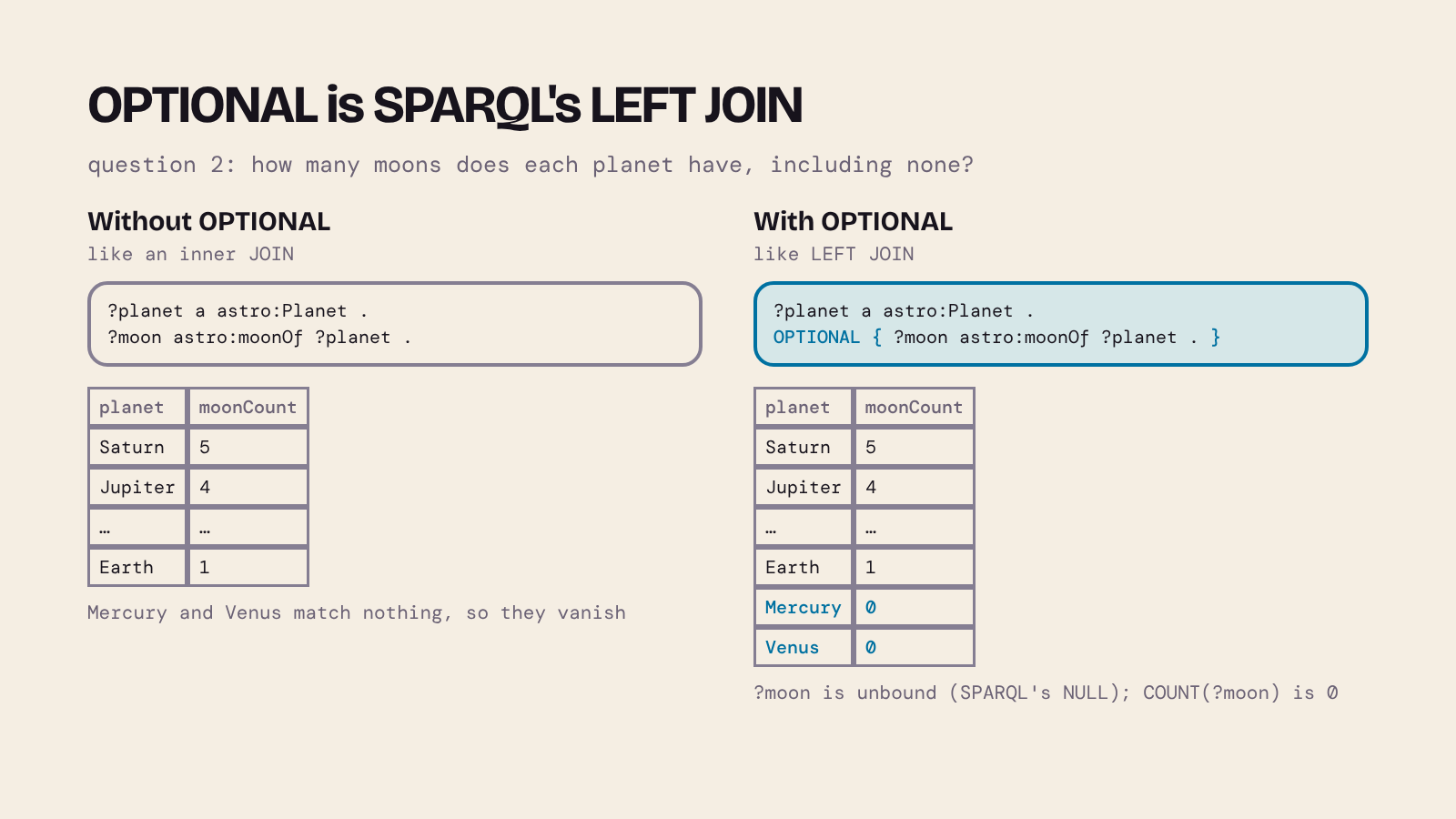
OPTIONAL is SPARQL's LEFT JOIN. Without it, Mercury and Venus don't match the pattern and disappear, the same trap as an inner join (or MongoDB's $group in part 2). With it, they stay, with ?moon unbound (SPARQL's version of NULL), and COUNT(?moon) doesn't count unbound values. GROUP BY and COUNT work as in SQL, and (COUNT(?moon) AS ?moonCount) is SPARQL's COUNT(…) AS MoonCount.
"Not there" and yes/no questions
Which planets have no moons, and does Venus have one?
PREFIX astro: <https://example.org/astronomy/vocab#>

SELECT ?planet
WHERE {
  ?planet a astro:Planet .
  FILTER NOT EXISTS { ?moon astro:moonOf ?planet . }
}
ORDER BY ?planet
planet
planet:Mercury
planet:Venus
(2 rows)
PREFIX astro:  <https://example.org/astronomy/vocab#>
PREFIX planet: <https://example.org/astronomy/planet/>

ASK { ?moon astro:moonOf planet:Venus . }
False
SELECT p.PlanetName
FROM Planets AS p
WHERE NOT EXISTS (SELECT 1 FROM Moons AS m WHERE m.PlanetName = p.PlanetName)
ORDER BY p.PlanetName;

SELECT EXISTS (SELECT 1 FROM Moons WHERE PlanetName = 'Venus') AS VenusHasMoon;
ASK returns true or false: does the pattern match anywhere? Here the open world matters again. In SQL, 0 means "Venus has no moons". In SPARQL, false means "this graph contains no triple saying that something is a moon of Venus". For our own complete list that's the same thing. For data gathered from the web, it isn't.
Property paths
A property path follows several arrows in one step. Which bodies does Europa orbit, directly or indirectly?
PREFIX astro: <https://example.org/astronomy/vocab#>
PREFIX moon:  <https://example.org/astronomy/moon/>

SELECT ?body
WHERE {
  moon:Europa (astro:moonOf|astro:orbits)+ ?body .
}
body
planet:Jupiter
star:Sun
(2 rows)
(astro:moonOf|astro:orbits) matches either predicate, and + means "one or more times": Europa is a moon of Jupiter, and Jupiter orbits the Sun (a fact from extra.ttl). In SQL you'd need a recursive common table expression (WITH RECURSIVE). Other path operators include / (one predicate then another), * (zero or more) and ^ (backwards):
PREFIX astro:  <https://example.org/astronomy/vocab#>
PREFIX planet: <https://example.org/astronomy/planet/>

SELECT ?moon
WHERE {
  planet:Mars ^astro:moonOf ?moon .
}
ORDER BY ?moon
moon
moon:Deimos
moon:Phobos
(2 rows)
planet:Mars ^astro:moonOf ?moon reads the moonOf arrow backwards: "things that are a moon of Mars", the hasMoon direction without a reasoner.
Making new triples with CONSTRUCT
SELECT returns a table. CONSTRUCT returns a graph: you give a template of triples, and it fills it in for every match. Here it builds the hasMoon triples ourselves, for two planets:
PREFIX astro:  <https://example.org/astronomy/vocab#>
PREFIX planet: <https://example.org/astronomy/planet/>

CONSTRUCT { ?planet astro:hasMoon ?moon . }
WHERE {
  ?moon astro:moonOf ?planet .
  FILTER (?planet IN (planet:Mars, planet:Neptune))
}
@prefix astro: <https://example.org/astronomy/vocab#> .
@prefix moon: <https://example.org/astronomy/moon/> .
@prefix planet: <https://example.org/astronomy/planet/> .

planet:Mars astro:hasMoon moon:Deimos,
        moon:Phobos .

planet:Neptune astro:hasMoon moon:Larissa,
        moon:Nereid,
        moon:Proteus,
        moon:Triton .
The result is RDF again, so you can save it, merge it, or query it. It's like INSERT … SELECT into a new table, except that the output can go anywhere. (DESCRIBE, which asks the endpoint for "everything useful" about a resource, is a fourth query form.)
Exploring a graph you don't know
With a relational database you'd start by reading the table definitions. A graph has no tables, so a common first query asks which classes are used, and how much:
SELECT ?type (COUNT(?thing) AS ?count)
WHERE {
  ?thing a ?type .
}
GROUP BY ?type
ORDER BY DESC(?count)
type          count
astro:Moon    20
astro:Planet  8
astro:Star    1
(3 rows)
Another is SELECT * WHERE { ?s ?p ?o } LIMIT 10 (any ten triples), then pick an interesting IRI and ask for its triples. On a large public endpoint, always start with LIMIT.
Languages and missing values
Literals can carry language tags, and LANG() reads them:
PREFIX rdfs: <http://www.w3.org/2000/01/rdf-schema#>
PREFIX star: <https://example.org/astronomy/star/>

SELECT ?label (LANG(?label) AS ?language)
WHERE {
  star:Sun rdfs:label ?label .
  FILTER (LANG(?label) != "en")
}
ORDER BY ?language
label   language
Sonne   de
Soleil  fr
(2 rows)
OPTIONAL also helps when some resources have a property and others don't. Our planets have Wikidata links; the Sun doesn't (yet):
PREFIX owl:   <http://www.w3.org/2002/07/owl#>
PREFIX astro: <https://example.org/astronomy/vocab#>

SELECT ?body ?wikidata
WHERE {
  { ?body a astro:Planet } UNION { ?body a astro:Star }
  OPTIONAL { ?body owl:sameAs ?wikidata . }
}
ORDER BY ?body
body            wikidata
planet:Earth    wd:Q2
planet:Jupiter  wd:Q319
planet:Mars     wd:Q111
planet:Mercury  wd:Q308
planet:Neptune  wd:Q332
planet:Saturn   wd:Q193
planet:Uranus   wd:Q324
planet:Venus    wd:Q313
star:Sun
(9 rows)
UNION gives the rows that match either pattern, like SQL's UNION.
Same answers in SQL and SPARQL
compare.py runs each SQL query on MySQL and its SPARQL twin on the graph, and compares the rows (taking the last part of each IRI, so planet:Mars becomes Mars):
"""Check that each SPARQL query returns the same rows as its SQL twin."""
import os
import re

import mysql.connector
from rdflib import Graph, URIRef

g = Graph()
for name in ("planets.ttl", "extra.ttl", "wikidata-links.ttl"):
    g.parse(name)

statements = [s.strip() for s in open("questions.sql").read().split(";") if s.strip()]
pairs = {  # SPARQL file -> SQL statement number in questions.sql (USE is 0)
    "q01-moons-of-jupiter.rq": 1,
    "q02-big-planets.rq": 2,
    "q03-water.rq": 3,
    "q04-moon-count.rq": 4,
    "q05-no-moons.rq": 5,
    "q06-ask.rq": 6,
}

conn = mysql.connector.connect(host="127.0.0.1", user="root",
                               password=os.environ.get("MYSQL_PWD", ""),
                               database="Astronomy")
cur = conn.cursor()


def plain(term):
    """IRI -> its last part (planet:Mars -> Mars); literal -> Python value."""
    if isinstance(term, URIRef):
        return re.split(r"[/#]", str(term))[-1]
    return term.toPython()


for query_file, n in pairs.items():
    cur.execute(statements[n])
    sql_rows = [tuple(r) for r in cur.fetchall()]
    result = g.query(open("queries/" + query_file).read())
    if result.type == "ASK":
        sparql_rows = [(int(result.askAnswer),)]
    else:
        sparql_rows = [tuple(plain(t) for t in row) for row in result]
    verdict = "same rows, same order" if sql_rows == sparql_rows else "DIFFERENT"
    rows = f"{len(sql_rows)} row" + ("s" if len(sql_rows) != 1 else "")
    print(f"{query_file:<26} {rows:>8}  {verdict}")
conn.close()
q01-moons-of-jupiter.rq      4 rows  same rows, same order
q02-big-planets.rq           3 rows  same rows, same order
q03-water.rq                11 rows  same rows, same order
q04-moon-count.rq            8 rows  same rows, same order
q05-no-moons.rq              2 rows  same rows, same order
q06-ask.rq                    1 row  same rows, same order
questions.sql holds the six SQL queries shown in this section, in order, after a USE Astronomy; line.
10. From SQL to SPARQL: a phrasebook
| SQL | SPARQL |
|---|---|
| table | class: ?p a astro:Planet |
| row, identified by its primary key | resource, identified by its IRI |
| column | predicate |
| foreign key | a triple linking two IRIs |
SELECT col FROM t WHERE … |
SELECT ?var WHERE { pattern } |
JOIN … ON a.x = b.x |
the same variable in two triples |
LEFT JOIN |
OPTIONAL { … } |
WHERE x > 5, IN (…) |
FILTER (?x > 5), FILTER (?x IN (…)) |
NOT EXISTS (subquery) |
FILTER NOT EXISTS { … } |
UNION |
{ … } UNION { … } |
GROUP BY, COUNT, ORDER BY, LIMIT, DISTINCT |
the same keywords |
NULL |
an unbound variable |
SELECT EXISTS (…) |
ASK { … } |
INSERT … SELECT, views |
CONSTRUCT { … } WHERE { … } |
WITH RECURSIVE |
property paths: +, *, /, ^ |
SHOW TABLES, DESCRIBE t |
SELECT ?type (COUNT(?s) AS ?n) WHERE { ?s a ?type } GROUP BY ?type |
INSERT, UPDATE, DELETE |
SPARQL 1.1 Update: INSERT DATA, DELETE … INSERT … WHERE |
| port 3306, behind a firewall | an HTTP endpoint, often public |
| closed world: missing row = false | open world: missing triple = unknown |
11. A SPARQL endpoint of your own
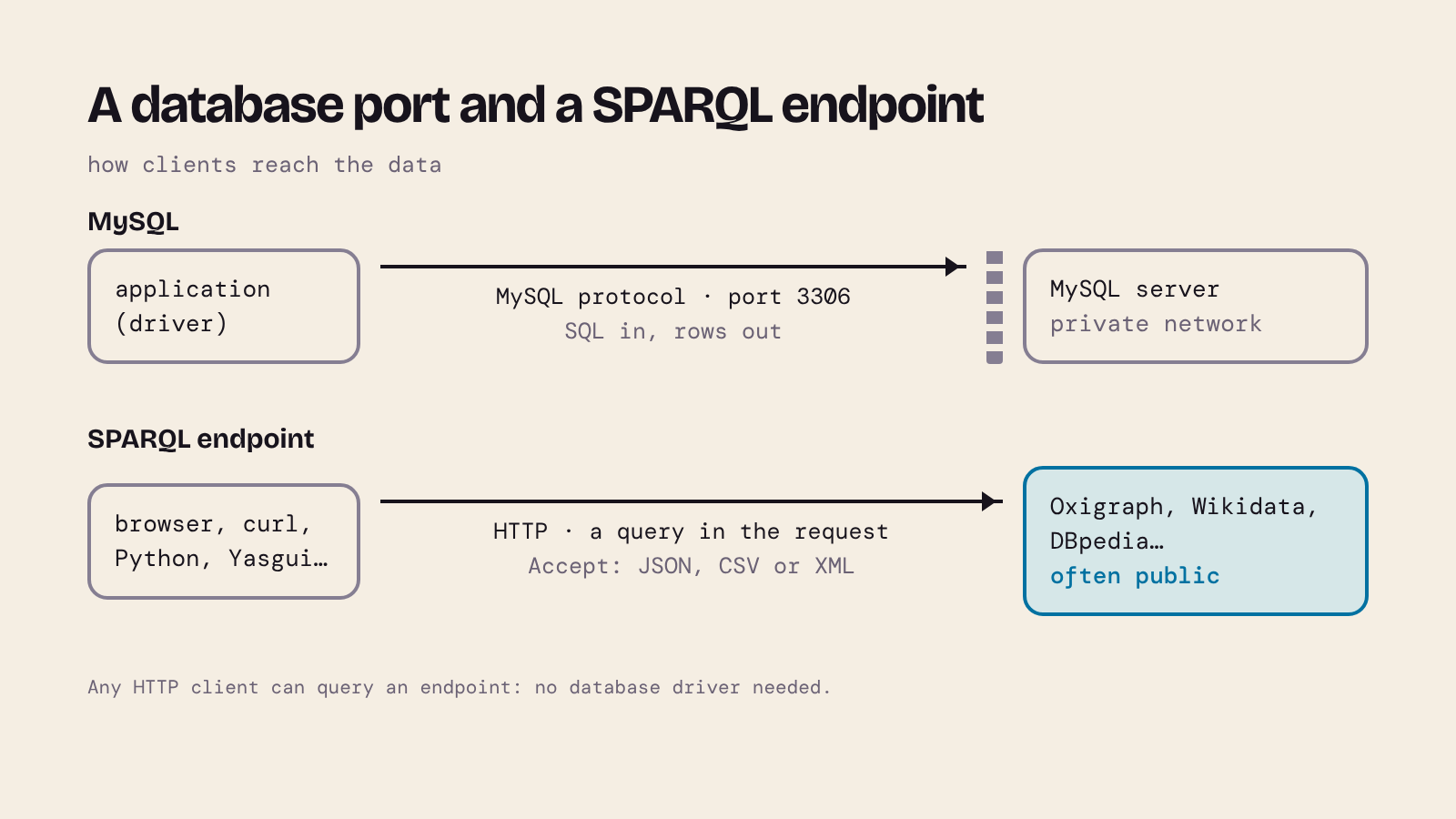
So far rdflib has loaded the files into memory every time. A triplestore is a database built for triples: it stores and indexes them on disk and answers SPARQL queries. Most triplestores are also SPARQL endpoints: web servers that accept a query in an HTTP request and send back the results, following the SPARQL Protocol. A MySQL server speaks its own protocol on port 3306, usually only inside a private network; a SPARQL endpoint speaks HTTP, and many are open to anyone.
We'll use Oxigraph, a small, fast triplestore, as a command-line tool (it came with pip install oxigraph). Load our three files into a store in the folder planets-db, then start the server:
oxigraph load --location planets-db --file planets.ttl extra.ttl wikidata-links.ttl
oxigraph serve --location planets-db
Some files like Wikidata dumps contain invalid IRIs or language tags. If you want to load them anyway use the `--lenient` option.
If you plan to run a read-heavy workload, consider running `oxigraph optimize -l planets-db` before
Listening for requests at http://localhost:7878
Leave it running and open a second terminal in the same folder. The endpoint is http://localhost:7878/query. With curl, you send the query as a form field, and the Accept header chooses the result format; here, CSV for question 2:
curl -s http://localhost:7878/query \
     -H 'Accept: text/csv' \
     --data-urlencode query@queries/q04-moon-count.rq
planetName,moonCount
Saturn,5
Jupiter,4
Neptune,4
Uranus,4
Mars,2
Earth,1
Mercury,0
Venus,0
And the ASK query, as JSON:
curl -s http://localhost:7878/query \
     -H 'Accept: application/sparql-results+json' \
     --data-urlencode query@queries/q06-ask.rq
{"head":{},"boolean":false}
Any language that can send an HTTP request can use an endpoint; no database driver needed. In Python, with nothing but the standard library:
"""Send a SPARQL query to an endpoint over HTTP and read the JSON results."""
import json
import urllib.parse
import urllib.request

ENDPOINT = "http://localhost:7878/query"   # Oxigraph; works with any endpoint

query = """
PREFIX rdfs:  <http://www.w3.org/2000/01/rdf-schema#>
PREFIX astro: <https://example.org/astronomy/vocab#>
SELECT ?moonName ?water
WHERE {
  ?moon astro:moonOf/rdfs:label "Saturn"@en ;
        rdfs:label ?moonName ;
        astro:hasLiquidWater ?water .
}
ORDER BY ?moonName
"""

request = urllib.request.Request(
    ENDPOINT,
    data=urllib.parse.urlencode({"query": query}).encode(),
    headers={"Accept": "application/sparql-results+json"},
)
with urllib.request.urlopen(request) as response:
    results = json.load(response)

for row in results["results"]["bindings"]:
    print(row["moonName"]["value"], "-", row["water"]["value"])
Dione - Suspected
Enceladus - Yes
Iapetus - Unknown
Rhea - Unknown
Titan - Yes
The pattern astro:moonOf/rdfs:label "Saturn"@en is a path: "a moon of something whose label is Saturn".
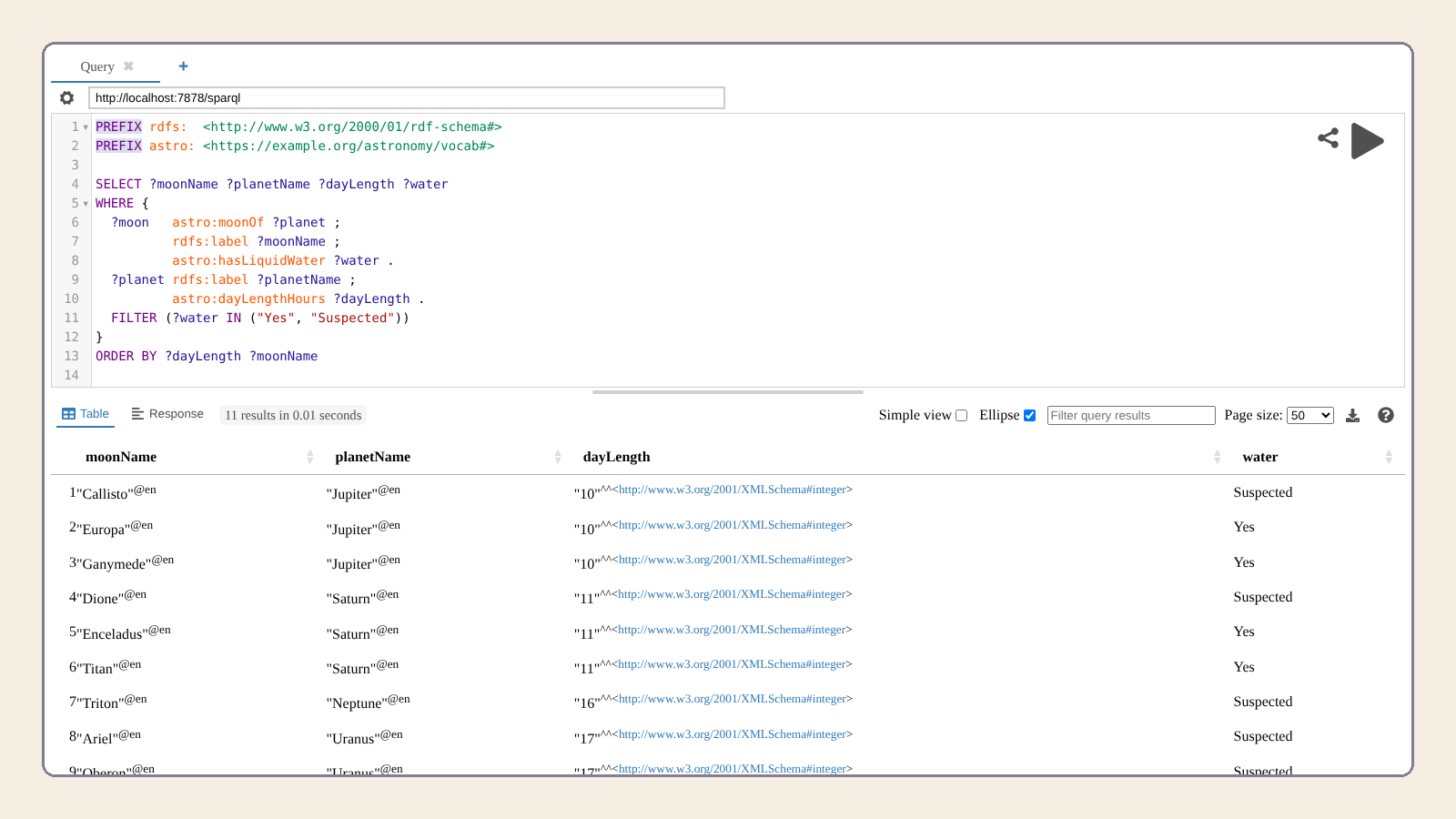
Open http://localhost:7878/ in a browser and you get a query editor. In its full view it shows each value as an RDF term, with its language tag or datatype, as in the screenshot. It's Yasgui, the same open-source editor many public endpoints use (and also available on its own at yasgui.triply.cc, where you can point it at any endpoint). Stop the server with Ctrl+C when you're done.
12. Querying Wikidata and DBpedia
The real reason to learn SPARQL is the data other people publish. Wikidata runs a public endpoint at query.wikidata.org, with an editor, examples and charts. DBpedia, which extracts structured data from Wikipedia, has one at dbpedia.org/sparql. I ran the queries below on 28 November 2026; your results may differ, as both are edited all the time. The Wikidata Query Service declares the common prefixes for you: wd: (things), wdt: (their direct properties), p:, ps:, psv: and pq: (statements, below), plus wikibase: and bd:.
What orbits Mars?
SELECT ?thing ?thingLabel
WHERE {
  ?thing wdt:P397 wd:Q111 .
  SERVICE wikibase:label { bd:serviceParam wikibase:language "en". }
}
wdt:P397 is parent astronomical body, and the SERVICE wikibase:label line is a Wikidata extension that fills in ?thingLabel for every ?thing. I expected two moons. I got 21 rows: Phobos and Deimos, but also spacecraft (Mars Express, MAVEN, the Viking orbiters and more), types of orbit (areostationary, areosynchronous), the general idea "moon of Mars", and a Martian meteorite found on Earth. Every one of them has Mars as its parent body in Wikidata, and in some sense that's true. This is why you explore before you trust a query. Asking only for natural satellites (class wd:Q2537, or any sub-class of it) fixes it:
SELECT ?moon ?moonLabel
WHERE {
  ?moon wdt:P397 wd:Q111 ;
        wdt:P31/wdt:P279* wd:Q2537 .
  SERVICE wikibase:label { bd:serviceParam wikibase:language "en". }
}
This returned two rows, Phobos (wd:Q7547) and Deimos (wd:Q7548). wdt:P31 is instance of and wdt:P279 is subclass of, so the path wdt:P31/wdt:P279* means "an instance of Q2537 or of any of its sub-classes, however deep". It's the usual way to ask "is a" on Wikidata.
Why DISTINCT matters
The same pattern for every planet, counting rows and distinct moons:
SELECT ?planetLabel (COUNT(?moon) AS ?rows) (COUNT(DISTINCT ?moon) AS ?moons)
WHERE {
  VALUES ?planet { wd:Q308 wd:Q313 wd:Q2 wd:Q111 wd:Q319 wd:Q193 wd:Q324 wd:Q332 }
  ?moon wdt:P397 ?planet ;
        wdt:P31/wdt:P279* wd:Q2537 .
  SERVICE wikibase:label { bd:serviceParam wikibase:language "en". }
}
GROUP BY ?planetLabel
ORDER BY DESC(?moons)
| planetLabel | rows | moons |
|---|---|---|
| Saturn | 243 | 165 |
| Jupiter | 195 | 97 |
| Uranus | 59 | 29 |
| Neptune | 31 | 16 |
| Earth | 9 | 5 |
| Mars | 2 | 2 |
VALUES lists the values a variable may take, like a small inline table. Many moons are counted more than once, because the path wdt:P31/wdt:P279* can reach "natural satellite" by more than one route, and each route is a separate match. DISTINCT (or COUNT(DISTINCT …)) removes the duplicates. Mercury and Venus don't appear at all: no matches, no group. The numbers themselves are interesting too, and we'll come back to them in section 15.
A federated query: Wikidata and DBpedia together
A federated query sends part of the query to another endpoint with SERVICE, and joins the results. This query starts on Wikidata, asks DBpedia which of its resources are owl:sameAs the two moons of Mars and who discovered them, and gets the English labels from Wikidata:
PREFIX owl: <http://www.w3.org/2002/07/owl#>
PREFIX dbp: <http://dbpedia.org/property/>

SELECT ?moonLabel ?dbpedia ?discoverer
WHERE {
  SERVICE <https://dbpedia.org/sparql> {
    VALUES ?moon { wd:Q7547 wd:Q7548 }
    ?dbpedia owl:sameAs ?moon .
    OPTIONAL { ?dbpedia dbp:discoverer ?discoverer . }
  }
  SERVICE wikibase:label { bd:serviceParam wikibase:language "en". }
}
| moonLabel | dbpedia | discoverer |
|---|---|---|
| Deimos | http://dbpedia.org/resource/Deimos_(moon) |
http://dbpedia.org/resource/Asaph_Hall |
| Phobos | http://dbpedia.org/resource/Phobos_(moon) |
http://dbpedia.org/resource/Asaph_Hall |
DBpedia links its resources to Wikidata with owl:sameAs, so the two datasets join on the Wikidata IRI, exactly as our own wikidata-links.ttl does. Two practical points:
- The
VALUESline is inside theSERVICEblock. When I put it outside, the query returned nothing: the Wikidata Query Service sends theSERVICEpart to DBpedia on its own, without the moons, and joins afterwards. - The Wikidata Query Service only federates with a list of endpoints it allows (DBpedia is one), and federated queries are slow. Most public endpoints don't allow federation at all, because one query can keep two servers busy.
Be a good citizen
Public endpoints are shared and free. Start with LIMIT, keep queries specific, and if you need everything, use the data dumps (Wikidata and DBpedia both publish them) and load them into your own triplestore. Endpoints set timeouts, and some go offline for good: running a public SPARQL endpoint costs real money, which is why many organisations publish dumps or files at their IRIs instead.
13. When a fact has parts, give it its own node
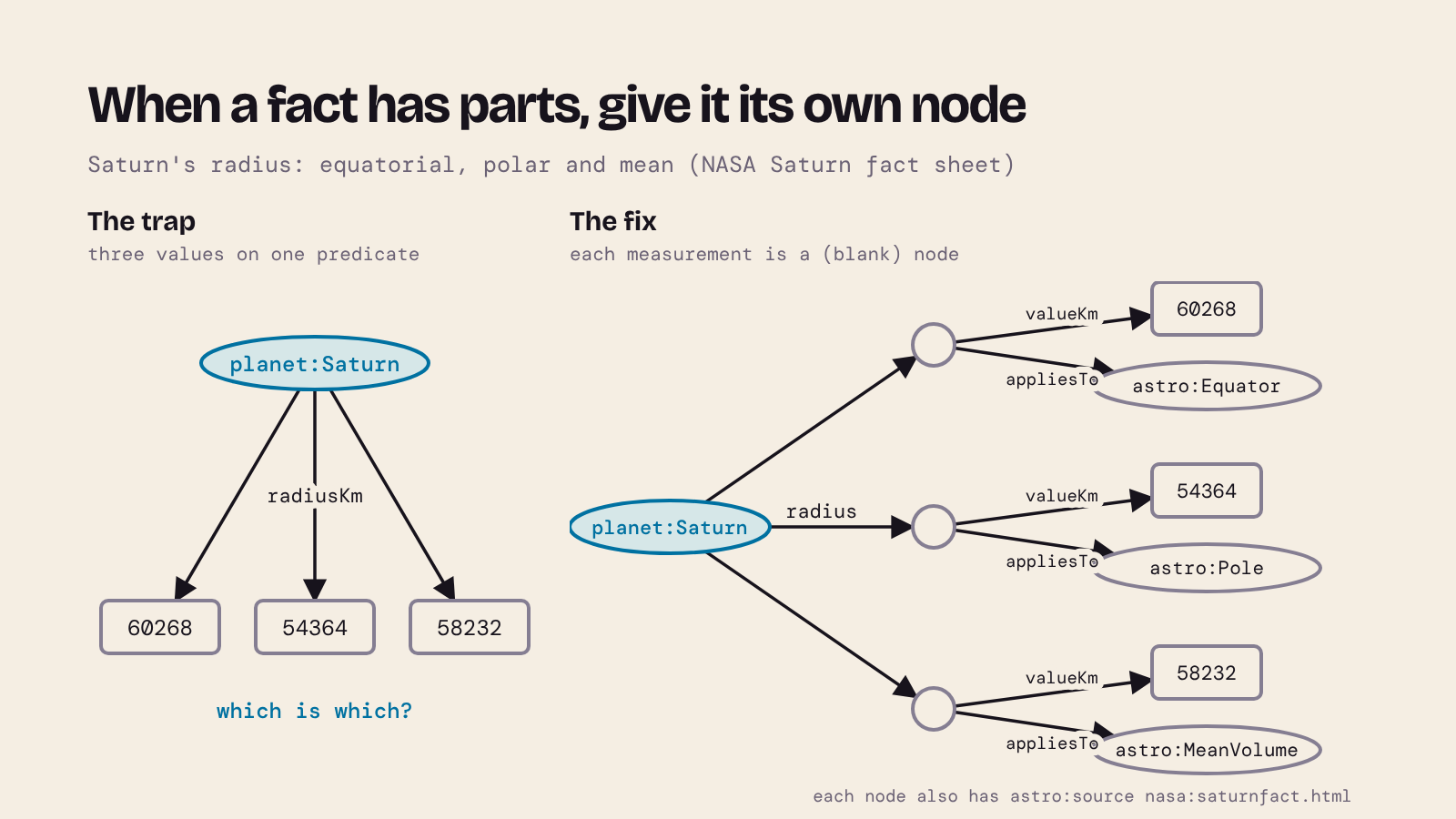
Our table has one diameter per planet. NASA's Saturn fact sheet gives three radii: equatorial (60,268 km), polar (54,364 km) and the volumetric mean (58,232 km). A first attempt might hang all three off Saturn:
# First attempt: three radii hang off Saturn. Which is which?
PREFIX astro:  <https://example.org/astronomy/vocab#>
PREFIX planet: <https://example.org/astronomy/planet/>

planet:Saturn astro:radiusKm 60268, 54364, 58232 .
PREFIX astro:  <https://example.org/astronomy/vocab#>
PREFIX planet: <https://example.org/astronomy/planet/>

SELECT ?km
WHERE {
  planet:Saturn astro:radiusKm ?km .
}
ORDER BY DESC(?km)
km
60268
58232
54364
(3 rows)
The values are all there, but there's no way to tell which is which. A triple can't carry extra information about itself. When a fact has parts (a value, what it applies to, a source, a date), make the fact a node of its own and hang the parts off it:
# Better: each measurement is a node of its own, with its parts.
PREFIX astro:  <https://example.org/astronomy/vocab#>
PREFIX planet: <https://example.org/astronomy/planet/>
PREFIX nasa:   <https://nssdc.gsfc.nasa.gov/planetary/factsheet/>

planet:Saturn astro:radius
    [ astro:valueKm 60268 ; astro:appliesTo astro:Equator ;    astro:source nasa:saturnfact.html ] ,
    [ astro:valueKm 54364 ; astro:appliesTo astro:Pole ;       astro:source nasa:saturnfact.html ] ,
    [ astro:valueKm 58232 ; astro:appliesTo astro:MeanVolume ; astro:source nasa:saturnfact.html ] .
Each [ … ] is a blank node: a node with no IRI, which only exists as part of the triple it's in. Here each measurement doesn't need a global name, so a blank node is enough. (If others might want to refer to it, give it an IRI.) Now the query can ask for the parts:
PREFIX astro:  <https://example.org/astronomy/vocab#>
PREFIX planet: <https://example.org/astronomy/planet/>

SELECT ?part ?km
WHERE {
  planet:Saturn astro:radius ?measurement .
  ?measurement astro:appliesTo ?part ;
               astro:valueKm ?km .
}
ORDER BY DESC(?km)
part              km
astro:Equator     60268
astro:MeanVolume  58232
astro:Pole        54364
(3 rows)
You know this move already: in SQL you'd fix it with a new table, PlanetRadii(PlanetName, Part, Km, Source), just as normalisation splits a repeating group into its own table. The same idea applies to a cast list (which actor played which role in which film), a student's enrolment (which module, which year, which result) or a footballer's goal (which match, which minute).
Wikidata does this for every fact. Behind each simple wdt: triple there's a statement node with the value, its unit, qualifiers and references. Saturn's diameter:
SELECT ?value ?unitLabel ?partLabel
WHERE {
  wd:Q193 p:P2386 ?statement .
  ?statement psv:P2386 ?amount .
  ?amount wikibase:quantityAmount ?value ;
          wikibase:quantityUnit ?unit .
  OPTIONAL { ?statement pq:P518 ?part . }
  SERVICE wikibase:label { bd:serviceParam wikibase:language "en". }
}
This returned one statement: 120536, unit kilometre, with the qualifier applies to part (pq:P518) set to equator. p: leads from the planet to its statement nodes, psv: to the full value (amount and unit), and pq: to the qualifiers.
RDF 1.2, now in draft at the W3C, adds triple terms, a standard way to make statements about a triple itself. Until it's finished and widely supported, an extra node like ours is the portable way to do it.
14. Linked data in web pages: schema.org
Linked data isn't only for research projects. Search engines read schema.org markup in web pages to build their rich results (recipes, events, reviews, articles), and the usual way to write it is JSON-LD in a <script> element. This blog already does it: Hashnode adds a BlogPosting to every post. Here's part of the one on Exploring the Cosmos, read from the page on 28 November 2026 (abridged: Hashnode also includes the headline, description, publisher, images and more):
{
  "@context": "https://schema.org",
  "@type": "BlogPosting",
  "url": "https://pedbad.hashnode.dev/exploring-the-cosmos-building-and-querying-a-planetary-database-with-mysql",
  "author": {
    "@type": "Person",
    "name": "Pedram Badakhchani",
    "url": "https://hashnode.com/@pedbad"
  },
  "datePublished": "2024-05-07T11:15:46.367Z",
  "keywords": "MySQL, Databases"
}
To see what it says as RDF, paste it into the JSON-LD Playground and choose N-Quads (N-Triples with an optional fourth part, the graph name). I ran the conversion with the playground's own JSON-LD library, which fetched the schema.org context:
_:b0 <http://schema.org/author> _:b1 .
_:b0 <http://schema.org/datePublished> "2024-05-07T11:15:46.367Z" .
_:b0 <http://schema.org/keywords> "MySQL, Databases" .
_:b0 <http://schema.org/url> "https://pedbad.hashnode.dev/exploring-the-cosmos-building-and-querying-a-planetary-database-with-mysql" .
_:b0 <http://www.w3.org/1999/02/22-rdf-syntax-ns#type> <http://schema.org/BlogPosting> .
_:b1 <http://schema.org/name> "Pedram Badakhchani" .
_:b1 <http://schema.org/url> "https://hashnode.com/@pedbad" .
_:b1 <http://www.w3.org/1999/02/22-rdf-syntax-ns#type> <http://schema.org/Person> .
Eight triples, and some familiar lessons:
- The post and its author are blank nodes (
_:b0,_:b1), because the JSON-LD has no@id. Adding"@id"with the post's URL would give the post a proper IRI that other data could link to. - The URL is a string, not a link: schema.org's context doesn't say that
urlholds an IRI. - The context maps the terms to
http://schema.org/…, even though the context itself is fetched fromhttps://schema.org. Once again, the exact IRI is what counts.
15. Can you trust linked data?
Linked data is only as good as the people and programs that wrote it, and on an open web anyone can write it. Some things I found while writing this post:
- Earth's natural satellites. In the "Why DISTINCT matters" query, Earth had 5 "natural satellites" on Wikidata. One is the Moon. The others were 2020 CD3, a small asteroid that was temporarily captured by Earth (a real "minimoon"), an item described only as "temporary satellite capture", a term from traditional Chinese astronomy, and a conspiracy theory about an alleged satellite. Each is classed, somewhere along its
P31/P279path, as a natural satellite. The query is correct; the data reflects how thousands of people have classified things. - Counts differ between sources. Wikidata gave Saturn 165 natural satellites; NASA's Saturn fact sheet says 274 (last updated March 2025). New moons are confirmed every year, and a community database catches up when someone adds them.
- Plain errors happen. On 28 November 2026, Wikidata's item for the 1818 novel Frankenstein; or, The Modern Prometheus (
wd:Q150827) gave its author as a modern researcher, not Mary Shelley (wd:Q47152). DBpedia, too, has had wrong facts extracted from Wikipedia. Mistakes like these are usually fixed once someone spots them, and Wikidata welcomes corrections. owl:sameAsspreads mistakes. If someone links two things that aren't the same, every fact about one becomes a "fact" about the other.
What to do about it:
- Explore before you trust a query: count, look at the types, and read some rows (section 12).
- Constrain your patterns with classes, and use
DISTINCT. - Prefer sources that give references (Wikidata statements can carry them), and record your own sources, as we did with
astro:sourcein section 13. - Cache what you use, validate it with SHACL, and check numbers that matter against a primary source, as we did with NASA.
16. Strengths, weaknesses and choosing
| Relational (MySQL) | Document (MongoDB) | Linked data (RDF and SPARQL) | |
|---|---|---|---|
| Unit of data | row in a table | document in a collection | triple in a graph |
| Identity | primary key, unique in one table | _id, unique in one collection |
IRI, unique on the whole web |
| Schema | fixed, enforced | flexible, optional validation | none needed; ontologies add meaning, SHACL adds checks |
| Relationships | foreign keys and joins | embedding or references | first-class: every predicate is a named link |
| Combining datasets | hard: keys and names clash | hard | easy: merge the triples; shared IRIs join |
| Missing data | closed world: no row means false | missing field | open world: no triple means unknown |
| Query language | SQL | MongoDB Query API, aggregation | SPARQL, over HTTP, across endpoints |
| Best at | transactions, consistency, reporting | records read and written as a whole | integrating, publishing and linking data from many sources |
Linked data is a good fit when:
- data comes from many sources and needs to be joined (libraries, museums, science, government data, knowledge graphs);
- you want others to reuse and link to your data, or you want to build on theirs (Wikidata, DBpedia);
- the structure changes often, or you can't know all the kinds of facts in advance;
- relationships, classifications and the meaning of terms matter as much as the values.
It's a poor fit for high-volume transactional systems (orders, bank accounts, bookings), where you want one closed, consistent database with constraints and fast updates. Many real systems keep their working data in a relational database and publish it as linked data, much as we did in section 4.
Before you publish linked data, check that:
- your IRIs are stable, on a domain you control, and name one thing each;
- you reuse well-known vocabularies where they fit (schema.org, FOAF, Dublin Core, SKOS) instead of inventing your own;
- your links (
owl:sameAsespecially) mean exactly what you say; - your data passes your SHACL shapes;
- your IRIs return something useful when requested, or there's a dump people can download.
17. Check your understanding
- Is this valid Turtle?
planet:Mars, planet:Venus astro:orbits star:Sun . - How many triples does this Turtle contain?
moon:Io a astro:Moon ; rdfs:label "Io"@en, "Io"@fr ; astro:moonOf planet:Jupiter . - You add
planet:Mars owl:sameAs <https://www.wikidata.org/entity/Q111> .to your data, but your queries don't join with Wikidata's triples about Mars. Why not? - Charon is a moon of Pluto, and Pluto isn't in our
Planetstable. If you addmoon:Charon a astro:Moon ; astro:moonOf planet:Pluto ; astro:hasLiquidWater "Unknown" ., what does the reasoner conclude about Pluto, and what does SHACL say? - Write the SPARQL version of
SELECT HasLiquidWater, COUNT(*) FROM Moons GROUP BY HasLiquidWater. ASK { ?moon astro:moonOf planet:Venus . }returnedfalse. Does that prove Venus has no moons?
Answers
- No. Turtle has no shorthand for several subjects, and rdflib reports a syntax error. Write two statements:
planet:Mars astro:orbits star:Sun . planet:Venus astro:orbits star:Sun . - Four: Io is a moon, it has two labels (one triple each, because the
,repeats the subject and predicate), and it's a moon of Jupiter. - Wikidata's data uses
http://www.wikidata.org/entity/Q111. IRIs are compared exactly, so thehttpsform is a different IRI that nothing else uses. - The reasoner concludes that Pluto is an
astro:Planet, because the range ofastro:moonOfisastro:Planet: it infers, it doesn't object. SHACL reports a violation, becausesh:class astro:Planetchecks that the planet is stated to be a planet in the data, and Pluto isn't. (I checked both with the files in this post.) - See the query after these answers. On our data it gives Suspected 7, Unknown 5, No 4 and Yes 4;
GROUP BYandCOUNTwork just as in SQL. - No. It proves only that this graph has no triple saying that something is a moon of Venus. For our own complete list that's the answer we want, and NASA agrees that Venus has no moons; for data gathered from the web, absence is not proof (the Open World Assumption).
The query for answer 5:
PREFIX astro: <https://example.org/astronomy/vocab#>

SELECT ?water (COUNT(?moon) AS ?moons)
WHERE {
  ?moon astro:hasLiquidWater ?water .
}
GROUP BY ?water
ORDER BY DESC(?moons)
18. Further reading and sources
- W3C: RDF 1.1 Primer, RDF 1.1 Concepts and Abstract Syntax, RDF 1.1 Turtle, RDF 1.1 N-Triples, JSON-LD 1.1, RDF 1.1 XML Syntax, RDF Schema 1.1, OWL 2 Overview, OWL 2 Profiles (OWL 2 RL), SHACL, SPARQL 1.1 Query Language, SPARQL 1.1 Protocol, SPARQL 1.1 Federated Query, A Direct Mapping of Relational Data to RDF and R2RML. Drafts: RDF 1.2 Concepts and SPARQL 1.2 Query Language.
- Berners-Lee, T. (2006) Linked Data, a design note with the four principles of linked data.
- Notation3 (N3): A readable RDF syntax, W3C Team Submission (2011).
- Tools: rdflib, OWL-RL (owlrl), pySHACL, Oxigraph, Yasgui, MySQL Connector/Python, JSON-LD Playground.
- Wikidata: Query Service, SPARQL tutorial, RDF dump format (prefixes, statements and qualifiers). DBpedia SPARQL endpoint.
- schema.org and its BlogPosting type.
- NASA: Planetary Fact Sheet and Saturn Fact Sheet.
- Allemang, D., Hendler, J. and Gandon, F. (2020) Semantic Web for the Working Ontologist, 3rd edn. ACM Books. A thorough, readable book on RDF, RDFS, OWL and SPARQL.
Related posts on this blog: Distributed databases: partitioning, replication and CAP (part 1), MongoDB for SQL developers (part 2), Exploring the Cosmos (the planets database in MySQL), XML: Documents with semantics (trees instead of graphs) and Mastering Database Normalisation.
This is my own tutor material, not official University of London course material.
About the author
- Head of eLearning at the University of Cambridge Language Centre, full-stack developer and AI engineer, and online tutor on the BSc Computer Science from Goldsmiths, University of London, on Coursera. I started out in neuroscience research before moving into web development, and have spent over twenty years building digital learning at Cambridge. This blog is my supplementary material for students on the BSc: set-up guides, explanations of the ideas that trip people up, and worked examples. New here? Click Website above for my Start here page and module guides.
Comments
Join the discussionNo comments yet. Be the first to comment.
Databases and Advanced Data Techniques (CM3010)
University of London - Module Specifications for CM3010 - Databases and Advanced Data Techniques