
Distributed databases: partitioning, replication and CAP

A database on one server is easy to reason about: one copy of the data, one place to look, one clock. This tutorial is about what happens when that's no longer enough, and you spread a database over several machines. We'll look at the three tools every distributed database uses, partitioning, replication and distributed transactions, try each of them by hand in both PostgreSQL and MySQL, and then look carefully at the trade-off that ties them together: Brewer's CAP theorem.
Everything here runs on your own computer. "Several machines" will be several database servers on different ports, which behave the same way as servers in different countries, only faster.
Tested with PostgreSQL 18.7, MySQL 9.7.4 LTS, Python 3.15.2, psycopg 3.3.9 and MySQL Connector/Python 26.10.0 on Linux, 18 November 2026. The single-server MySQL examples (partitioning and XA transactions) also ran unchanged on MySQL 8.0.46, so you can try them on the MySQL you already have.
Contents
- Why distribute a database?
- The goal: users shouldn't notice
- Setting up a small lab
- Partitioning: splitting the data
- Replication: copying the data
- Distributed transactions: two-phase commit
- CAP: what you give up when the network fails
- Looking ahead: key/value data and MapReduce
- Check your understanding
- Further reading and sources
1. Why distribute a database?
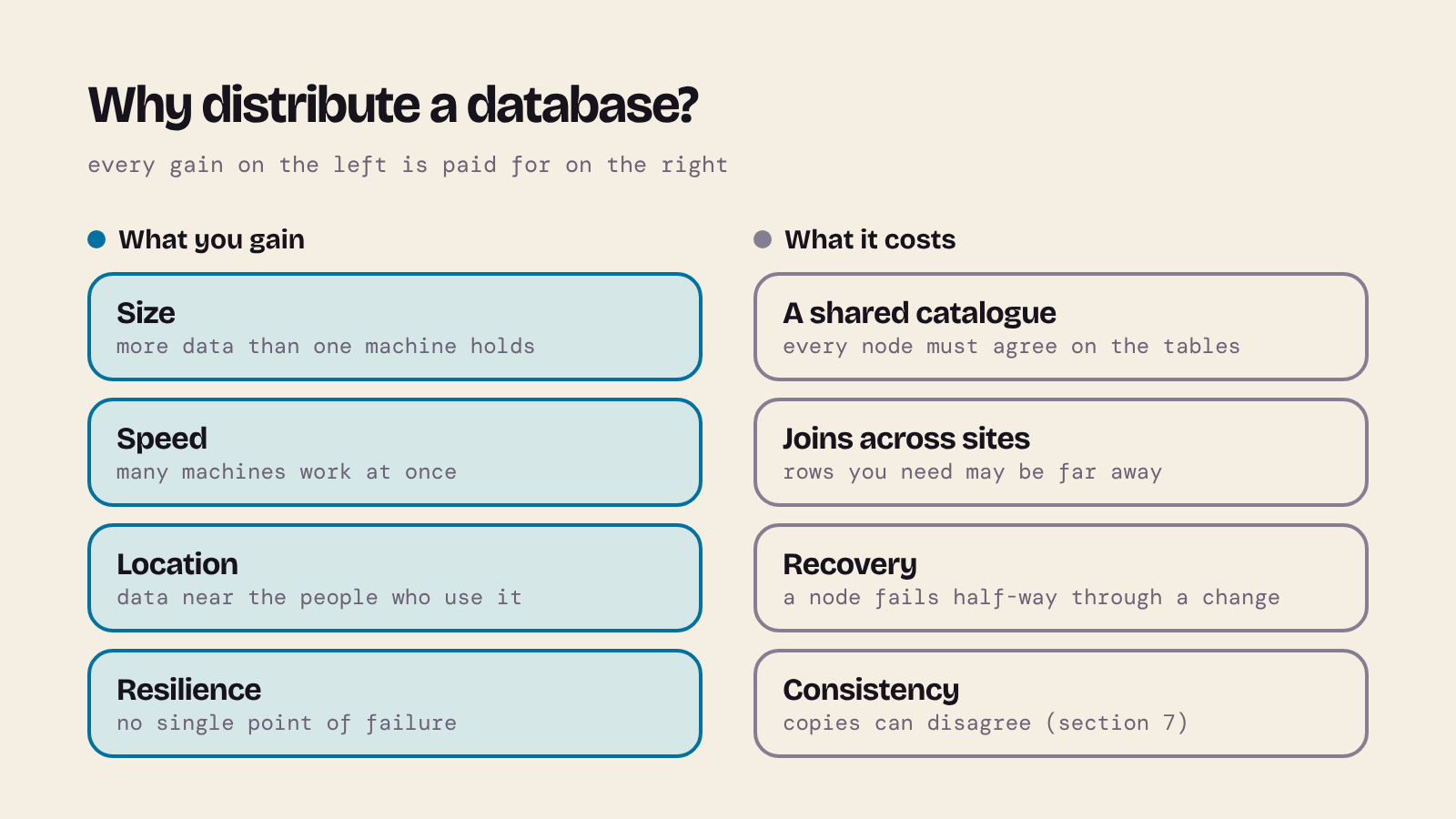
There are four common reasons:
- Size. The data, or the work done on it, is too big for one machine.
- Speed. Several machines can answer different queries, or different parts of one query, at the same time.
- Location. Data can live near the people who use it. A telescope in Chile and one in Hawaii can each write to a server nearby instead of one in London.
- Resilience. If one machine fails, another can carry on, so there's no single point of failure.
None of this is free. Every node must agree on what the tables look like (the catalogue), a join may need rows that live on different machines, and when a node fails part-way through a change, someone has to work out what happened and put things right (recovery). And once data is copied, the copies can disagree. Most of this post is about those costs.
2. The goal: users shouldn't notice
The ideal distributed database looks exactly like a single database to the people who use it. In 1987 C. J. Date set out twelve goals for distributed databases. In plain words:
| # | Goal | Meaning |
|---|---|---|
| 1 | Local autonomy | Each site manages its own data and works independently. |
| 2 | No central site | No single site that everything depends on. |
| 3 | Continuous operation | No planned downtime, even for upgrades or adding sites. |
| 4 | Location independence | Users don't need to know where the data is stored. |
| 5 | Fragmentation independence | Users don't need to know how a table is split up. |
| 6 | Replication independence | Users don't need to know which data is copied where. |
| 7 | Distributed query processing | Queries that need data from several sites still work, and efficiently. |
| 8 | Distributed transaction management | Transactions across sites are still all-or-nothing. |
| 9–11 | Hardware, operating system and network independence | Any mix of machines and networks. |
| 12 | DBMS independence | Different database products can take part. |
These are aims, not a checklist that real products meet; DBMS independence in particular is rare. They're often called "Codd's rules" by mistake. Codd's twelve rules (1985) are about relational systems in general, though one of them, distribution independence, already asked that users shouldn't notice where the data lives.
3. Setting up a small lab
You need the server programs of PostgreSQL 18 and MySQL (9.7 LTS or 8.4 LTS) on your PATH, plus Python 3. If you have Homebrew, my post Install MySQL on OSX Using Homebrew covers MySQL. I used conda-forge, which has both servers and works the same way on every system:
conda create -n dd-lab -c conda-forge postgresql=18 mysql-server=9.7 mysql-client python=3.15
conda activate dd-lab
python -m pip install "psycopg[binary]" mysql-connector-python
Then make a folder for the lab and tell the PostgreSQL tools where to connect:
mkdir dd-lab && cd dd-lab
export PGHOST=localhost PGUSER=postgres
Local learning only. The servers below accept connections from your own machine without a password (
--auth=trust, a MySQLrootwith no password). That's fine for a lab on your laptop; never set up a real server like this.
A PostgreSQL server on port 5433
initdb -D primary -U postgres --auth=trust
echo "max_prepared_transactions = 10" >> primary/postgresql.conf
pg_ctl -D primary -o "-p 5433" -l primary.log start
createdb -p 5433 cosmos
max_prepared_transactions is off (0) by default; we'll need it in section 6. Using port 5433 keeps the lab apart from any PostgreSQL you already run on the default 5432.
Two MySQL servers on ports 3307 and 3308
We'll use the second one in section 5. Save this as start_mysql.sh:
# Two MySQL servers on one machine: a source (3307) and a replica (3308)
mysqld --no-defaults --datadir="$PWD/my_source" --port=3307 \
  --socket=/tmp/mysql_source.sock --mysqlx=OFF --server-id=1 \
  --gtid-mode=ON --enforce-gtid-consistency=ON \
  --log-error="$PWD/source.err" &
mysqld --no-defaults --datadir="$PWD/my_replica" --port=3308 \
  --socket=/tmp/mysql_replica.sock --mysqlx=OFF --server-id=2 \
  --gtid-mode=ON --enforce-gtid-consistency=ON --super-read-only=ON \
  --log-error="$PWD/replica.err" &
Then create the two data directories and start both servers:
mysqld --no-defaults --initialize-insecure --datadir="$PWD/my_source"
mysqld --no-defaults --initialize-insecure --datadir="$PWD/my_replica"
bash start_mysql.sh
sleep 5   # give the servers a moment to start
mysql -h 127.0.0.1 -P 3307 -u root -e "SELECT VERSION(), @@server_id"
Each server needs its own server-id, port and socket. --super-read-only stops anyone writing to the replica directly; only replication will change its data.
4. Partitioning: splitting the data
Partitioning (Date calls it fragmentation) splits one logical table into pieces that can be stored, and searched, separately.
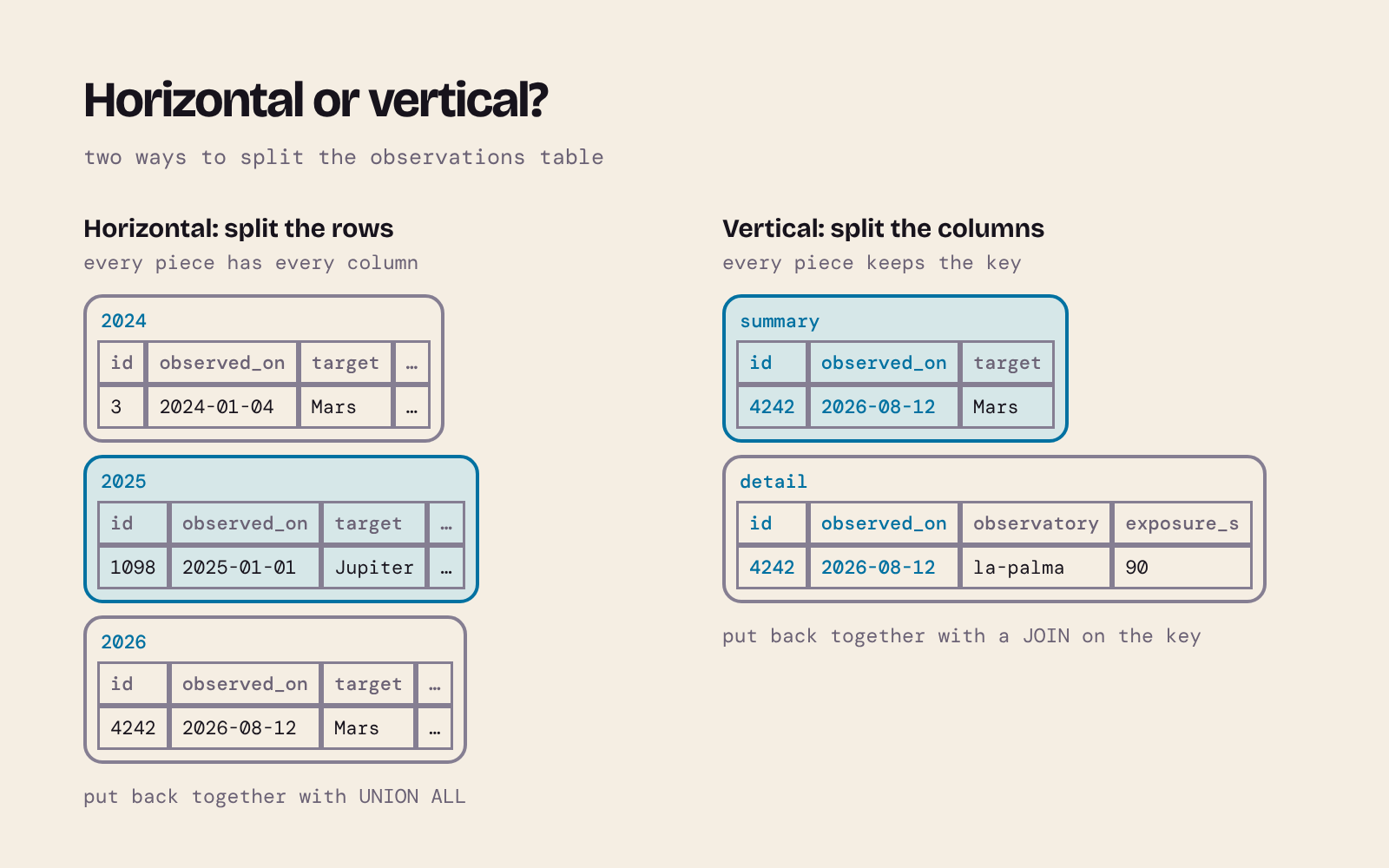
- Horizontal partitioning splits the rows: 2024's observations in one piece, 2025's in another. Each piece has every column.
- Vertical partitioning splits the columns: the columns most queries need in one piece, the rest in another. Each piece keeps the primary key, so a join puts the rows back together. Normalisation is a kind of vertical split too (see Mastering Database Normalisation).
Rows can be divided up by three kinds of rule:
| Rule | Example | Good for |
|---|---|---|
| Range | observed_on in 2024, 2025, 2026 |
Time series; dropping old data |
| List | observatory is 'paranal' |
Keeping each site's data together, near that site |
| Hash | a hash of observation_id, 4 ways |
Spreading rows evenly when no natural rule fits |
What follows is partitioning on one server. It's the building block of sharding, where each partition lives on a different server; the ideas, and the way queries skip partitions, are the same.
Range partitioning in PostgreSQL
Our running example is a log of telescope observations from three observatories: La Palma (Canary Islands), Mauna Kea (Hawaii) and Paranal (Chile). The data is made up, but realistic enough. Save this as 01_range_partitioning.sql:
-- Horizontal partitioning by date range (PostgreSQL)
CREATE TABLE observations (
    observation_id bigint GENERATED ALWAYS AS IDENTITY,
    observatory    text    NOT NULL,
    observed_on    date    NOT NULL,
    target         text    NOT NULL,
    exposure_s     integer NOT NULL,
    PRIMARY KEY (observation_id, observed_on)
) PARTITION BY RANGE (observed_on);

CREATE TABLE observations_2024 PARTITION OF observations
    FOR VALUES FROM ('2024-01-01') TO ('2025-01-01');
CREATE TABLE observations_2025 PARTITION OF observations
    FOR VALUES FROM ('2025-01-01') TO ('2026-01-01');
CREATE TABLE observations_2026 PARTITION OF observations
    FOR VALUES FROM ('2026-01-01') TO ('2027-01-01');

-- 30,000 made-up observations spread over 2024-2026
INSERT INTO observations (observatory, observed_on, target, exposure_s)
SELECT (ARRAY['la-palma', 'mauna-kea', 'paranal'])[1 + n % 3],
       DATE '2024-01-01' + (n % 1096),
       (ARRAY['Jupiter', 'Saturn', 'Mars', 'M31', 'M42'])[1 + n % 5],
       30 + (n % 10) * 30
FROM generate_series(1, 30000) AS n;
psql -p 5433 -d cosmos -f 01_range_partitioning.sql
Notice the primary key: it includes observed_on. PostgreSQL can only enforce a unique key on a partitioned table if the key contains the partition column, because each partition checks uniqueness on its own. MySQL has the same rule.
You still insert into, and query, observations as one table. Each row goes to the right partition by itself. tableoid shows where each row went:
SELECT tableoid::regclass AS partition, count(*)
FROM observations GROUP BY partition ORDER BY partition;
     partition     | count
-------------------+-------
 observations_2024 | 10247
 observations_2025 |  9898
 observations_2026 |  9855
(3 rows)
That's fragmentation independence in action: the user sees one table.
Partition pruning
Now ask for one month. EXPLAIN shows the plan:
EXPLAIN (COSTS OFF)
SELECT count(*) FROM observations
WHERE observed_on BETWEEN '2025-03-01' AND '2025-03-31';
                                          QUERY PLAN
-----------------------------------------------------------------------------------------------
 Aggregate
   ->  Seq Scan on observations_2025 observations
         Filter: ((observed_on >= '2025-03-01'::date) AND (observed_on <= '2025-03-31'::date))
(3 rows)
Only observations_2025 is read. The planner knows no row from March 2025 can be in the other partitions, so it skips them: this is partition pruning. A query that doesn't filter on the partition column has to visit every partition:
EXPLAIN (COSTS OFF)
SELECT count(*) FROM observations WHERE target = 'Jupiter';
                        QUERY PLAN
----------------------------------------------------------
 Aggregate
   ->  Append
         ->  Seq Scan on observations_2024 observations_1
               Filter: (target = 'Jupiter'::text)
         ->  Seq Scan on observations_2025 observations_2
               Filter: (target = 'Jupiter'::text)
         ->  Seq Scan on observations_2026 observations_3
               Filter: (target = 'Jupiter'::text)
(8 rows)
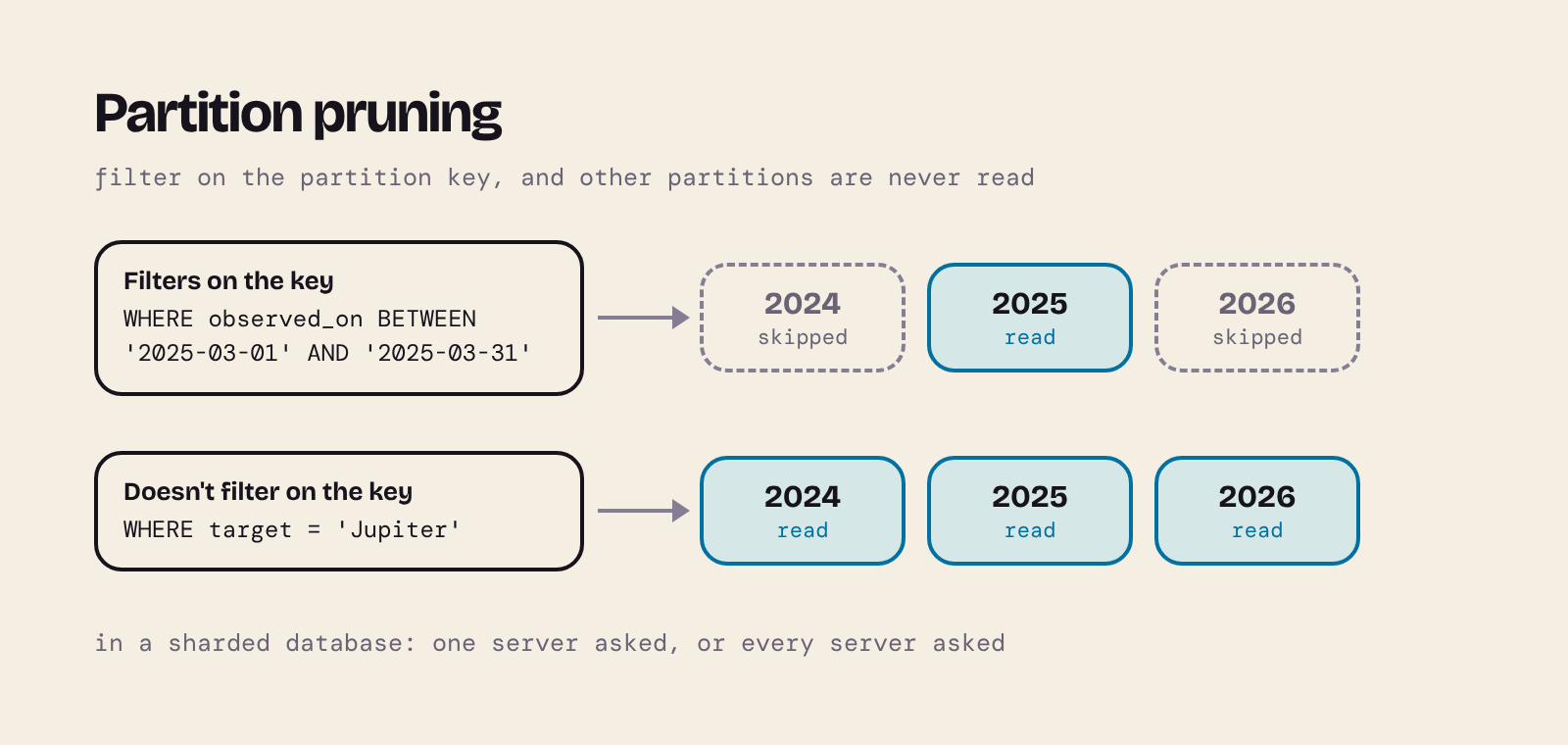
In a sharded system the difference is bigger still: the first query goes to one server, the second to all of them. So choose the partition key to match your most common queries. Knowing how the data is partitioned is exactly what lets a query be sent "close to the data".
One more thing to try: a row that fits no partition.
INSERT INTO observations (observatory, observed_on, target, exposure_s)
VALUES ('paranal', '2027-01-15', 'Saturn', 120);
ERROR:  no partition of relation "observations" found for row
DETAIL:  Partition key of the failing row contains (observed_on) = (2027-01-15).
Range partitions have to be created ahead of time (or you add a DEFAULT partition to catch everything else).
List, hash and vertical partitioning in PostgreSQL
Save this as 02_list_hash_vertical.sql. It copies the same rows into a list-partitioned table (one partition per observatory), a hash-partitioned table (four partitions) and two vertical fragments:
-- List partitioning: one partition per observatory
CREATE TABLE observations_by_site (
    observation_id bigint  NOT NULL,
    observatory    text    NOT NULL,
    observed_on    date    NOT NULL,
    target         text    NOT NULL,
    exposure_s     integer NOT NULL,
    PRIMARY KEY (observation_id, observatory)
) PARTITION BY LIST (observatory);

CREATE TABLE observations_la_palma  PARTITION OF observations_by_site FOR VALUES IN ('la-palma');
CREATE TABLE observations_mauna_kea PARTITION OF observations_by_site FOR VALUES IN ('mauna-kea');
CREATE TABLE observations_paranal   PARTITION OF observations_by_site FOR VALUES IN ('paranal');

INSERT INTO observations_by_site
SELECT observation_id, observatory, observed_on, target, exposure_s FROM observations;

-- Hash partitioning: spread rows evenly when no natural rule fits
CREATE TABLE observations_by_hash (
    observation_id bigint  NOT NULL PRIMARY KEY,
    observatory    text    NOT NULL,
    observed_on    date    NOT NULL,
    target         text    NOT NULL,
    exposure_s     integer NOT NULL
) PARTITION BY HASH (observation_id);

CREATE TABLE observations_h0 PARTITION OF observations_by_hash FOR VALUES WITH (MODULUS 4, REMAINDER 0);
CREATE TABLE observations_h1 PARTITION OF observations_by_hash FOR VALUES WITH (MODULUS 4, REMAINDER 1);
CREATE TABLE observations_h2 PARTITION OF observations_by_hash FOR VALUES WITH (MODULUS 4, REMAINDER 2);
CREATE TABLE observations_h3 PARTITION OF observations_by_hash FOR VALUES WITH (MODULUS 4, REMAINDER 3);

INSERT INTO observations_by_hash
SELECT observation_id, observatory, observed_on, target, exposure_s FROM observations;

-- Vertical partitioning: split the columns, keep the key in both parts
CREATE TABLE observation_summary AS
SELECT observation_id, observed_on, target FROM observations;
CREATE TABLE observation_detail AS
SELECT observation_id, observed_on, observatory, exposure_s FROM observations;
ALTER TABLE observation_summary ADD PRIMARY KEY (observation_id, observed_on);
ALTER TABLE observation_detail  ADD PRIMARY KEY (observation_id, observed_on);
psql -p 5433 -d cosmos -q -f 02_list_hash_vertical.sql
The list partitions hold exactly one observatory each, and the hash partitions come out roughly equal, which is the point of hashing:
SELECT tableoid::regclass AS partition, count(*)
FROM observations_by_site GROUP BY partition ORDER BY partition;
SELECT tableoid::regclass AS partition, count(*)
FROM observations_by_hash GROUP BY partition ORDER BY partition;
       partition        | count
------------------------+-------
 observations_la_palma  | 10000
 observations_mauna_kea | 10000
 observations_paranal   | 10000
(3 rows)

    partition    | count
-----------------+-------
 observations_h0 |  7528
 observations_h1 |  7541
 observations_h2 |  7535
 observations_h3 |  7396
(4 rows)
Pruning works for both:
EXPLAIN (COSTS OFF)
SELECT * FROM observations_by_site WHERE observatory = 'paranal' AND target = 'Mars';
EXPLAIN (COSTS OFF)
SELECT * FROM observations_by_hash WHERE observation_id = 4242;
                               QUERY PLAN
-------------------------------------------------------------------------
 Seq Scan on observations_paranal observations_by_site
   Filter: ((observatory = 'paranal'::text) AND (target = 'Mars'::text))
(2 rows)

                                  QUERY PLAN
-------------------------------------------------------------------------------
 Index Scan using observations_h0_pkey on observations_h0 observations_by_hash
   Index Cond: (observation_id = 4242)
(2 rows)
Hash partitioning can only prune on equality (=): a hash tells you nothing about which partition holds a range of ids.
Finally, the two vertical fragments join back into the full row on the key they share:
SELECT s.observation_id, s.observed_on, s.target, d.observatory, d.exposure_s
FROM observation_summary AS s
JOIN observation_detail AS d USING (observation_id, observed_on)
WHERE s.observation_id = 4242;
 observation_id | observed_on | target | observatory | exposure_s
----------------+-------------+--------+-------------+------------
           4242 | 2026-08-12  | Mars   | la-palma    |         90
(1 row)
The same in MySQL
MySQL builds partitioning into CREATE TABLE. RANGE COLUMNS and LIST COLUMNS let you partition on a date or text column directly. MySQL has no generate_series, so a recursive CTE makes the 30,000 numbers. Save this as mysql_partitioning.sql:
CREATE DATABASE cosmos;
USE cosmos;

-- Horizontal partitioning by date range (MySQL)
CREATE TABLE observations (
    observation_id BIGINT      NOT NULL AUTO_INCREMENT,
    observatory    VARCHAR(20) NOT NULL,
    observed_on    DATE        NOT NULL,
    target         VARCHAR(20) NOT NULL,
    exposure_s     INT         NOT NULL,
    PRIMARY KEY (observation_id, observed_on)
)
PARTITION BY RANGE COLUMNS (observed_on) (
    PARTITION p2024 VALUES LESS THAN ('2025-01-01'),
    PARTITION p2025 VALUES LESS THAN ('2026-01-01'),
    PARTITION p2026 VALUES LESS THAN ('2027-01-01')
);

-- The same 30,000 made-up observations (MySQL has no generate_series)
SET SESSION cte_max_recursion_depth = 30000;
INSERT INTO observations (observatory, observed_on, target, exposure_s)
WITH RECURSIVE numbers (n) AS (
    SELECT 1 UNION ALL SELECT n + 1 FROM numbers WHERE n < 30000
)
SELECT ELT(1 + n % 3, 'la-palma', 'mauna-kea', 'paranal'),
       DATE '2024-01-01' + INTERVAL (n % 1096) DAY,
       ELT(1 + n % 5, 'Jupiter', 'Saturn', 'Mars', 'M31', 'M42'),
       30 + (n % 10) * 30
FROM numbers;

-- List and hash partitioning
CREATE TABLE observations_by_site (
    observation_id BIGINT      NOT NULL,
    observatory    VARCHAR(20) NOT NULL,
    observed_on    DATE        NOT NULL,
    target         VARCHAR(20) NOT NULL,
    exposure_s     INT         NOT NULL,
    PRIMARY KEY (observation_id, observatory)
)
PARTITION BY LIST COLUMNS (observatory) (
    PARTITION p_la_palma  VALUES IN ('la-palma'),
    PARTITION p_mauna_kea VALUES IN ('mauna-kea'),
    PARTITION p_paranal   VALUES IN ('paranal')
);
INSERT INTO observations_by_site SELECT * FROM observations;

CREATE TABLE observations_by_hash (
    observation_id BIGINT      NOT NULL PRIMARY KEY,
    observatory    VARCHAR(20) NOT NULL,
    observed_on    DATE        NOT NULL,
    target         VARCHAR(20) NOT NULL,
    exposure_s     INT         NOT NULL
)
PARTITION BY HASH (observation_id) PARTITIONS 4;
INSERT INTO observations_by_hash SELECT * FROM observations;
mysql -h 127.0.0.1 -P 3307 -u root < mysql_partitioning.sql
The same rows land in the same years. In MySQL you can name a partition in the query:
SELECT 'p2024' AS part, COUNT(*) FROM observations PARTITION (p2024)
UNION ALL SELECT 'p2025', COUNT(*) FROM observations PARTITION (p2025)
UNION ALL SELECT 'p2026', COUNT(*) FROM observations PARTITION (p2026);
+-------+----------+
| part  | COUNT(*) |
+-------+----------+
| p2024 |    10247 |
| p2025 |     9898 |
| p2026 |     9855 |
+-------+----------+
For pruning, look at the partitions column of EXPLAIN. MySQL 9.7 shows a tree-shaped plan by default, which doesn't have that column, so ask for the traditional table:
EXPLAIN FORMAT=TRADITIONAL
SELECT COUNT(*) FROM observations WHERE observed_on BETWEEN '2025-03-01' AND '2025-03-31';
EXPLAIN FORMAT=TRADITIONAL
SELECT COUNT(*) FROM observations WHERE target = 'Jupiter';
EXPLAIN FORMAT=TRADITIONAL
SELECT * FROM observations_by_site WHERE observatory = 'paranal' AND target = 'Mars';
EXPLAIN FORMAT=TRADITIONAL
SELECT * FROM observations_by_hash WHERE observation_id = 4242;
Trimmed to the useful columns:
| table                | partitions        | type  | rows  |
| observations         | p2025             | index |  9898 |
| observations         | p2024,p2025,p2026 | ALL   | 30000 |
| observations_by_site | p_paranal         | ALL   | 10000 |
| observations_by_hash | p2                | const |     1 |
The same three results as PostgreSQL: one partition for the date range, all of them for target, one for the site and one for the hashed id. (MySQL's HASH is simply the id modulo the number of partitions, 4242 mod 4 = 2, so it lands in p2; PostgreSQL uses its own hash function, so the partition numbers don't match.) And a 2027 row fails here too:
INSERT INTO observations (observatory, observed_on, target, exposure_s)
VALUES ('paranal', '2027-01-15', 'Saturn', 120);
ERROR 1526 (HY000) at line 1: Table has no partition for value from column_list
5. Replication: copying the data
Replication keeps copies of the same data on several servers. One server, the primary (MySQL says source), takes the writes and sends a stream of changes to one or more replicas, which replay them. Replicas can answer read queries, and one can take over if the primary fails.
The big question is when the primary says "committed":
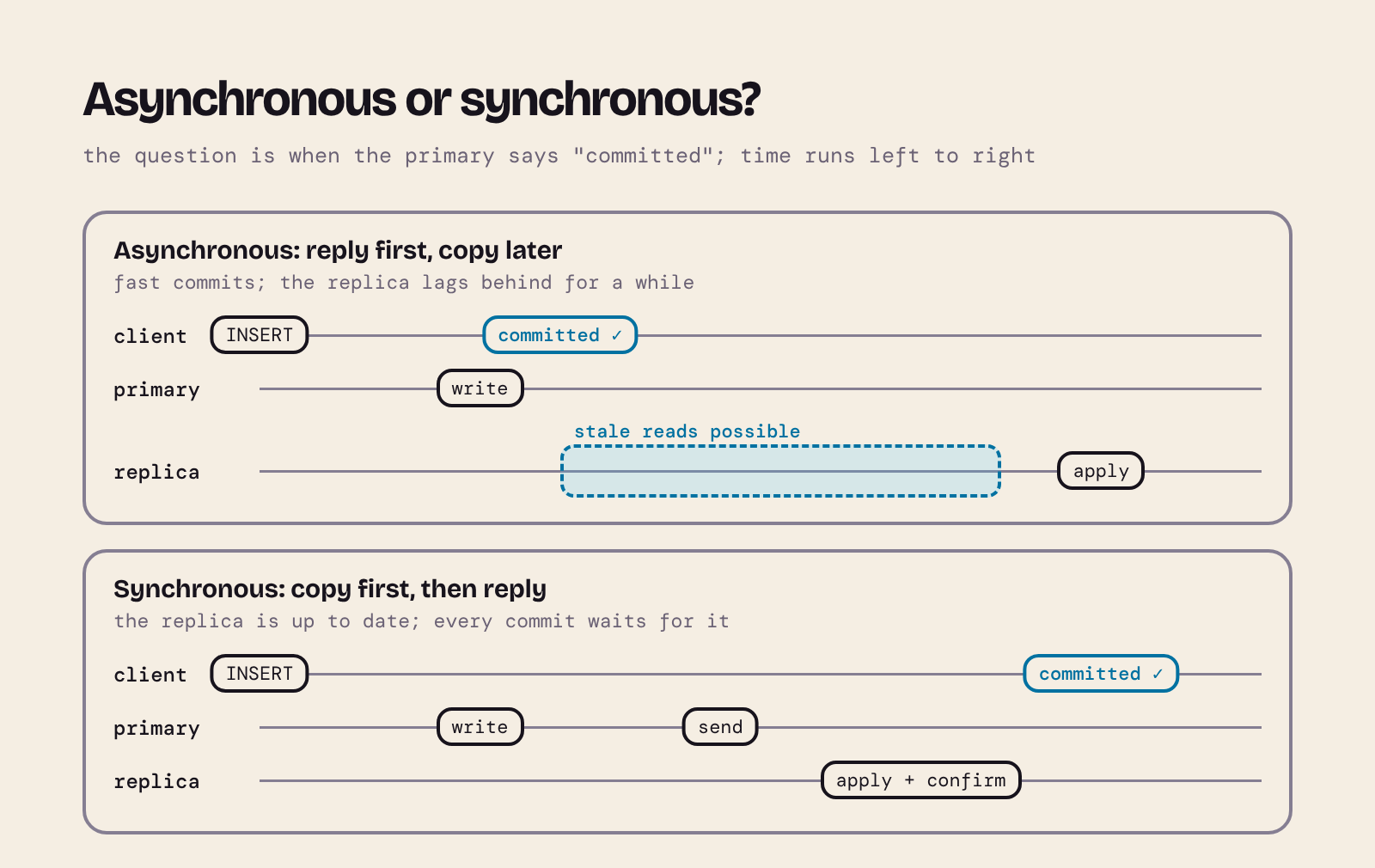
- Asynchronous: the primary commits and replies straight away; the replica catches up a moment later. Fast, but for that moment the replica is behind (replication lag), and if the primary dies, its last few commits may never reach the replica.
- Synchronous: the primary waits until the replica confirms before it tells the client "committed". Nothing confirmed is lost, but every commit waits for the network and the replica.
Let's watch both.
A PostgreSQL replica
pg_basebackup copies the running primary, and -R writes the settings that make the copy follow it as a replica. application_name gives the replica a name the primary can refer to, and --checkpoint=fast stops the backup waiting (up to a few minutes) for the primary's next scheduled checkpoint.
pg_basebackup -d "host=localhost port=5433 user=postgres application_name=replica1" -D replica -R --checkpoint=fast
pg_ctl -D replica -o "-p 5434" -l replica.log start
psql -p 5433 -c "SELECT application_name, state, sync_state FROM pg_stat_replication;"
 application_name |   state   | sync_state
------------------+-----------+------------
 replica1         | streaming | async
(1 row)
The replica already has all 30,000 observations, and it refuses writes:
psql -p 5434 -d cosmos -c "SELECT pg_is_in_recovery(), count(*) FROM observations;"
psql -p 5434 -d cosmos -c "INSERT INTO observations (observatory, observed_on, target, exposure_s)
                           VALUES ('paranal', '2026-11-18', 'Saturn', 120);"
 pg_is_in_recovery | count
-------------------+-------
 t                 | 30000
(1 row)

ERROR:  cannot execute INSERT in a read-only transaction
Seeing replication lag
On one laptop, replication takes milliseconds, too fast to see. recovery_min_apply_delay makes the replica wait 5 seconds before it applies each change, which simulates a slow or distant replica. This script writes on the primary and reads the replica straight away, then again after 6 seconds:
INSERT="INSERT INTO observations (observatory, observed_on, target, exposure_s) VALUES ('paranal', '2026-11-18', 'Saturn', 120);"
COUNT="SELECT count(*) FROM observations WHERE observed_on = '2026-11-18';"

psql -p 5434 -c "ALTER SYSTEM SET recovery_min_apply_delay = '5s';" -c "SELECT pg_reload_conf();"
psql -p 5433 -d cosmos -c "$INSERT"
echo "primary: $(psql -p 5433 -d cosmos -Atc "$COUNT")"
echo "replica now: $(psql -p 5434 -d cosmos -Atc "$COUNT")"
sleep 6
echo "replica after 6 s: $(psql -p 5434 -d cosmos -Atc "$COUNT")"
psql -p 5433 -c "SELECT application_name, sync_state, replay_lag FROM pg_stat_replication;"
primary: 28
replica now: 27
replica after 6 s: 28
 application_name | sync_state |   replay_lag
------------------+------------+-----------------
 replica1         | async      | 00:00:05.000651
(1 row)
For a few seconds, two servers holding "the same" database gave different answers. That's a stale read, and it's normal for asynchronous replicas. If your app writes on the primary and then reads from a replica (a user saves a booking, then sees the list of bookings), it may not see its own write.
Synchronous replication: safer, slower, and it can stop
Now name the replica in synchronous_standby_names, and ask for synchronous_commit = remote_apply, which means "don't confirm my commit until the replica has applied it":
psql -p 5433 -c "ALTER SYSTEM SET synchronous_standby_names = 'replica1';" -c "SELECT pg_reload_conf();"
psql -p 5433 -d cosmos -c '\timing on' -c "SET synchronous_commit = remote_apply;" -c "$INSERT"
echo "replica straight after: $(psql -p 5434 -d cosmos -Atc "$COUNT")"
INSERT 0 1
Time: 5002.953 ms (00:05.003)
replica straight after: 29
The same one-row insert now took five seconds, because the commit waited for the (artificially slow) replica. In return, the replica was up to date the moment the insert returned. (The default synchronous_commit = on waits only until the replica has safely received and stored the change, not applied it, so it's faster but still waits for the network.)
What if the replica goes away?
pg_ctl -D replica stop -m fast
timeout 5 psql -p 5433 -d cosmos -c "$INSERT" || echo "psql gave up after 5 s"
echo "primary sees: $(psql -p 5433 -d cosmos -Atc "$COUNT")"
psql gave up after 5 s
primary sees: 29
The insert never returned. The primary had written it to its own disk, but it would not tell anyone "committed", or show the row to other sessions, until a synchronous replica confirmed it. In pg_stat_activity the waiting session shows wait_event = SyncRep. When I started the replica again, the row appeared on both servers. The primary chose consistency over availability: it stopped accepting writes rather than let the two copies differ. Keep that in mind for section 7.
Put the lab back to normal before moving on:
pg_ctl -D replica -o "-p 5434" -l replica.log start
psql -p 5433 -c "ALTER SYSTEM RESET synchronous_standby_names;" -c "SELECT pg_reload_conf();"
psql -p 5434 -c "ALTER SYSTEM RESET recovery_min_apply_delay;" -c "SELECT pg_reload_conf();"
A MySQL replica
MySQL replicates from the source's binary log. With GTIDs (global transaction identifiers, switched on in start_mysql.sh) the replica keeps track of which transactions it already has, so SOURCE_AUTO_POSITION = 1 is all it needs to find its place. First an account for the replica, on the source. Save this as repl_source.sql:
-- On the source (port 3307): an account the replica uses to connect
CREATE USER 'repl'@'127.0.0.1' IDENTIFIED BY 'choose-a-password';
GRANT REPLICATION SLAVE ON *.* TO 'repl'@'127.0.0.1';
(The privilege still has its old name in MySQL 9.7.) Then the replica's side, repl_replica.sql:
-- On the replica (port 3308): follow the source and start replicating
CHANGE REPLICATION SOURCE TO
    SOURCE_HOST = '127.0.0.1',
    SOURCE_PORT = 3307,
    SOURCE_USER = 'repl',
    SOURCE_PASSWORD = 'choose-a-password',
    SOURCE_AUTO_POSITION = 1,
    GET_SOURCE_PUBLIC_KEY = 1;
START REPLICA;
GET_SOURCE_PUBLIC_KEY lets the replica log in with MySQL's default password plugin without setting up TLS, which is fine on your own machine. Because our source still has its whole binary log, the replica fetches everything from the start, including CREATE DATABASE cosmos. (For a source with a long history you'd copy the data first, for example with mysqldump or the clone plugin.)
S="mysql -h 127.0.0.1 -P 3307 -u root"
Q="mysql -h 127.0.0.1 -P 3308 -u root"
$S < repl_source.sql
$Q < repl_replica.sql
sleep 3
$Q -E -e "SHOW REPLICA STATUS" | grep -E "Replica_IO_Running:|Replica_SQL_Running:|Seconds_Behind_Source"
$Q -e "SELECT COUNT(*) FROM cosmos.observations"
$Q -e "INSERT INTO cosmos.observations (observatory, observed_on, target, exposure_s)
       VALUES ('paranal', '2026-11-18', 'Saturn', 120)"
           Replica_IO_Running: Yes
          Replica_SQL_Running: Yes
        Seconds_Behind_Source: 0
COUNT(*)
30000
ERROR 1290 (HY000) at line 1: The MySQL server is running with the --super-read-only option so it cannot execute this statement
MySQL has delayed replication built in, which shows lag in the same way:
INSERT="INSERT INTO cosmos.observations (observatory, observed_on, target, exposure_s) VALUES ('paranal', '2026-11-18', 'Saturn', 120);"
COUNT="SELECT COUNT(*) FROM cosmos.observations WHERE observed_on = '2026-11-18';"

$Q -e "STOP REPLICA; CHANGE REPLICATION SOURCE TO SOURCE_DELAY = 5; START REPLICA;"
$S -e "$INSERT"
echo "source: $($S -N -e "$COUNT")"
echo "replica now: $($Q -N -e "$COUNT")"
sleep 8
echo "replica after 8 s: $($Q -N -e "$COUNT")"
$Q -e "STOP REPLICA; CHANGE REPLICATION SOURCE TO SOURCE_DELAY = 0; START REPLICA;"
source: 28
replica now: 27
replica after 8 s: 28
MySQL's semisynchronous replication makes the opposite choice
MySQL's alternative to asynchronous replication is semisynchronous replication: the source waits until at least one replica says it has received each transaction (not applied it). It comes as a pair of plugins. The replica is read-only, so switch that off for a moment to install its plugin:
$S -e "INSTALL PLUGIN rpl_semi_sync_source SONAME 'semisync_source.so';
       SET GLOBAL rpl_semi_sync_source_enabled = ON;
       SET GLOBAL rpl_semi_sync_source_timeout = 3000;"
$Q -e "SET GLOBAL super_read_only = OFF;
       INSTALL PLUGIN rpl_semi_sync_replica SONAME 'semisync_replica.so';
       SET GLOBAL super_read_only = ON;
       SET GLOBAL rpl_semi_sync_replica_enabled = ON;
       STOP REPLICA IO_THREAD; START REPLICA IO_THREAD;"
With the replica running, an insert is quick:
$S -e "SHOW STATUS LIKE 'Rpl_semi_sync_source_status';"
time $S -e "$INSERT"
Variable_name	Value
Rpl_semi_sync_source_status	ON

real	0m0.012s
Now stop the replica and insert again:
$Q -e "STOP REPLICA;"
time $S -e "$INSERT"
$S -e "SHOW STATUS LIKE 'Rpl_semi_sync_source_status';"
echo "source: $($S -N -e "$COUNT")  replica: $($Q -N -e "$COUNT")"
real	0m3.009s
Variable_name	Value
Rpl_semi_sync_source_status	OFF
source: 30  replica: 29
The insert waited for the 3-second timeout (rpl_semi_sync_source_timeout, 10 seconds by default), then the source switched itself back to asynchronous replication and committed anyway. The two copies now differ until the replica returns:
$Q -e "START REPLICA;"
sleep 2
echo "replica: $($Q -N -e "$COUNT")"
replica: 30
MySQL chose availability over consistency here: exactly the opposite of the PostgreSQL synchronous primary above. Neither is wrong; they're different answers to the question in section 7.
6. Distributed transactions: two-phase commit
Replication copies the same data. Often one change needs to touch different data on different servers, and must happen everywhere or nowhere: that's a distributed transaction.
Our example: booking a night on the William Herschel Telescope (wht) for a university project. The university database records how many observing hours each project has left; the observatory database records bookings. A booking must take hours from the project and create the booking. If one server commits and the other doesn't, hours vanish or a free booking appears.
Each server can only make its own part atomic. Two-phase commit (2PC) adds a coordinator that runs the transaction on all the participants:
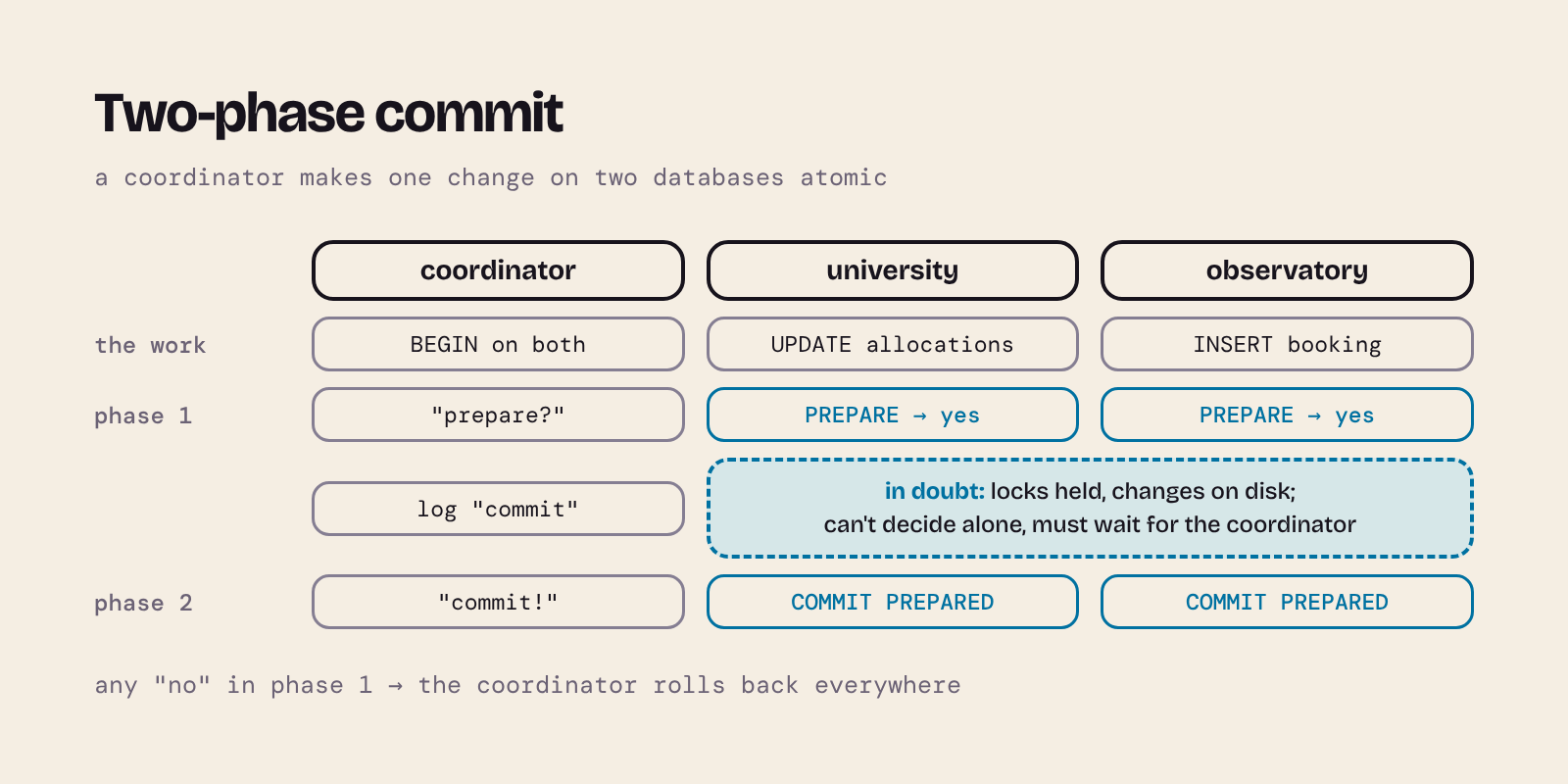
- Phase 1, prepare (voting). The coordinator asks each participant to prepare: check everything, write the changes to disk so they'd survive a crash, keep the locks, and vote yes. A participant that can't commit (a constraint fails, say) votes no.
- Phase 2, commit. If every vote was yes, the coordinator records its decision, then tells everyone to commit. If any vote was no, it tells everyone to roll back.
The key promise: once a participant has voted yes, it must be able to commit later even if it crashes and restarts, and it may not change its mind on its own. That's what makes the second phase safe, and also what makes 2PC's weak spot, as we'll see.
Here are the two databases, on the PostgreSQL primary. In real life they'd be on different servers; for the coordinator, only the connection strings would change. Save the first table as university.sql and the second as observatory.sql:
-- Run in the university database
CREATE TABLE allocations (
    project    text    PRIMARY KEY,
    hours_left numeric NOT NULL CHECK (hours_left >= 0)
);
INSERT INTO allocations VALUES ('exoplanets', 10), ('comets', 2);
-- Run in the observatory database
CREATE TABLE bookings (
    telescope text    NOT NULL,
    night     date    NOT NULL,
    project   text    NOT NULL,
    hours     numeric NOT NULL,
    PRIMARY KEY (telescope, night)
);
createdb -p 5433 university
createdb -p 5433 observatory
psql -p 5433 -d university -q -f university.sql
psql -p 5433 -d observatory -q -f observatory.sql
PostgreSQL's 2PC commands are PREPARE TRANSACTION 'id', then COMMIT PREPARED 'id' or ROLLBACK PREPARED 'id'. Here's a small coordinator in Python. Save it as two_phase_booking.py:
"""Book telescope time across two PostgreSQL databases with two-phase commit.

The university database holds each project's remaining hours; the observatory
database holds the bookings. A booking must change both or neither.
"""
import os
import sys
from decimal import Decimal

import psycopg
from psycopg import sql

PARTICIPANTS = {
    "university": "host=localhost port=5433 user=postgres dbname=university",
    "observatory": "host=localhost port=5433 user=postgres dbname=observatory",
}
DECISION_LOG = "decisions.log"


def log_decision(gid):
    """Record the commit decision durably before phase 2 starts."""
    with open(DECISION_LOG, "a") as log:
        log.write(f"{gid} commit\n")
        log.flush()
        os.fsync(log.fileno())


def committed_gids():
    try:
        with open(DECISION_LOG) as log:
            return {line.split()[0] for line in log if line.strip()}
    except FileNotFoundError:
        return set()


def book(project, telescope, night, hours, crash_at=None):
    gid = f"booking:{telescope}:{night}"  # global id; each participant adds its name
    conns = {name: psycopg.connect(dsn, autocommit=True)
             for name, dsn in PARTICIPANTS.items()}
    university, observatory = conns["university"], conns["observatory"]
    prepared = []
    try:
        # The work: an open transaction on each participant
        university.execute("BEGIN")
        updated = university.execute(
            "UPDATE allocations SET hours_left = hours_left - %s WHERE project = %s",
            (hours, project),
        ).rowcount
        if updated != 1:
            raise ValueError(f"unknown project {project!r}")
        observatory.execute("BEGIN")
        observatory.execute(
            "INSERT INTO bookings (telescope, night, project, hours) VALUES (%s, %s, %s, %s)",
            (telescope, night, project, hours),
        )

        # Phase 1: each participant prepares, which is its vote to commit
        for name, conn in conns.items():
            conn.execute(sql.SQL("PREPARE TRANSACTION {}").format(sql.Literal(f"{gid}:{name}")))
            prepared.append(name)
            print(f"phase 1: {name} voted yes")
    except (psycopg.Error, ValueError) as error:
        message = error.diag.message_primary if isinstance(error, psycopg.Error) else error
        print(f"phase 1: abort ({message})")
        for name, conn in conns.items():
            if name in prepared:
                conn.execute(sql.SQL("ROLLBACK PREPARED {}").format(sql.Literal(f"{gid}:{name}")))
            elif conn.info.transaction_status != psycopg.pq.TransactionStatus.IDLE:
                conn.execute("ROLLBACK")
        return False

    if crash_at == "before-decision":
        print("coordinator crashed after phase 1")
        os._exit(1)
    log_decision(gid)
    if crash_at == "after-decision":
        print("coordinator crashed after logging its decision")
        os._exit(1)

    # Phase 2: every participant voted yes, so commit everywhere
    for name, conn in conns.items():
        conn.execute(sql.SQL("COMMIT PREPARED {}").format(sql.Literal(f"{gid}:{name}")))
        print(f"phase 2: {name} committed")
    return True


def recover():
    """Finish transactions left prepared by a crashed coordinator."""
    decided = committed_gids()
    for name, dsn in PARTICIPANTS.items():
        with psycopg.connect(dsn, autocommit=True) as conn:
            rows = conn.execute(
                "SELECT gid FROM pg_prepared_xacts WHERE database = current_database()"
            ).fetchall()
            for (branch,) in rows:
                gid = branch.rsplit(":", 1)[0]  # drop the participant name
                action = "COMMIT PREPARED" if gid in decided else "ROLLBACK PREPARED"
                conn.execute(sql.SQL(action + " {}").format(sql.Literal(branch)))
                print(f"recovery: {action} {branch}")


if __name__ == "__main__":
    if sys.argv[1] == "recover":
        recover()
    else:
        project, telescope, night, hours = sys.argv[1:5]
        crash_at = sys.argv[5] if len(sys.argv) > 5 else None
        book(project, telescope, night, Decimal(hours), crash_at)
A few things to notice:
- The connections use
autocommit=Trueand an explicitBEGIN, so we decide when each transaction ends, withPREPARE TRANSACTIONrather thanCOMMIT. PREPARE TRANSACTIONdoesn't accept a placeholder (%s), so the id is quoted safely withsql.Literal.- Each participant gets its own id (
booking:wht:2026-12-01:university). Prepared-transaction ids must be unique per server, and here both databases share one server. My first version used the same id for both and the secondPREPAREfailed withtransaction identifier ... is already in use. MySQL's XA ids have a separate "branch" part for exactly this reason. - Before phase 2 the coordinator writes its decision to a file and
fsyncs it, so a coordinator that crashes and restarts knows what it decided. Real transaction managers keep this log too.
When every vote is yes
python two_phase_booking.py exoplanets wht 2026-12-01 4
phase 1: university voted yes
phase 1: observatory voted yes
phase 2: university committed
phase 2: observatory committed
When a participant votes no
The comets project has only 2 hours left, so asking for 3 breaks the CHECK constraint. Then a second booking for a night that's already taken breaks the observatory's primary key:
python two_phase_booking.py comets wht 2026-12-02 3
python two_phase_booking.py comets wht 2026-12-01 1
phase 1: abort (new row for relation "allocations" violates check constraint "allocations_hours_left_check")
phase 1: abort (duplicate key value violates unique constraint "bookings_pkey")
In the second case the university had already taken an hour from comets; the rollback gave it back. Both databases are unchanged: exoplanets has 6 hours, comets still 2, and there's one booking.
When the coordinator crashes
Now the interesting part. before-decision makes the coordinator die after both participants have voted yes, before it decides:
python two_phase_booking.py exoplanets wht 2026-12-03 2 before-decision
psql -p 5433 -c "SELECT gid, database, prepared FROM pg_prepared_xacts;"
phase 1: university voted yes
phase 1: observatory voted yes
coordinator crashed after phase 1
                gid                 |  database   |           prepared
------------------------------------+-------------+-------------------------------
 booking:wht:2026-12-03:university  | university  | 2026-11-18 21:46:40.92902+00
 booking:wht:2026-12-03:observatory | observatory | 2026-11-18 21:46:40.929639+00
(2 rows)
Both transactions are in doubt: prepared, but neither committed nor rolled back. The participants have promised to do whatever the coordinator decides, and the coordinator is gone. Meanwhile they keep their locks. Reading still works (you see the old value), but try to change the same row:
psql -p 5433 -d university \
  -c "SELECT * FROM allocations WHERE project = 'exoplanets';" \
  -c "SET lock_timeout = '2s';" \
  -c "UPDATE allocations SET hours_left = hours_left + 1 WHERE project = 'exoplanets';"
  project   | hours_left
------------+------------
 exoplanets |          6
(1 row)

SET
ERROR:  canceling statement due to lock timeout
CONTEXT:  while updating tuple (0,3) in relation "allocations"
Without the lock_timeout that UPDATE would wait for ever. This is why 2PC is called a blocking protocol: a coordinator failure at the wrong moment leaves participants stuck, holding locks, until the coordinator (or an administrator) comes back. Prepared transactions even survive a server restart, because they're on disk.
Recovery looks at the decision log. No decision was recorded, so the safe choice is to roll back (often called presumed abort):
python two_phase_booking.py recover
recovery: ROLLBACK PREPARED booking:wht:2026-12-03:university
recovery: ROLLBACK PREPARED booking:wht:2026-12-03:observatory
If the coordinator crashes after logging "commit", recovery must commit, even though no participant has been told yet:
python two_phase_booking.py exoplanets wht 2026-12-04 2 after-decision
python two_phase_booking.py recover
phase 1: university voted yes
phase 1: observatory voted yes
coordinator crashed after logging its decision
recovery: COMMIT PREPARED booking:wht:2026-12-04:university
recovery: COMMIT PREPARED booking:wht:2026-12-04:observatory
Everything that happened, happened on both databases:
psql -p 5433 -d university -c "SELECT * FROM allocations ORDER BY project;"
psql -p 5433 -d observatory -c "SELECT * FROM bookings ORDER BY night;"
  project   | hours_left
------------+------------
 comets     |          2
 exoplanets |          4
(2 rows)

 telescope |   night    |  project   | hours
-----------+------------+------------+-------
 wht       | 2026-12-01 | exoplanets |     4
 wht       | 2026-12-04 | exoplanets |     2
(2 rows)
exoplanets has 4 hours left (10 − 4 − 2), and there are bookings for 1 and 4 December only.
PostgreSQL's documentation is blunt:
PREPARE TRANSACTIONis meant for transaction managers, not everyday application code, and a forgotten prepared transaction holds locks and stopsVACUUMcleaning up. That's whymax_prepared_transactionsis 0 by default.
Two-phase commit in MySQL: XA transactions
MySQL implements the X/Open XA standard. An XA id has a global part and a branch qualifier, so each participant gets its own branch of the same global transaction:
| Step | MySQL | PostgreSQL |
|---|---|---|
| Start a branch | XA START 'gid', 'branch' |
BEGIN |
| Finish the work | XA END 'gid', 'branch' |
— |
| Phase 1 | XA PREPARE 'gid', 'branch' |
PREPARE TRANSACTION 'id' |
| Phase 2 | XA COMMIT 'gid', 'branch' or XA ROLLBACK … |
COMMIT PREPARED 'id' or ROLLBACK PREPARED 'id' |
| List in-doubt transactions | XA RECOVER |
SELECT * FROM pg_prepared_xacts |
The tables are the same as before. Save this as mysql_two_phase_setup.sql:
CREATE DATABASE university;
CREATE TABLE university.allocations (
    project    VARCHAR(30)  PRIMARY KEY,
    hours_left DECIMAL(6,1) NOT NULL CHECK (hours_left >= 0)
);
INSERT INTO university.allocations VALUES ('exoplanets', 10), ('comets', 2);

CREATE DATABASE observatory;
CREATE TABLE observatory.bookings (
    telescope VARCHAR(20)  NOT NULL,
    night     DATE         NOT NULL,
    project   VARCHAR(30)  NOT NULL,
    hours     DECIMAL(6,1) NOT NULL,
    PRIMARY KEY (telescope, night)
);
mysql -h 127.0.0.1 -P 3307 -u root < mysql_two_phase_setup.sql
The coordinator has the same shape; only the SQL changes. Save it as two_phase_booking_mysql.py:
"""Book telescope time across two MySQL databases with XA two-phase commit."""
import os
import re
import sys
from decimal import Decimal

import mysql.connector

PARTICIPANTS = {
    "university": dict(host="127.0.0.1", port=3307, user="root", database="university"),
    "observatory": dict(host="127.0.0.1", port=3307, user="root", database="observatory"),
}
DECISION_LOG = "decisions_mysql.log"


def xid(gid, name):
    """An XA id has two parts: the global id and a branch qualifier.

    XA statements don't accept placeholders, so only allow safe characters.
    """
    for part in (gid, name):
        if not re.fullmatch(r"[\w:-]+", part):
            raise ValueError(f"unsafe XA id part {part!r}")
    return f"'{gid}', '{name}'"


def log_decision(gid):
    with open(DECISION_LOG, "a") as log:
        log.write(f"{gid} commit\n")
        log.flush()
        os.fsync(log.fileno())


def committed_gids():
    try:
        with open(DECISION_LOG) as log:
            return {line.split()[0] for line in log if line.strip()}
    except FileNotFoundError:
        return set()


def book(project, telescope, night, hours, crash_at=None):
    gid = f"booking:{telescope}:{night}"
    conns = {name: mysql.connector.connect(**config)
             for name, config in PARTICIPANTS.items()}
    cursors = {name: conn.cursor() for name, conn in conns.items()}
    university, observatory = cursors["university"], cursors["observatory"]
    started, prepared = [], []
    try:
        university.execute(f"XA START {xid(gid, 'university')}")
        started.append("university")
        university.execute(
            "UPDATE allocations SET hours_left = hours_left - %s WHERE project = %s",
            (hours, project),
        )
        if university.rowcount != 1:
            raise ValueError(f"unknown project {project!r}")
        observatory.execute(f"XA START {xid(gid, 'observatory')}")
        started.append("observatory")
        observatory.execute(
            "INSERT INTO bookings (telescope, night, project, hours) VALUES (%s, %s, %s, %s)",
            (telescope, night, project, hours),
        )

        # Phase 1: end each branch and prepare it (the vote)
        for name, cursor in cursors.items():
            cursor.execute(f"XA END {xid(gid, name)}")
            cursor.execute(f"XA PREPARE {xid(gid, name)}")
            prepared.append(name)
            print(f"phase 1: {name} voted yes")
    except (mysql.connector.Error, ValueError) as error:
        message = error.msg if isinstance(error, mysql.connector.Error) else error
        print(f"phase 1: abort ({message})")
        for name in started:
            cursor = cursors[name]
            if name not in prepared:
                try:
                    cursor.execute(f"XA END {xid(gid, name)}")
                except mysql.connector.Error:
                    pass  # the branch may already be ended or rolled back
            try:
                cursor.execute(f"XA ROLLBACK {xid(gid, name)}")
            except mysql.connector.Error:
                pass  # MySQL may already have rolled the branch back
        return False

    if crash_at == "before-decision":
        print("coordinator crashed after phase 1")
        os._exit(1)
    log_decision(gid)
    if crash_at == "after-decision":
        print("coordinator crashed after logging its decision")
        os._exit(1)

    # Phase 2: every branch voted yes, so commit everywhere
    for name, cursor in cursors.items():
        cursor.execute(f"XA COMMIT {xid(gid, name)}")
        print(f"phase 2: {name} committed")
    return True


def recover():
    """Finish XA branches left prepared by a crashed coordinator."""
    decided = committed_gids()
    conn = mysql.connector.connect(**PARTICIPANTS["university"])
    cursor = conn.cursor()
    cursor.execute("XA RECOVER")  # lists prepared branches on this server
    for format_id, gtrid_length, bqual_length, data in cursor.fetchall():
        data = data.decode() if isinstance(data, (bytes, bytearray)) else data
        gid, name = data[:gtrid_length], data[gtrid_length:]
        action = "XA COMMIT" if gid in decided else "XA ROLLBACK"
        cursor.execute(f"{action} {xid(gid, name)}")
        print(f"recovery: {action} {gid} ({name})")


if __name__ == "__main__":
    if sys.argv[1] == "recover":
        recover()
    else:
        project, telescope, night, hours = sys.argv[1:5]
        crash_at = sys.argv[5] if len(sys.argv) > 5 else None
        book(project, telescope, night, Decimal(hours), crash_at)
The same runs give the same story:
python two_phase_booking_mysql.py exoplanets wht 2026-12-01 4
python two_phase_booking_mysql.py comets wht 2026-12-02 3
python two_phase_booking_mysql.py exoplanets wht 2026-12-03 2 before-decision
mysql -h 127.0.0.1 -P 3307 -u root -e "XA RECOVER;"
phase 1: university voted yes
phase 1: observatory voted yes
phase 2: university committed
phase 2: observatory committed
phase 1: abort (Check constraint 'allocations_chk_1' is violated.)
phase 1: university voted yes
phase 1: observatory voted yes
coordinator crashed after phase 1
formatID	gtrid_length	bqual_length	data
1	22	11	booking:wht:2026-12-03observatory
1	22	10	booking:wht:2026-12-03university
XA RECOVER shows the global id and branch run together in data; the two lengths tell you where to split them, which is what recover() does. While the branches are in doubt, the exoplanets row is locked here too:
mysql -h 127.0.0.1 -P 3307 -u root -e "SET SESSION innodb_lock_wait_timeout = 2;
  UPDATE university.allocations SET hours_left = hours_left + 1 WHERE project = 'exoplanets';"
python two_phase_booking_mysql.py recover
ERROR 1205 (HY000) at line 2: Lock wait timeout exceeded; try restarting transaction
recovery: XA ROLLBACK booking:wht:2026-12-03 (observatory)
recovery: XA ROLLBACK booking:wht:2026-12-03 (university)
Our MySQL source is still replicating, so the committed booking has reached the replica too. Replication and distributed transactions work together:
mysql -h 127.0.0.1 -P 3308 -u root --table -e "SELECT * FROM observatory.bookings;"
+-----------+------------+------------+-------+
| telescope | night      | project    | hours |
+-----------+------------+------------+-------+
| wht       | 2026-12-01 | exoplanets |   4.0 |
+-----------+------------+------------+-------+
7. CAP: what you give up when the network fails
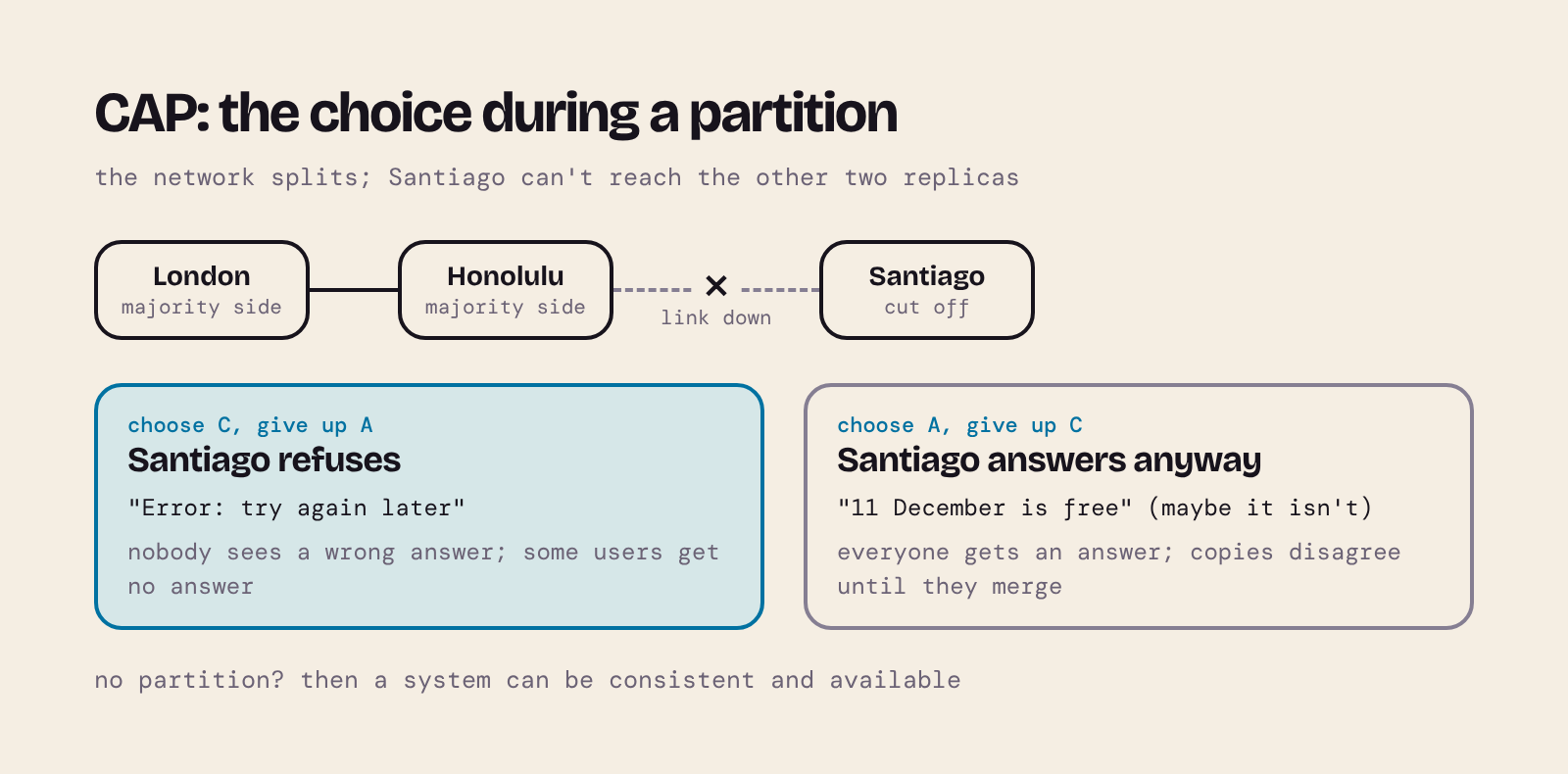
You've now seen both servers make a choice when a replica disappeared. PostgreSQL's synchronous primary stopped answering rather than let the copies differ. MySQL's semisynchronous source kept answering and let them differ for a while. Brewer's CAP theorem says that, when the network fails, every distributed system has to make one of these two choices.
| Letter | Property | Precisely |
|---|---|---|
| C | Consistency | Every read sees the most recent write, as if there were a single up-to-date copy of the data. |
| A | Availability | Every request to a working node gets a (non-error) response. |
| P | Partition tolerance | The system keeps working when the network splits the nodes into groups that can't talk to each other. |
Eric Brewer proposed this in 2000, and Seth Gilbert and Nancy Lynch proved it in 2002 for these precise definitions. It's usually summarised as "pick two of three", which Brewer himself later called misleading:
- Partitions aren't optional. Networks fail: cables are cut, routers crash, a data centre loses its link. A distributed system can't decide not to have partitions, so "CA" isn't a real option once there's more than one node.
- The choice only arises during a partition. When the network is fine, a system can be both consistent and available. When it splits, a node that can't reach the others must either refuse to answer (keep C, lose A) or answer with what it has (keep A, risk losing C).
- It isn't all or nothing. A system can choose differently for different operations or data, for example consistent for payments and available for "likes".
Two kinds of "consistency"
Be careful with the word. The C in CAP is a strong, single-copy kind: every read sees the latest write, everywhere, at once (formally, linearisability). It's not the same as the C in ACID, which means a transaction takes the database from one valid state to another, respecting its constraints. Brewer notes that CAP's C is narrower than ACID's.
Systems that choose availability usually promise eventual consistency instead: if writes stop, all the copies eventually converge to the same value. That's a much weaker guarantee, and it's what you get when you give up CAP's C, not a version of it. So an eventually consistent system doesn't "have all three"; it has chosen A. The acronym BASE (basically available, soft state, eventually consistent) is often used for this style, in contrast with ACID.
A CAP simulation
The servers above show the trade-off, but a short simulation lets you see both choices side by side. Three replicas of a telescope's booking calendar sit in London, Honolulu and Santiago. Then Santiago is cut off.
- In CP mode a replica only answers if it can reach a majority of replicas (2 of 3). London and Honolulu together are a majority and carry on; Santiago, alone, refuses.
- In AP mode every replica answers from its own copy. When the network heals, the replicas merge and have to sort out any conflicts.
Save this as cap_simulation.py:
"""A toy model of CAP: three replicas of a telescope's booking calendar.

When the network splits, a CP system only lets the majority side answer,
so the minority side is unavailable. An AP system lets every replica answer,
so the two sides can disagree until the split heals and they merge.
"""
from itertools import count

clock = count(1)  # a simple logical clock to order writes


class Replica:
    def __init__(self, name):
        self.name = name
        self.bookings = {}  # night -> (project, timestamp)


class Cluster:
    def __init__(self, mode):
        self.mode = mode  # "CP" or "AP"
        self.replicas = {name: Replica(name) for name in ("london", "honolulu", "santiago")}
        self.groups = [set(self.replicas)]  # replicas that can reach each other

    def split(self, *isolated):
        self.groups = [set(self.replicas) - set(isolated), set(isolated)]

    def heal(self):
        self.groups = [set(self.replicas)]
        self.merge()

    def reachable(self, name):
        return next(group for group in self.groups if name in group)

    def has_majority(self, name):
        return len(self.reachable(name)) > len(self.replicas) / 2

    def book(self, at, night, project):
        if self.mode == "CP" and not self.has_majority(at):
            return f"{at}: ERROR, can't reach a majority; try again later"
        here = self.replicas[at]
        if night in here.bookings:
            return f"{at}: refused, {night} is already booked by {here.bookings[night][0]}"
        stamp = next(clock)
        for name in self.reachable(at):  # write to every replica we can reach
            self.replicas[name].bookings[night] = (project, stamp)
        return f"{at}: booked {night} for {project}"

    def read(self, at, night):
        if self.mode == "CP" and not self.has_majority(at):
            return f"{at}: ERROR, can't reach a majority"
        project = self.replicas[at].bookings.get(night, ("free",))[0]
        return f"{at}: {night} -> {project}"

    def merge(self):
        """After the split: keep the earliest booking for each night, report the rest."""
        nights = {night for r in self.replicas.values() for night in r.bookings}
        for night in sorted(nights):
            versions = {r.bookings[night] for r in self.replicas.values() if night in r.bookings}
            winner = min(versions, key=lambda version: version[1])
            for loser in versions - {winner}:
                print(f"  merge: {night} double-booked; {loser[0]} must be moved "
                      f"({winner[0]} booked first)")
            for replica in self.replicas.values():
                replica.bookings[night] = winner


def run(mode):
    print(f"--- {mode} ---")
    cluster = Cluster(mode)
    print(cluster.book("london", "2026-12-10", "exoplanets"))
    cluster.split("santiago")  # Santiago loses its link to the others
    print(cluster.book("london", "2026-12-11", "exoplanets"))
    print(cluster.book("santiago", "2026-12-11", "comets"))
    print(cluster.read("santiago", "2026-12-11"))
    print(cluster.read("honolulu", "2026-12-11"))
    cluster.heal()
    print(cluster.read("santiago", "2026-12-11"))


if __name__ == "__main__":
    run("CP")
    run("AP")
python cap_simulation.py
--- CP ---
london: booked 2026-12-10 for exoplanets
london: booked 2026-12-11 for exoplanets
santiago: ERROR, can't reach a majority; try again later
santiago: ERROR, can't reach a majority
honolulu: 2026-12-11 -> exoplanets
santiago: 2026-12-11 -> exoplanets
--- AP ---
london: booked 2026-12-10 for exoplanets
london: booked 2026-12-11 for exoplanets
santiago: booked 2026-12-11 for comets
santiago: 2026-12-11 -> comets
honolulu: 2026-12-11 -> exoplanets
  merge: 2026-12-11 double-booked; comets must be moved (exoplanets booked first)
santiago: 2026-12-11 -> exoplanets
In CP mode, Santiago's users got errors for as long as the split lasted, but nobody ever saw a wrong answer. In AP mode, everyone got an answer, but Santiago and Honolulu disagreed about 11 December, the telescope was double-booked, and after the merge someone had to be told their booking was moved. Brewer's article calls this step compensation, and gives the same kind of example: an airline that overbooks during a partition and sorts it out afterwards.
Which is right depends on the cost of each failure. A bank balance or the last seat on a flight usually wants C: an error is better than money that doesn't exist. A social media feed or a shopping basket usually wants A: a slightly stale page is better than no page.
This is a toy. Real CP systems agree on a majority with consensus protocols such as Raft or Paxos, and real AP systems use smarter merges such as version vectors and CRDTs (data types designed to merge without conflicts). The trade-off they're managing is exactly the one above.
Beyond CAP: latency
CAP only talks about what happens during a partition, which is rare. Daniel Abadi pointed out that the trade-off you live with every day is between consistency and latency. His PACELC says: if there's a Partition, choose A or C; Else, choose Latency or Consistency. You saw the "else" half in section 5: with no failure at all, waiting for the replica made each commit slower (five seconds with our artificial delay), and not waiting made reads from the replica stale.
8. Looking ahead: key/value data and MapReduce
Distributing a relational database is hard because rows are connected: foreign keys, joins and transactions all cross partition boundaries. One response is to simplify the data. A key/value store keeps just a key and a value, like a Python dictionary. Rows are independent, so they can be partitioned by key (horizontally, by hash or range) and spread over as many machines as you like.
MapReduce, described by Jeffrey Dean and Sanjay Ghemawat at Google in 2004, processes such data in two steps: a map function runs where the data is stored and turns each record into new key/value pairs (for example ("jupiter", 1) for every word in a text), and a reduce function gathers all the values for each key and combines them (adding up the ones). It's the "send the query to the data" idea from section 4, applied to a whole cluster. Part 2, MongoDB for SQL developers: document databases explained with the planets database, looks at NoSQL and document databases in depth, including MapReduce in MongoDB.
9. Check your understanding
- Your app mostly runs "all observations from one observatory in a date range". Which partition key would you choose, and why?
- Why can a hash-partitioned table prune for
observation_id = 4242but not forobservation_id BETWEEN 4000 AND 5000? - A user saves a booking (written to the primary) and the next page, which reads from an asynchronous replica, doesn't show it. What happened, and name two ways to fix it.
- In two-phase commit, why can't a participant that has voted yes simply roll back on its own if the coordinator goes quiet?
- A system replicates asynchronously and promises eventual consistency. Is it "CA", "CP" or "AP"? Explain using the definitions above.
- Section 5 showed PostgreSQL and MySQL behaving differently when a synchronous or semisynchronous replica stopped. Which is CP-like and which is AP-like?
Answers
- Partition by
observatory(list), so each query reads one partition. If tables are still big you can sub-partition each observatory by date range. The rule: partition on what your most common queries filter by. - Equal ids always hash to the same partition, but neighbouring ids are scattered across all partitions by the hash, so a range could be anywhere.
- Replication lag: the replica hadn't applied the write yet (a stale read). Fixes: read your own recent writes from the primary; use synchronous replication (for example
synchronous_commit = remote_apply) at the cost of slower commits; or wait until the replica has reached the write's position. - By voting yes it promised to commit if asked. Another participant may already have committed on the coordinator's instruction, so rolling back alone could break atomicity. It has to wait for the decision: that's why 2PC blocks.
- AP. During a partition it keeps answering from each copy, so it's available, but reads can be stale, so it isn't consistent in CAP's sense. Eventual consistency is the weaker promise it makes instead.
- PostgreSQL's synchronous primary stopped confirming writes rather than let the copies differ: CP-like. MySQL's semisynchronous source timed out and carried on asynchronously: AP-like.
10. Further reading and sources
- Brewer, E. (2012) "CAP twelve years later: How the 'rules' have changed", Computer, 45(2), pp. 23–29. Free reprint on InfoQ. The best short read on this topic.
- Gilbert, S. and Lynch, N. (2002) "Brewer's conjecture and the feasibility of consistent, available, partition-tolerant web services", ACM SIGACT News, 33(2). ACM Digital Library (free access).
- Abadi, D. J. (2012) "Consistency tradeoffs in modern distributed database system design: CAP is only part of the story", Computer, 45(2), pp. 37–42. Author's PDF.
- Dean, J. and Ghemawat, S. (2004) "MapReduce: Simplified data processing on large clusters", OSDI 2004. Google Research. Their 2010 follow-up, "MapReduce: a flexible data processing tool" (Communications of the ACM, 53(1)), answers its critics.
- Date, C. J. (1987) "Twelve rules for a distributed database", Computerworld.
- Kleppmann, M. and Riccomini, C. (2026) Designing Data-Intensive Applications, 2nd edn. O'Reilly. Chapters on replication, sharding, transactions and consistency go much further than this post.
- PostgreSQL 18 documentation: Table partitioning, Log-shipping standby servers, Replication settings, PREPARE TRANSACTION.
- MySQL 9.7 Reference Manual: Partitioning, Replication with GTIDs, Delayed replication, Semisynchronous replication, XA transactions.
Related posts on this blog: Exploring the Cosmos (the planets database that inspired this post's example), Mastering Database Normalisation, Install MySQL on OSX Using Homebrew and Django, Docker, and PostgreSQL (running PostgreSQL in a container).
Next in this series: part 2, MongoDB for SQL developers: document databases explained with the planets database.
This is my own tutor material, not official University of London course material.
About the author
- Head of eLearning at the University of Cambridge Language Centre, full-stack developer and AI engineer, and online tutor on the BSc Computer Science from Goldsmiths, University of London, on Coursera. I started out in neuroscience research before moving into web development, and have spent over twenty years building digital learning at Cambridge. This blog is my supplementary material for students on the BSc: set-up guides, explanations of the ideas that trip people up, and worked examples. New here? Click Website above for my Start here page and module guides.
Comments
Join the discussionNo comments yet. Be the first to comment.
Databases and Advanced Data Techniques (CM3010)
University of London - Module Specifications for CM3010 - Databases and Advanced Data Techniques