
MongoDB for SQL developers: document databases explained with the planets database

If you've learnt databases the relational way, with tables, primary and foreign keys, normalisation, joins and transactions, MongoDB can feel like someone has taken the rules away. There's no CREATE TABLE, a misspelt field name is accepted without complaint, and the advice is to copy data rather than normalise it. This tutorial explains what a document database gives you in return, where it's better than a relational database, where it's worse, and the habits from SQL that will trip you up.
We'll take one small, familiar database, the planets and moons from my post Exploring the Cosmos, and build it twice: once in MySQL and once in MongoDB. We'll ask both the same questions and compare the answers, the queries and the design decisions along the way, then finish with what each model is good at.
This is part 2 of two posts on distributed and NoSQL databases. Part 1, Distributed databases: partitioning, replication and CAP, explains why spreading a database over many machines is hard. You don't need to read it first, but section 1 picks up where it left off.
Tested with MongoDB Community Server 9.0.8, mongosh 2.14.2 and MySQL 9.7.4 LTS on Linux, 19 November 2026. Every command and every output below comes from that run.
Contents
- Why NoSQL?
- Four families of NoSQL database
- Documents and JSON
- Setting up MongoDB
- From SQL to MongoDB: a phrasebook
- The planets database in MySQL
- The same data as documents: embed or reference?
- The two questions in MongoDB
- Reading and writing documents
- Surprises for SQL developers
- Indexes and
explain() - Schema validation: rules when you want them
- Transactions: ACID in MongoDB
- MapReduce then and now (and Hadoop)
- Scaling out: replica sets and sharding
- MySQL can store documents too
- Strengths, weaknesses and choosing
- Check your understanding
- Further reading and sources
1. Why NoSQL?
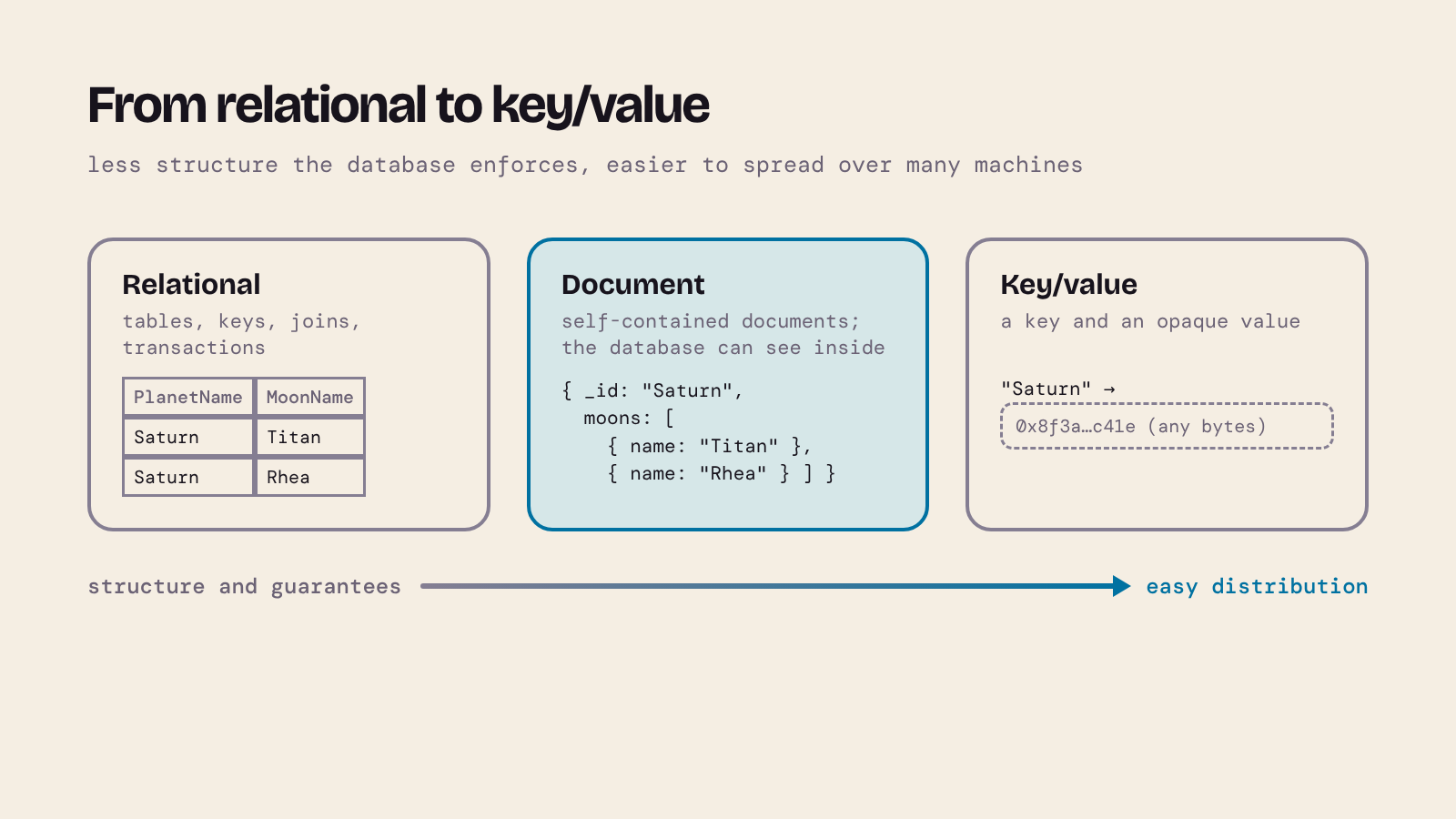
A relational database is built on one generic structure, the table, and on strong guarantees: a schema, keys, foreign keys and transactions. Those guarantees are what make it so dependable, and they're also what make it hard to spread over many machines. In part 1 we saw why: a join or a foreign key check may need rows that live on another server, and a transaction that touches two servers needs a coordinator and two-phase commit.
One response is to simplify the data. At the far end is a key/value store: just a key and a value that the database treats as an opaque blob. Every pair is independent of every other, so you can split them across as many machines as you like.
Document databases sit in the middle. Like a key/value store, each document stands on its own and is fetched by its key. Unlike a key/value store, the database understands what's inside: a document can have nested objects and lists, and you can query, index and update any field in it. You give up joins as the default way of working and some of the guarantees, and in exchange the data is easier to distribute and often closer to the objects in your program.
"NoSQL" doesn't mean "no SQL is allowed". The usual reading today is "not only SQL": a family of databases that don't use the relational model as their main way of storing data.
2. Four families of NoSQL database
| Family | Stores | Good for | Example |
|---|---|---|---|
| Key/value | a value looked up by its key | caches, sessions, settings, anything fetched by an id | Redis, Amazon DynamoDB |
| Document | self-contained documents (JSON-like) in collections | records with nested or varied structure, read as a whole | MongoDB, CouchDB |
| Wide-column | rows with many, sparse, grouped columns, spread by a partition key | huge write-heavy data sets, such as sensor readings or event logs | Apache Cassandra, HBase |
| Graph | nodes and the relationships between them | data that is relationships: networks, recommendations, routes | Neo4j |
The rest of this post is about document databases, using MongoDB. Many of the ideas carry over to the others.
3. Documents and JSON
A document looks like a JSON object: names and values, where a value can be a number, a string, true/false, null, a list (array) or another object. Here is a moon:
{ "name": "Titan", "liquidWater": "Yes" }
JSON (JavaScript Object Notation) is a text format for exchanging data, defined in RFC 8259 and ECMA-404. It looks like a JavaScript object literal, but it's stricter, and the differences matter as soon as you write JSON by hand:
- names (keys) must be in double quotes:
"name", notnameor'name'; - strings must be in double quotes too;
- no trailing comma after the last item;
- no comments;
- no variables, functions or references: one JSON document can't point at another by name.
You can check this in mongosh, MongoDB's shell (we'll install it in section 4), because it's a JavaScript environment with JSON.parse() built in. The first line is valid JSON; each of the others breaks one rule:
JSON.parse('{ "name": "Titan", "liquidWater": "Yes" }')
JSON.parse('{ name: "Titan" }')
JSON.parse("{ 'name': 'Titan' }")
JSON.parse('{ "name": "Titan", }')
JSON.parse('{ "name": "Titan" /* largest moon of Saturn */ }')
Output:
{ name: 'Titan', liquidWater: 'Yes' }
Uncaught:
SyntaxError: Expected property name or '}' in JSON at position 2 (line 1 column 3)
Uncaught:
SyntaxError: Expected property name or '}' in JSON at position 2 (line 1 column 3)
Uncaught:
SyntaxError: Expected double-quoted property name in JSON at position 19 (line 1 column 20)
Uncaught:
SyntaxError: Expected ',' or '}' after property value in JSON at position 18 (line 1 column 19)
The unquoted name, the single quotes, the trailing comma and the comment are all rejected. (In mongosh itself you may type keys without quotes, because mongosh commands are JavaScript, not JSON. That's why most MongoDB examples, including the ones below, don't quote the keys.)
Another quick check, if you have Python: python3 -m json.tool planets.json prints the file nicely or tells you where it breaks.
MongoDB doesn't actually store text. It stores BSON (binary JSON), which adds types JSON doesn't have, such as dates, 64-bit integers, decimals and ObjectId, the 12-byte identifier MongoDB creates when you don't give a document an _id of your own.
4. Setting up MongoDB
You need two programs: the server, mongod, and the shell, mongosh.
- macOS:
brew tap mongodb/brewthenbrew install mongodb-community(it installs mongosh as well). On 19 November 2026 the tap installs MongoDB 9.0.8. - Linux: add MongoDB's package repository and install
mongodb-org, following the installation guide for your distribution. - Windows: the MSI installer from the MongoDB Community Server download page; install mongosh separately.
I used the official Linux download (the .tgz archive) for MongoDB 9.0.8 and mongosh 2.14.2 from npm. MongoDB Community Server is free to use; its licence is MongoDB's Server Side Public License (SSPL), which isn't an OSI-approved open-source licence. That only matters if you plan to offer MongoDB itself as a service.
For MySQL I used MySQL 9.7.4 LTS; anything from 8.0 on runs the SQL in this post. My post Install MySQL on OSX Using Homebrew covers the Mac.
Start a one-member replica set
Section 13 uses multi-document transactions, and MongoDB only allows those on a replica set (a group of servers that keep copies of the same data; more in section 15). A replica set with one member is enough for learning, so we'll start the server that way from the beginning. In one terminal:
mkdir -p mongo-lab/data
mongod --dbpath mongo-lab/data --replSet rs0 --bind_ip 127.0.0.1
Leave it running. If you installed with Homebrew and started it with brew services start mongodb-community, stop that first (brew services stop mongodb-community): it runs a standalone server on the same port.
In a second terminal, open the shell with mongosh and turn the server into a replica set, once:
rs.initiate()
Output (your timestamps will differ):
{
  info2: 'no configuration specified. Using a default configuration for the set',
  me: '127.0.0.1:27017',
  ok: 1,
  '$clusterTime': {
    clusterTime: Timestamp({ t: 1795057422, i: 1 }),
    signature: {
      hash: Binary.createFromBase64('AAAAAAAAAAAAAAAAAAAAAAAAAAA=', 0),
      keyId: Long('0')
    }
  },
  operationTime: Timestamp({ t: 1795057422, i: 1 })
}
The prompt changes to rs0 [direct: primary] test>: you're connected to the primary of replica set rs0, using a database called test. Next time, start mongod with the same command and skip rs.initiate().
Local learning only. This server has no users or passwords and only listens on your own machine (
127.0.0.1). Never run a real server like this.
5. From SQL to MongoDB: a phrasebook
| SQL | MongoDB | Note |
|---|---|---|
| database | database | use solar_embedded switches to it (and creates it on first write) |
| table | collection | created automatically the first time you insert |
| row | document | can contain nested objects and arrays |
| column | field | documents in one collection may have different fields |
| primary key | _id |
every document has one; MongoDB makes an ObjectId if you don't |
| foreign key | a reference (a field holding another document's _id) |
not checked by the database |
JOIN |
embedding, or $lookup in an aggregation |
|
WHERE |
the filter document in find() |
{ diameter: { $gt: 12000 } } |
SELECT col1, col2 |
the projection in find() |
{ diameter: 1 } |
GROUP BY and aggregates |
$group in an aggregation pipeline |
|
UNIQUE |
a unique index | |
CREATE TABLE |
nothing, or schema validation if you want rules | section 12 |
| transaction | transaction | needs a replica set; section 13 |
6. The planets database in MySQL
Here's the relational version. It's the Exploring the Cosmos database with two additions: each planet now has its diameter, and Moons.PlanetName is a real foreign key. Planet figures are rounded from NASA's Planetary Fact Sheet: diameter in km, length of day in hours, length of year in Earth days. The moons are a selection, not all of them (Saturn alone has 274 according to the fact sheet), and HasLiquidWater records whether a moon has liquid water: Yes (an ocean is confirmed or very likely), Suspected, No or Unknown, as explained in that post.
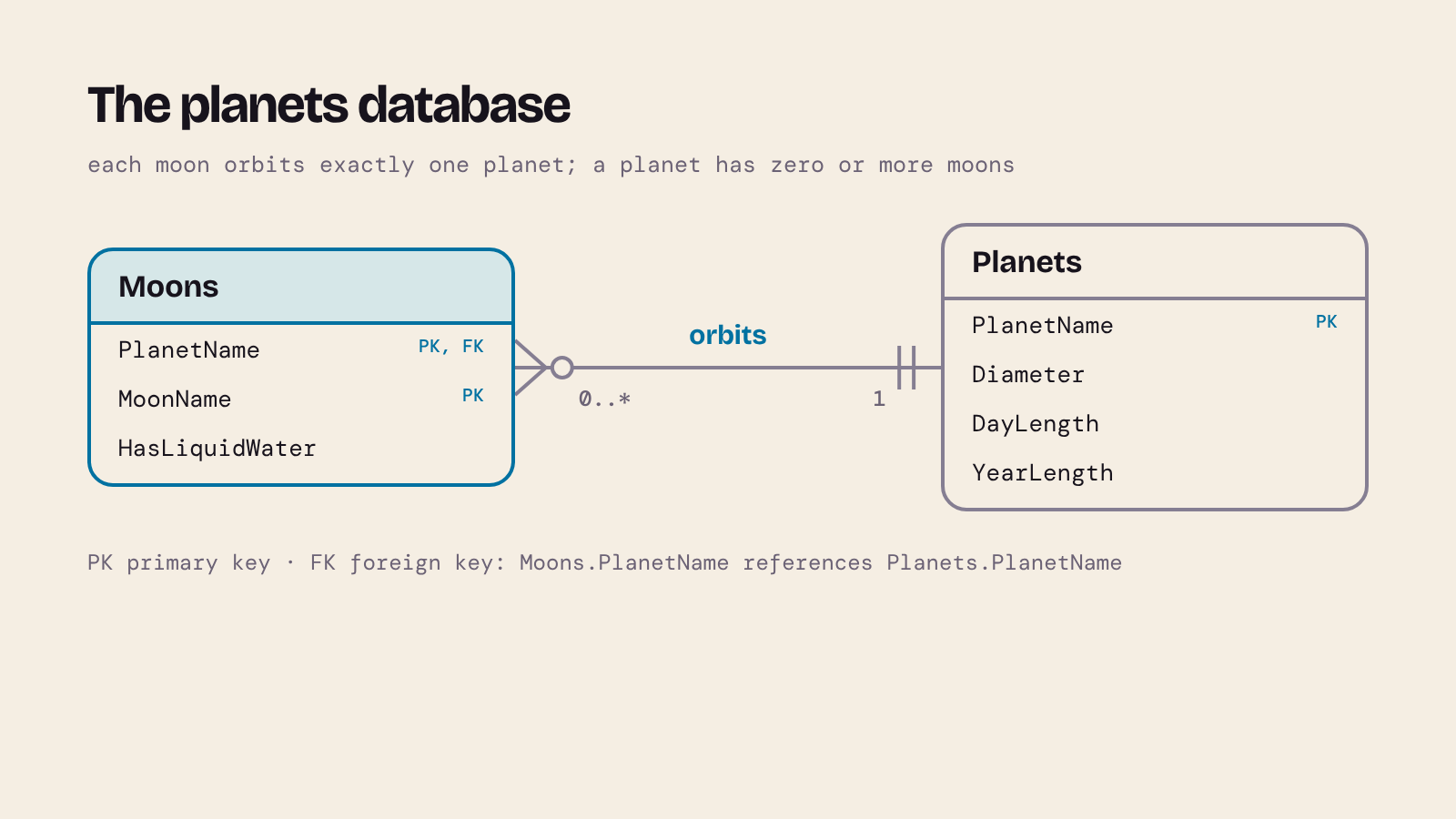
Save this as planets.sql and run it with mysql -u root -p < planets.sql:
-- The planets database in MySQL
-- Planet figures: NASA Planetary Fact Sheet (diameter in km,
-- length of day in hours, orbital period in Earth days), rounded.
DROP DATABASE IF EXISTS Astronomy;
CREATE DATABASE Astronomy;
USE Astronomy;

CREATE TABLE Planets (
    PlanetName VARCHAR(25) PRIMARY KEY,
    Diameter   INT NOT NULL,
    DayLength  INT NOT NULL,
    YearLength INT NOT NULL
);

CREATE TABLE Moons (
    PlanetName     VARCHAR(25)  NOT NULL,
    MoonName       VARCHAR(100) NOT NULL,
    HasLiquidWater ENUM('Yes', 'No', 'Unknown', 'Suspected') NOT NULL,
    PRIMARY KEY (PlanetName, MoonName),
    FOREIGN KEY (PlanetName) REFERENCES Planets (PlanetName)
);

INSERT INTO Planets (PlanetName, Diameter, DayLength, YearLength) VALUES
    ('Mercury',   4879, 4223,    88),
    ('Venus',    12104, 2802,   225),
    ('Earth',    12756,   24,   365),
    ('Mars',      6792,   25,   687),
    ('Jupiter', 142984,   10,  4331),
    ('Saturn',  120536,   11, 10747),
    ('Uranus',   51118,   17, 30589),
    ('Neptune',  49528,   16, 59800);

INSERT INTO Moons (PlanetName, MoonName, HasLiquidWater) VALUES
    ('Earth',   'Moon',      'No'),
    ('Mars',    'Phobos',    'No'),
    ('Mars',    'Deimos',    'No'),
    ('Jupiter', 'Io',        'No'),
    ('Jupiter', 'Europa',    'Yes'),
    ('Jupiter', 'Ganymede',  'Yes'),
    ('Jupiter', 'Callisto',  'Suspected'),
    ('Saturn',  'Titan',     'Yes'),
    ('Saturn',  'Enceladus', 'Yes'),
    ('Saturn',  'Rhea',      'Unknown'),
    ('Saturn',  'Iapetus',   'Unknown'),
    ('Saturn',  'Dione',     'Suspected'),
    ('Uranus',  'Titania',   'Suspected'),
    ('Uranus',  'Oberon',    'Suspected'),
    ('Uranus',  'Umbriel',   'Suspected'),
    ('Uranus',  'Ariel',     'Suspected'),
    ('Neptune', 'Triton',    'Suspected'),
    ('Neptune', 'Nereid',    'Unknown'),
    ('Neptune', 'Proteus',   'Unknown'),
    ('Neptune', 'Larissa',   'Unknown');
Two questions we'll ask in both databases:
- Which moons have, or may have, liquid water, and how long is a day on their planet?
- How many moons does each planet have in our data, including planets with none?
Connect with mysql -u root -p Astronomy to try them. In SQL the first is a join and the second is a LEFT JOIN with GROUP BY:
SELECT m.MoonName, m.PlanetName, p.DayLength, m.HasLiquidWater
FROM Moons AS m
JOIN Planets AS p ON p.PlanetName = m.PlanetName
WHERE m.HasLiquidWater IN ('Yes', 'Suspected')
ORDER BY p.DayLength, m.MoonName;
+-----------+------------+-----------+----------------+
| MoonName  | PlanetName | DayLength | HasLiquidWater |
+-----------+------------+-----------+----------------+
| Callisto  | Jupiter    |        10 | Suspected      |
| Europa    | Jupiter    |        10 | Yes            |
| Ganymede  | Jupiter    |        10 | Yes            |
| Dione     | Saturn     |        11 | Suspected      |
| Enceladus | Saturn     |        11 | Yes            |
| Titan     | Saturn     |        11 | Yes            |
| Triton    | Neptune    |        16 | Suspected      |
| Ariel     | Uranus     |        17 | Suspected      |
| Oberon    | Uranus     |        17 | Suspected      |
| Titania   | Uranus     |        17 | Suspected      |
| Umbriel   | Uranus     |        17 | Suspected      |
+-----------+------------+-----------+----------------+
11 rows in set
SELECT p.PlanetName, COUNT(m.MoonName) AS MoonCount
FROM Planets AS p
LEFT JOIN Moons AS m ON m.PlanetName = p.PlanetName
GROUP BY p.PlanetName
ORDER BY MoonCount DESC, p.PlanetName;
+------------+-----------+
| PlanetName | MoonCount |
+------------+-----------+
| Saturn     |         5 |
| Jupiter    |         4 |
| Neptune    |         4 |
| Uranus     |         4 |
| Mars       |         2 |
| Earth      |         1 |
| Mercury    |         0 |
| Venus      |         0 |
+------------+-----------+
8 rows in set
Notice the LEFT JOIN and COUNT(m.MoonName) in the second query: an inner join, or COUNT(*), would quietly lose or miscount Mercury and Venus. Keep that in mind for section 8.
7. The same data as documents: embed or reference?
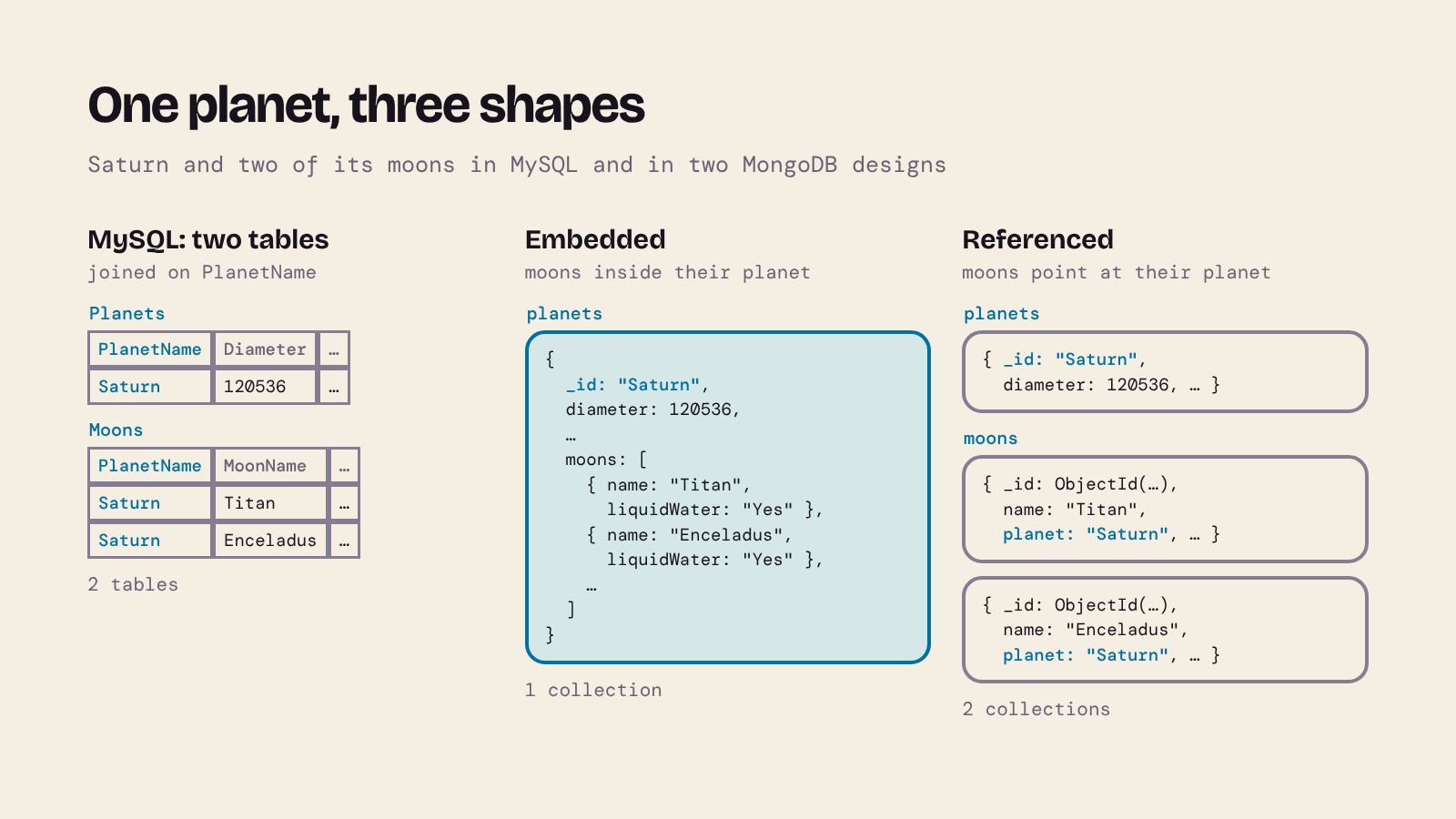
In a relational design there's usually one right answer: normalise, one table per entity, and join when you query. In a document database the big design decision is what goes inside what. For each relationship you either:
- embed the related data inside the parent document (Saturn's moons in an array inside Saturn), or
- reference it: keep it in its own collection and store the parent's
_idin it, much like a foreign key.
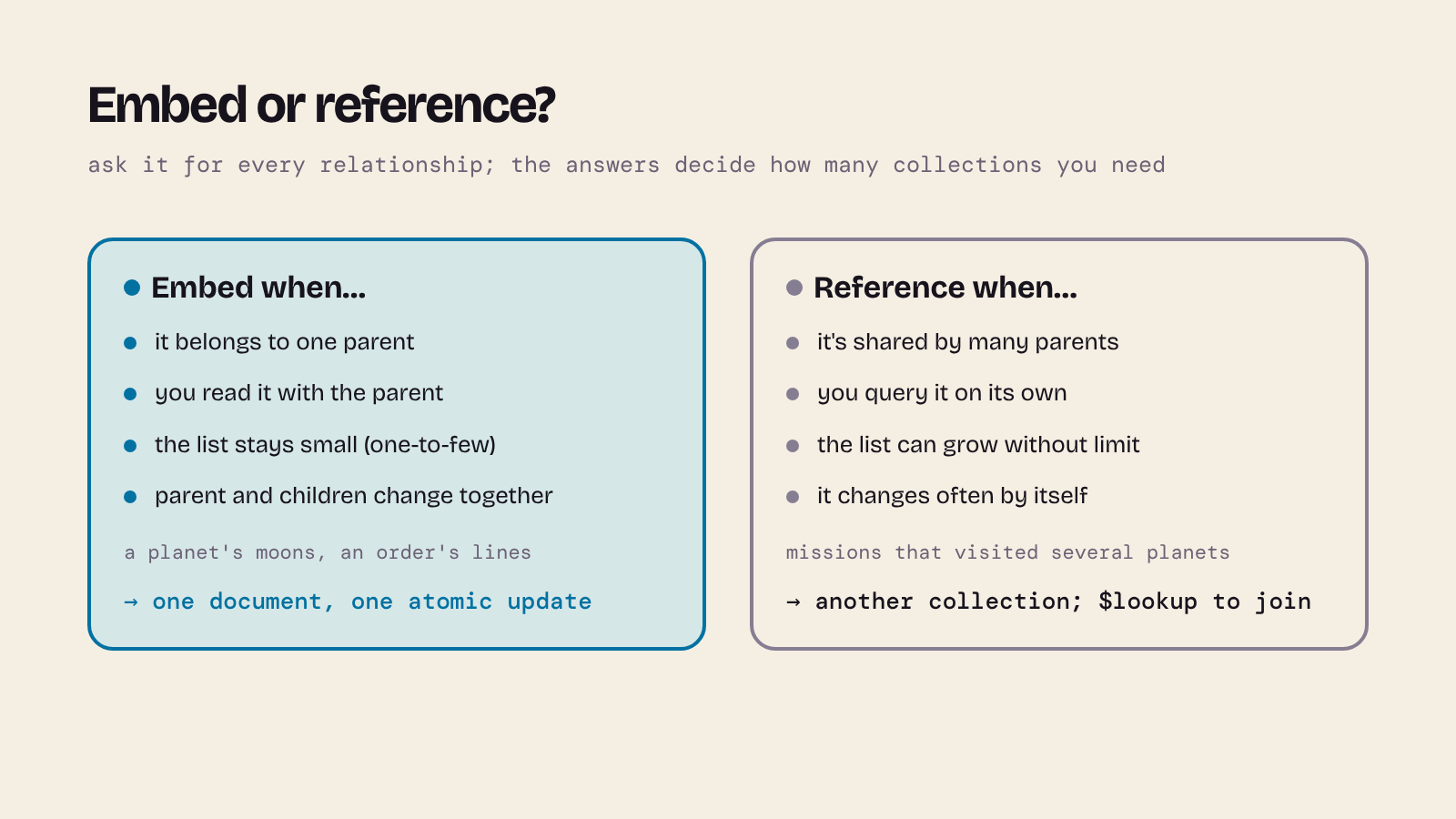
Rules of thumb:
| Embed when… | Reference when… |
|---|---|
| the child belongs to exactly one parent (a moon orbits one planet) | the child is shared by many parents (many-to-many, such as space missions that visited several planets) |
| you nearly always read them together | you often query the child on its own |
| the list stays small ("one-to-few") | the list can grow without limit (every observation ever made of a planet) |
| you want one atomic update of parent and children | the child is updated often and independently |
A document can't be bigger than 16 MiB, which is another reason not to embed lists that keep growing.
For the planets, both designs are reasonable, so we'll build both and compare. Embedded: one collection. Each planet document holds its moons. This file is valid JSON (keys and strings in double quotes, no trailing commas); save it as planets.json:
[
  {
    "_id": "Mercury",
    "diameter": 4879,
    "dayLength": 4223,
    "yearLength": 88,
    "moons": []
  },
  {
    "_id": "Venus",
    "diameter": 12104,
    "dayLength": 2802,
    "yearLength": 225,
    "moons": []
  },
  {
    "_id": "Earth",
    "diameter": 12756,
    "dayLength": 24,
    "yearLength": 365,
    "moons": [
      { "name": "Moon", "liquidWater": "No" }
    ]
  },
  {
    "_id": "Mars",
    "diameter": 6792,
    "dayLength": 25,
    "yearLength": 687,
    "moons": [
      { "name": "Phobos", "liquidWater": "No" },
      { "name": "Deimos", "liquidWater": "No" }
    ]
  },
  {
    "_id": "Jupiter",
    "diameter": 142984,
    "dayLength": 10,
    "yearLength": 4331,
    "moons": [
      { "name": "Io", "liquidWater": "No" },
      { "name": "Europa", "liquidWater": "Yes" },
      { "name": "Ganymede", "liquidWater": "Yes" },
      { "name": "Callisto", "liquidWater": "Suspected" }
    ]
  },
  {
    "_id": "Saturn",
    "diameter": 120536,
    "dayLength": 11,
    "yearLength": 10747,
    "moons": [
      { "name": "Titan", "liquidWater": "Yes" },
      { "name": "Enceladus", "liquidWater": "Yes" },
      { "name": "Rhea", "liquidWater": "Unknown" },
      { "name": "Iapetus", "liquidWater": "Unknown" },
      { "name": "Dione", "liquidWater": "Suspected" }
    ]
  },
  {
    "_id": "Uranus",
    "diameter": 51118,
    "dayLength": 17,
    "yearLength": 30589,
    "moons": [
      { "name": "Titania", "liquidWater": "Suspected" },
      { "name": "Oberon", "liquidWater": "Suspected" },
      { "name": "Umbriel", "liquidWater": "Suspected" },
      { "name": "Ariel", "liquidWater": "Suspected" }
    ]
  },
  {
    "_id": "Neptune",
    "diameter": 49528,
    "dayLength": 16,
    "yearLength": 59800,
    "moons": [
      { "name": "Triton", "liquidWater": "Suspected" },
      { "name": "Nereid", "liquidWater": "Unknown" },
      { "name": "Proteus", "liquidWater": "Unknown" },
      { "name": "Larissa", "liquidWater": "Unknown" }
    ]
  }
]
I used the planet's name as _id, as the SQL table uses PlanetName as its primary key. Field names follow MongoDB's usual camelCase style. A planet with no moons gets an empty array rather than no moons field, so every document has the same shape; MongoDB wouldn't insist on that, but your queries will be simpler.
Start mongosh in the folder where you saved planets.json, then load it into a new database, solar_embedded:
use solar_embedded
const fs = require('fs')
const planets = JSON.parse(fs.readFileSync('planets.json', 'utf8'))
db.planets.insertMany(planets)
{
  acknowledged: true,
  insertedIds: {
    '0': 'Mercury',
    '1': 'Venus',
    '2': 'Earth',
    '3': 'Mars',
    '4': 'Jupiter',
    '5': 'Saturn',
    '6': 'Uranus',
    '7': 'Neptune'
  }
}
db.planets.findOne({ _id: "Mars" })
{
  _id: 'Mars',
  diameter: 6792,
  dayLength: 25,
  yearLength: 687,
  moons: [
    { name: 'Phobos', liquidWater: 'No' },
    { name: 'Deimos', liquidWater: 'No' }
  ]
}
There was no CREATE DATABASE and no CREATE TABLE: the database and the collection appeared when the first document was written.
Referenced: two collections. In solar_referenced the planets have no moons array, and each moon is its own document with a planet field holding its planet's _id. The same file can be reshaped as we load it:
use solar_referenced
const fs = require('fs')
const planets = JSON.parse(fs.readFileSync('planets.json', 'utf8'))
db.planets.insertMany(planets.map(({ moons, ...planet }) => planet))
db.moons.insertMany(planets.flatMap(p =>
  p.moons.map(m => ({ name: m.name, planet: p._id, liquidWater: m.liquidWater }))
))
db.moons.findOne({ name: "Phobos" })
{
  _id: ObjectId('6afe6711fc6e7b900dc53018'),
  name: 'Phobos',
  planet: 'Mars',
  liquidWater: 'No'
}
db.planets.countDocuments()
db.moons.countDocuments()
8
20
The moons didn't get an _id from us, so MongoDB made an ObjectId for each (yours will differ). This is now very close to the SQL design: planet plays the part of the foreign key. The difference, as we'll see in section 10, is that nothing checks it.
How big is a planet with its moons embedded? bsonsize() gives a document's size in bytes:
use solar_embedded
bsonsize(db.planets.findOne({ _id: "Saturn" }))
322
322 bytes, a long way from 16 MiB.
8. The two questions in MongoDB
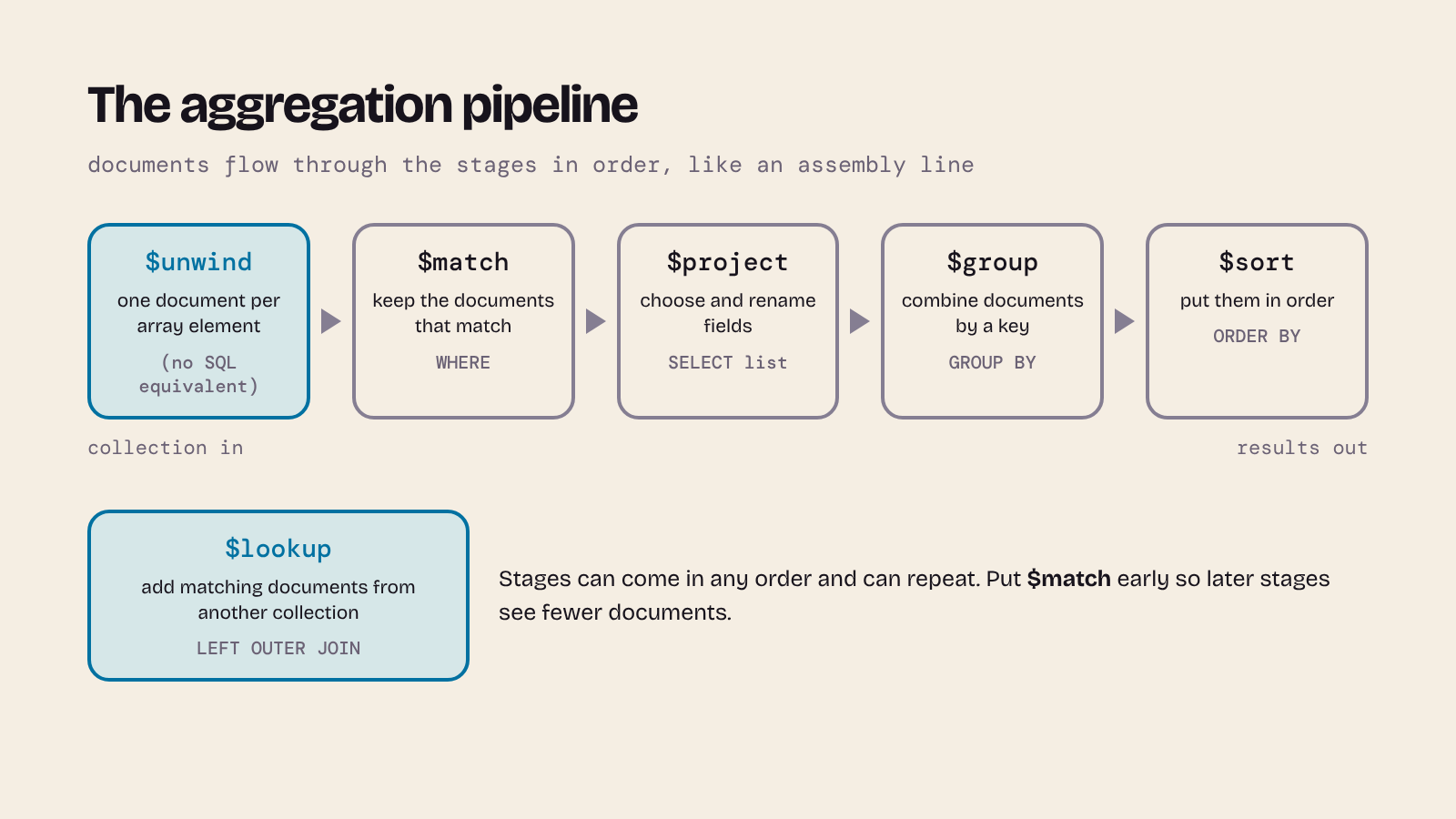
Complex queries in MongoDB are written as an aggregation pipeline: a list of stages, each taking the documents from the stage before, like an assembly line. It's the counterpart of a SELECT with joins, WHERE, GROUP BY and ORDER BY, written in the order the work happens.
Question 1: moons that have, or may have, liquid water
Embedded. The moons are inside the planets, so first $unwind the array: it turns one planet with five moons into five documents, one per moon, each carrying the planet's fields. Then filter, reshape and sort:
use solar_embedded
db.planets.aggregate([
  { $unwind: "$moons" },
  { $match: { "moons.liquidWater": { $in: ["Yes", "Suspected"] } } },
  { $project: {
      _id: 0,
      moon: "$moons.name",
      planet: "$_id",
      dayLength: "$dayLength",
      liquidWater: "$moons.liquidWater"
  } },
  { $sort: { dayLength: 1, moon: 1 } }
])
[
  {
    moon: 'Callisto',
    planet: 'Jupiter',
    dayLength: 10,
    liquidWater: 'Suspected'
  },
  {
    moon: 'Europa',
    planet: 'Jupiter',
    dayLength: 10,
    liquidWater: 'Yes'
  },
  {
    moon: 'Ganymede',
    planet: 'Jupiter',
    dayLength: 10,
    liquidWater: 'Yes'
  },
  {
    moon: 'Dione',
    planet: 'Saturn',
    dayLength: 11,
    liquidWater: 'Suspected'
  },
  {
    moon: 'Enceladus',
    planet: 'Saturn',
    dayLength: 11,
    liquidWater: 'Yes'
  },
  { moon: 'Titan', planet: 'Saturn', dayLength: 11, liquidWater: 'Yes' },
  {
    moon: 'Triton',
    planet: 'Neptune',
    dayLength: 16,
    liquidWater: 'Suspected'
  },
  {
    moon: 'Ariel',
    planet: 'Uranus',
    dayLength: 17,
    liquidWater: 'Suspected'
  },
  {
    moon: 'Oberon',
    planet: 'Uranus',
    dayLength: 17,
    liquidWater: 'Suspected'
  },
  {
    moon: 'Titania',
    planet: 'Uranus',
    dayLength: 17,
    liquidWater: 'Suspected'
  },
  {
    moon: 'Umbriel',
    planet: 'Uranus',
    dayLength: 17,
    liquidWater: 'Suspected'
  }
]
The same 11 moons, in the same order, as the SQL query, and no join was needed: each moon already sits next to its planet's dayLength.
Referenced. Here the moons and the day length are in different collections, so we need a join. In MongoDB that's the $lookup stage. It adds an array (planetDoc) holding the matching planet documents, which $unwind flattens:
use solar_referenced
db.moons.aggregate([
  { $match: { liquidWater: { $in: ["Yes", "Suspected"] } } },
  { $lookup: {
      from: "planets",
      localField: "planet",
      foreignField: "_id",
      as: "planetDoc"
  } },
  { $unwind: "$planetDoc" },
  { $project: {
      _id: 0,
      moon: "$name",
      planet: "$planet",
      dayLength: "$planetDoc.dayLength",
      liquidWater: "$liquidWater"
  } },
  { $sort: { dayLength: 1, moon: 1 } }
])
It returns exactly the same 11 documents as the embedded version. $lookup behaves like a left outer join: a moon whose planet didn't exist would get an empty planetDoc array, and $unwind would then drop it.
Question 2: how many moons each planet has
Embedded. The moons of each planet are already counted in one place: the length of its array.
db.planets.aggregate([
  { $project: { moonCount: { $size: "$moons" } } },
  { $sort: { moonCount: -1, _id: 1 } }
])
[
  { _id: 'Saturn', moonCount: 5 },
  { _id: 'Jupiter', moonCount: 4 },
  { _id: 'Neptune', moonCount: 4 },
  { _id: 'Uranus', moonCount: 4 },
  { _id: 'Mars', moonCount: 2 },
  { _id: 'Earth', moonCount: 1 },
  { _id: 'Mercury', moonCount: 0 },
  { _id: 'Venus', moonCount: 0 }
]
Referenced. The obvious translation of GROUP BY is $group on the moons:
db.moons.aggregate([
  { $group: { _id: "$planet", moonCount: { $sum: 1 } } },
  { $sort: { moonCount: -1, _id: 1 } }
])
[
  { _id: 'Saturn', moonCount: 5 },
  { _id: 'Jupiter', moonCount: 4 },
  { _id: 'Neptune', moonCount: 4 },
  { _id: 'Uranus', moonCount: 4 },
  { _id: 'Mars', moonCount: 2 },
  { _id: 'Earth', moonCount: 1 }
]
Mercury and Venus have gone: they have no moon documents to group, exactly the trap the SQL LEFT JOIN avoided. To include them, start from the planets and look their moons up:
db.planets.aggregate([
  { $lookup: {
      from: "moons",
      localField: "_id",
      foreignField: "planet",
      as: "moons"
  } },
  { $project: { moonCount: { $size: "$moons" } } },
  { $sort: { moonCount: -1, _id: 1 } }
])
[
  { _id: 'Saturn', moonCount: 5 },
  { _id: 'Jupiter', moonCount: 4 },
  { _id: 'Neptune', moonCount: 4 },
  { _id: 'Uranus', moonCount: 4 },
  { _id: 'Mars', moonCount: 2 },
  { _id: 'Earth', moonCount: 1 },
  { _id: 'Mercury', moonCount: 0 },
  { _id: 'Venus', moonCount: 0 }
]
Now all eight planets are there, with the same counts as MySQL.
What changed, and which would I choose?
- Modelling. The relational design came first and the queries followed; any question could be asked later. In MongoDB I had to decide up front how the data would be read. The embedded design fits the planets well: each moon belongs to one planet, the lists are short and we usually want a planet with its moons. The referenced design mirrors the tables and needs two collections instead of one.
- What got simpler. With moons embedded, both questions needed no join, and question 2 was just the size of an array. A planet with its moons is one read and one document, and updating a planet and its moons together is one atomic operation (section 13).
- What got harder. Any question about moons on their own (all moons with water, sorted) has to
$unwindthe planets first. If the same moon could belong to several parents, or we stored thousands of measurements per moon, embedding would mean duplicated data or huge documents. In the referenced design, question 2 needed$lookup, and the obvious$groupgave a wrong answer without any error. - Constraints. MySQL refused bad data on its own: an unknown planet for a moon, a duplicate moon, a value outside the
ENUM. In MongoDB none of that is checked until we add indexes and validation ourselves (sections 10 to 12). - For this data, I'd choose MySQL, or MongoDB with embedded moons. The data is small, has a fixed shape and is fully related, and SQL answers new questions without redesigning anything. Nothing here needs to be spread over many machines. MongoDB starts to pay off when the records vary in shape, are read as a whole, or grow beyond one server: add each planet's atmosphere layers, mission history and changing lists of instruments, all different from planet to planet, and the document model looks much more attractive.
9. Reading and writing documents
The rest of the examples use these two databases. In mongosh, use solar_embedded or use solar_referenced switches between them.
Finding documents
find() takes a filter (which documents) and an optional projection (which fields). Query operators start with $: $gt (greater than), $gte, $lt, $lte, $ne (not equal), $in (any of a list) and so on.
use solar_embedded
db.planets.find({ diameter: { $gt: 12000 } }, { diameter: 1 })
[
  { _id: 'Venus', diameter: 12104 },
  { _id: 'Earth', diameter: 12756 },
  { _id: 'Jupiter', diameter: 142984 },
  { _id: 'Saturn', diameter: 120536 },
  { _id: 'Uranus', diameter: 51118 },
  { _id: 'Neptune', diameter: 49528 }
]
find() returns every matching document (findOne() returns one). In the projection, 1 means "include this field"; _id comes back unless you exclude it with _id: 0.
Sorting (1 ascending, -1 descending), limiting and counting:
db.planets.find({ dayLength: { $lt: 24 } }, { dayLength: 1 }).sort({ dayLength: 1 })
[
  { _id: 'Jupiter', dayLength: 10 },
  { _id: 'Saturn', dayLength: 11 },
  { _id: 'Neptune', dayLength: 16 },
  { _id: 'Uranus', dayLength: 17 }
]
db.planets.find({}, { diameter: 1 }).sort({ diameter: -1 }).limit(3)
[
  { _id: 'Jupiter', diameter: 142984 },
  { _id: 'Saturn', diameter: 120536 },
  { _id: 'Uranus', diameter: 51118 }
]
db.planets.countDocuments({ yearLength: { $gt: 400 } })
5
A projection with 0 means "everything except": here, every field but the moons. $in matches any value in a list:
db.planets.find({ _id: { $in: ["Earth", "Mars"] } }, { moons: 0 })
[
  { _id: 'Earth', diameter: 12756, dayLength: 24, yearLength: 365 },
  { _id: 'Mars', diameter: 6792, dayLength: 25, yearLength: 687 }
]
Fields listed side by side in a filter are combined with AND; for OR, use $or with a list of conditions:
db.planets.find(
  { $or: [{ dayLength: { $gt: 1000 } }, { diameter: { $gt: 100000 } }] },
  { _id: 1 }
)
[
  { _id: 'Mercury' },
  { _id: 'Venus' },
  { _id: 'Jupiter' },
  { _id: 'Saturn' }
]
Querying inside arrays
Here's something SQL has no direct equivalent for. A condition on an array field matches if any element matches, and dot notation reaches into the objects inside it:
db.planets.find({ "moons.name": "Titan" }, { _id: 1 })
[ { _id: 'Saturn' } ]
db.planets.find({ "moons.liquidWater": "Yes" }, { _id: 1 })
[ { _id: 'Jupiter' }, { _id: 'Saturn' } ]
Notice what came back: planets, not moons. find() always returns whole documents (or the fields you project). The positional projection "moons.$" keeps only the first matching moon of each planet, so Ganymede and Enceladus are missing:
db.planets.find({ "moons.liquidWater": "Yes" }, { "moons.$": 1 })
[
  { _id: 'Jupiter', moons: [ { name: 'Europa', liquidWater: 'Yes' } ] },
  { _id: 'Saturn', moons: [ { name: 'Titan', liquidWater: 'Yes' } ] }
]
To get every matching moon, use $unwind in an aggregation, as in section 8. $size tests an array's length:
db.planets.find({ moons: { $size: 0 } }, { _id: 1 })
[ { _id: 'Mercury' }, { _id: 'Venus' } ]
Regular expressions
MongoDB accepts JavaScript-style regular expressions in a filter. A regular expression matches anywhere in the value unless you anchor it: ^ for the start, $ for the end. These examples use the referenced moons:
use solar_referenced
db.moons.find({ name: /^T/ }, { _id: 0, name: 1 })
[ { name: 'Titan' }, { name: 'Titania' }, { name: 'Triton' } ]
db.moons.find({ name: /us$/ }, { _id: 0, name: 1 })
[ { name: 'Enceladus' }, { name: 'Iapetus' }, { name: 'Proteus' } ]
The i flag ignores case. Unanchored, /titan/i also finds Titania; anchored at both ends, it finds only Titan:
db.moons.find({ name: /titan/i }, { _id: 0, name: 1 })
[ { name: 'Titan' }, { name: 'Titania' } ]
db.moons.find({ name: /^titan$/i }, { _id: 0, name: 1 })
[ { name: 'Titan' } ]
A common mistake: /* starts a comment
A pattern like "anything, then titan, then anything" isn't written /*titan*/. In JavaScript, and so in mongosh, /* starts a comment that runs to the next */, so the whole pattern disappears and the command is broken:
db.moons.find({ name: /*[tT]itan*/ })
Uncaught:
SyntaxError: Unexpected token (1:35)

> 1 | db.moons.find({ name: /*[tT]itan*/ })
    |                                    ^
  2 |
In a regular expression, * means "repeat the thing before me", so it can't come first. You don't need it anyway, because an unanchored pattern already matches anywhere in the name:
db.moons.find({ name: /[tT]itan/ }, { _id: 0, name: 1 })
[ { name: 'Titan' }, { name: 'Titania' } ]
If you want to write "anything" explicitly, it's .*, as in /.*titan.*/i.
Updating documents
An update has two parts: a filter (like SQL's WHERE) and an update document that says what to change, using update operators such as $set, $unset, $inc (add to a number) and $push (append to an array). updateOne() changes the first matching document, updateMany() all of them.
Adding a new field to some documents needs no ALTER TABLE:
use solar_embedded
db.planets.updateMany(
  { _id: { $in: ["Mercury", "Venus", "Earth", "Mars"] } },
  { $set: { type: "terrestrial" } }
)
db.planets.updateMany({ type: { $exists: false } }, { $set: { type: "giant" } })
{
  acknowledged: true,
  insertedId: null,
  matchedCount: 4,
  modifiedCount: 4,
  upsertedCount: 0
}
The first updateMany() reports 4 matched and 4 modified; so does the second, which gives the other four planets type: "giant".
Adding a moon to a planet is a $push onto its array. Despina is one of Neptune's smaller moons (NASA's Neptune moons page); like the other small moons in our data, its water is "Unknown":
db.planets.updateOne(
  { _id: "Neptune" },
  { $push: { moons: { name: "Despina", liquidWater: "Unknown" } } }
)
{
  acknowledged: true,
  insertedId: null,
  matchedCount: 1,
  modifiedCount: 1,
  upsertedCount: 0
}
Updating one element inside an array needs care. Say we decide to relabel "Unknown" as "Not known". The positional operator $ updates the element that matched the filter, but only the first one in each document:
db.planets.updateOne(
  { _id: "Saturn", "moons.liquidWater": "Unknown" },
  { $set: { "moons.$.liquidWater": "Not known" } }
)
db.planets.findOne({ _id: "Saturn" }, { moons: 1 })
{
  _id: 'Saturn',
  moons: [
    { name: 'Titan', liquidWater: 'Yes' },
    { name: 'Enceladus', liquidWater: 'Yes' },
    { name: 'Rhea', liquidWater: 'Not known' },
    { name: 'Iapetus', liquidWater: 'Unknown' },
    { name: 'Dione', liquidWater: 'Suspected' }
  ]
}
Rhea changed, Iapetus didn't. To change every matching element, give the elements a name in arrayFilters and use $[name]:
db.planets.updateMany(
  { "moons.liquidWater": "Unknown" },
  { $set: { "moons.$[m].liquidWater": "Not known" } },
  { arrayFilters: [{ "m.liquidWater": "Unknown" }] }
)
{
  acknowledged: true,
  insertedId: null,
  matchedCount: 2,
  modifiedCount: 2,
  upsertedCount: 0
}
db.planets.find({ "moons.liquidWater": "Not known" }, { "moons.name": 1, "moons.liquidWater": 1 })
[
  {
    _id: 'Saturn',
    moons: [
      { name: 'Titan', liquidWater: 'Yes' },
      { name: 'Enceladus', liquidWater: 'Yes' },
      { name: 'Rhea', liquidWater: 'Not known' },
      { name: 'Iapetus', liquidWater: 'Not known' },
      { name: 'Dione', liquidWater: 'Suspected' }
    ]
  },
  {
    _id: 'Neptune',
    moons: [
      { name: 'Triton', liquidWater: 'Suspected' },
      { name: 'Nereid', liquidWater: 'Not known' },
      { name: 'Proteus', liquidWater: 'Not known' },
      { name: 'Larissa', liquidWater: 'Not known' },
      { name: 'Despina', liquidWater: 'Not known' }
    ]
  }
]
Now all six moons that were "Unknown", on both planets, read "Not known". (There's also $[], with nothing between the brackets, which updates every element of the array whatever its value.) Let's put the labels back:
db.planets.updateMany(
  { "moons.liquidWater": "Not known" },
  { $set: { "moons.$[m].liquidWater": "Unknown" } },
  { arrayFilters: [{ "m.liquidWater": "Not known" }] }
)
In SQL each moon is its own row, so UPDATE Moons SET HasLiquidWater = 'Not known' WHERE HasLiquidWater = 'Unknown' would have done it in one go. Embedding makes reading a planet easy and changing things deep inside it a little harder.
Upserts and deletes
An upsert updates a matching document or inserts one if none matches. Let's add Pluto (figures from the same NASA fact sheet):
use solar_embedded
db.planets.updateOne(
  { _id: "Pluto" },
  { $set: { diameter: 2376, dayLength: 153, yearLength: 90560, moons: [] } },
  { upsert: true }
)
{
  acknowledged: true,
  insertedId: 'Pluto',
  matchedCount: 0,
  modifiedCount: 0,
  upsertedCount: 1
}
We didn't give Pluto a type, which shows a difference from SQL's NULL. A filter for null matches documents where the field is null or missing; $exists: false matches only documents without it:
db.planets.find({ type: null }, { _id: 1 })
db.planets.find({ type: { $exists: false } }, { _id: 1 })
[ { _id: 'Pluto' } ]
[ { _id: 'Pluto' } ]
Pluto was reclassified as a dwarf planet in 2006 by the International Astronomical Union (NASA: Pluto facts), so it can go again:
db.planets.deleteOne({ _id: "Pluto" })
db.planets.countDocuments()
{ acknowledged: true, deletedCount: 1 }
8
deleteMany() deletes every match, and deleteMany({}) empties a collection, so read your filter twice.
10. Surprises for SQL developers
Each of these is shown in both databases, MySQL first.
1. A misspelt field is accepted
UPDATE Planets SET Diamter = 6800 WHERE PlanetName = 'Mars';
ERROR 1054 (42S22): Unknown column 'Diamter' in 'field list'
use solar_embedded
db.planets.updateOne({ _id: "Mars" }, { $set: { diamter: 6800 } })
db.planets.findOne({ _id: "Mars" }, { diameter: 1, diamter: 1 })
{
  acknowledged: true,
  insertedId: null,
  matchedCount: 1,
  modifiedCount: 1,
  upsertedCount: 0
}
{ _id: 'Mars', diameter: 6792, diamter: 6800 }
MySQL knows its columns and refuses. MongoDB has no list of fields, so it happily added a second, misspelt one to Mars. Tidy up with $unset:
db.planets.updateOne({ _id: "Mars" }, { $unset: { diamter: "" } })
2. A misspelt collection is created, not rejected
SELECT * FROM Planet WHERE PlanetName = 'Mars';
ERROR 1146 (42S02): Table 'Astronomy.Planet' doesn't exist
In MongoDB, reading a collection that doesn't exist just returns nothing (the shell prints no result at all), and writing to it creates it:
db.planet.find({ _id: "Mars" })
db.planet.insertOne({ _id: "Mars" })
db.getCollectionNames()
{ acknowledged: true, insertedId: 'Mars' }
[ 'planets', 'planet' ]
We now have a planet collection next to planets. Remove it with db.planet.drop().
3. Comparisons are case-sensitive
SELECT PlanetName, MoonName FROM Moons WHERE MoonName = 'titan';
+------------+----------+
| PlanetName | MoonName |
+------------+----------+
| Saturn     | Titan    |
+------------+----------+
1 row in set
MySQL's default collation (utf8mb4_0900_ai_ci) ignores case and accents, so 'titan' finds Titan. MongoDB compares strings exactly unless you ask for a collation; strength: 2 ignores case:
db.planets.find({ "moons.name": "titan" }, { _id: 1 })
That prints nothing: no match. With a collation:
db.planets.find({ "moons.name": "titan" }, { _id: 1 }).collation({ locale: "en", strength: 2 })
[ { _id: 'Saturn' } ]
4. Types are not converted for you
SELECT PlanetName FROM Planets WHERE Diameter = '12756';
+------------+
| PlanetName |
+------------+
| Earth      |
+------------+
1 row in set
MySQL converted the string '12756' to a number. In MongoDB the string "12756" and the number 12756 are different values, so only the second query finds Earth:
db.planets.find({ diameter: "12756" }, { _id: 1 })
db.planets.find({ diameter: 12756 }, { _id: 1 })
[ { _id: 'Earth' } ]
This bites when data arrives from a web form or a CSV file as text.
5. null also means "missing"
As we saw with Pluto in section 9, { type: null } matches documents where type is null and documents with no type at all. Use { type: { $exists: false } } when you mean "missing". (In SQL, remember, WHERE Type = NULL matches nothing; you need IS NULL.)
6. References aren't enforced
DELETE FROM Planets WHERE PlanetName = 'Neptune';
ERROR 1451 (23000): Cannot delete or update a parent row: a foreign key constraint fails (`Astronomy`.`Moons`, CONSTRAINT `Moons_ibfk_1` FOREIGN KEY (`PlanetName`) REFERENCES `Planets` (`PlanetName`))
The foreign key protects the moons. MongoDB has no foreign keys, so in the referenced design deleting Neptune leaves its four moons pointing at nothing:
use solar_referenced
db.planets.deleteOne({ _id: "Neptune" })
db.moons.countDocuments({ planet: "Neptune" })
{ acknowledged: true, deletedCount: 1 }
4
Keeping references valid is your application's job (or avoid the problem by embedding). Let's put Neptune back:
db.planets.insertOne({ _id: "Neptune", diameter: 49528, dayLength: 16, yearLength: 59800 })
7. Uniqueness needs an index
INSERT INTO Moons VALUES ('Neptune', 'Triton', 'Suspected');
ERROR 1062 (23000): Duplicate entry 'Neptune-Triton' for key 'Moons.PRIMARY'
The composite primary key stops a duplicate moon. In MongoDB only _id is unique, and the moons' _ids are generated, so a second Triton goes straight in:
db.moons.insertOne({ name: "Triton", planet: "Neptune", liquidWater: "Suspected" })
db.moons.countDocuments({ name: "Triton" })
2
The fix is a unique index, MongoDB's version of a UNIQUE constraint. Delete the duplicate first, or the index can't be built:
db.moons.deleteOne({ name: "Triton", liquidWater: "Suspected" })
db.moons.createIndex({ planet: 1, name: 1 }, { unique: true })
db.moons.insertOne({ name: "Triton", planet: "Neptune", liquidWater: "Suspected" })
planet_1_name_1
Uncaught MongoServerError: E11000 duplicate key error collection: solar_referenced.moons index: planet_1_name_1 dup key: { planet: "Neptune", name: "Triton" }
8. _id can't be changed
A document's _id is fixed once it's written. Using the planet's name as _id is convenient, but renaming a planet would mean inserting a new document and deleting the old one (and, in the referenced design, updating every moon that points at it). In SQL, ON UPDATE CASCADE can do this for you. If a natural key might change, let MongoDB generate the _id and keep the name in an ordinary field.
11. Indexes and explain()
Indexes work much as they do in MySQL: without one, MongoDB reads every document in the collection (a collection scan); with one, it goes straight to the matching documents. explain("executionStats") shows which plan was used, like MySQL's EXPLAIN:
use solar_referenced
const before = db.moons.find({ liquidWater: "Yes" }).explain("executionStats")
before.queryPlanner.winningPlan
{
  isCached: false,
  stage: 'COLLSCAN',
  filter: { liquidWater: { '$eq': 'Yes' } },
  nss: 'solar_referenced.moons',
  direction: 'forward'
}
before.executionStats.totalDocsExamined
20
COLLSCAN, and all 20 moons examined to find 4. Now add an index and ask again:
db.moons.createIndex({ liquidWater: 1 })
const after = db.moons.find({ liquidWater: "Yes" }).explain("executionStats")
after.queryPlanner.winningPlan
liquidWater_1
{
  isCached: false,
  stage: 'FETCH',
  nss: 'solar_referenced.moons',
  inputStage: {
    stage: 'IXSCAN',
    nss: 'solar_referenced.moons',
    keyPattern: { liquidWater: 1 },
    indexName: 'liquidWater_1',
    isMultiKey: false,
    multiKeyPaths: { liquidWater: [] },
    isUnique: false,
    isSparse: false,
    isPartial: false,
    indexVersion: 2,
    direction: 'forward',
    indexBounds: { liquidWater: [ '["Yes", "Yes"]' ] }
  }
}
after.executionStats.totalDocsExamined
4
An IXSCAN (index scan) followed by FETCH (read the documents), and only the 4 matching moons examined. With 20 documents it makes no difference to speed; with 20 million it's the difference between milliseconds and minutes. getIndexes() lists them all, including the automatic one on _id:
db.moons.getIndexes()
[
  { v: 2, key: { _id: 1 }, name: '_id_' },
  {
    v: 2,
    key: { planet: 1, name: 1 },
    name: 'planet_1_name_1',
    unique: true
  },
  { v: 2, key: { liquidWater: 1 }, name: 'liquidWater_1' }
]
An index on an array field (like moons.name in the embedded design) is a multikey index: it has an entry for every element, so queries inside arrays can use it too.
12. Schema validation: rules when you want them
"No schema" is MongoDB's default, not a rule. You can attach a validator to a collection, written in JSON Schema, and MongoDB will then reject inserts and updates that break it. This one says every moon needs a name, a planet and a liquidWater value from our four categories, much like the NOT NULL and ENUM in the SQL table:
use solar_referenced
db.runCommand({
  collMod: "moons",
  validator: {
    $jsonSchema: {
      bsonType: "object",
      required: ["name", "planet", "liquidWater"],
      properties: {
        name: { bsonType: "string" },
        planet: { bsonType: "string" },
        liquidWater: { enum: ["Yes", "No", "Unknown", "Suspected"] }
      }
    }
  }
})
db.moons.insertOne({ name: "Despina", planet: "Neptune", liquidWater: "Maybe" })
Uncaught:
MongoServerError: Document failed validation
Additional information: {
  failingDocumentId: ObjectId('6afe671b4332e031cad1c58d'),
  details: {
    operatorName: '$jsonSchema',
    schemaRulesNotSatisfied: [
      {
        operatorName: 'properties',
        propertiesNotSatisfied: [
          {
            propertyName: 'liquidWater',
            details: [
              {
                operatorName: 'enum',
                specifiedAs: { enum: [ 'Yes', 'No', 'Unknown', 'Suspected' ] },
                reason: 'value was not found in enum',
                consideredValue: 'Maybe'
              }
            ]
          }
        ]
      }
    ]
  }
}
The error says exactly which rule failed. A validator is a middle way: you choose which fields to check, and the rest of the document stays flexible. You can add one to db.createCollection() from the start, too.
13. Transactions: ACID in MongoDB
If you've met ACID transactions (atomic, consistent, isolated, durable) in SQL, the first question is whether MongoDB has them. It does, in two ways.
A single document is always atomic. An update to one document either happens completely or not at all, however many fields and array elements it touches. That's why embedding matters so much: in solar_embedded, adding Despina to Neptune's moons was one atomic operation. MongoDB's own advice is that a good document design removes the need for most multi-document transactions (MongoDB Manual: Transactions).
Across documents and collections you need a transaction. In solar_referenced the moons and planets are separate. Suppose each planet keeps a moonCount of the moons we store (a copied value, kept for fast reads); adding a moon now means two writes that must succeed or fail together. First, set the counts:
use solar_referenced
db.planets.find().forEach(p =>
  db.planets.updateOne(
    { _id: p._id },
    { $set: { moonCount: db.moons.countDocuments({ planet: p._id }) } }
  )
)
db.planets.findOne({ _id: "Neptune" })
{
  _id: 'Neptune',
  diameter: 49528,
  dayLength: 16,
  yearLength: 59800,
  moonCount: 4
}
A transaction belongs to a session. Inside it, use the database you get from the session (tx here):
const session = db.getMongo().startSession()
const tx = session.getDatabase("solar_referenced")
session.startTransaction()
tx.moons.insertOne({ name: "Despina", planet: "Neptune", liquidWater: "Unknown" })
tx.planets.updateOne({ _id: "Neptune" }, { $inc: { moonCount: 1 } })
Before committing, look from outside the transaction:
db.moons.countDocuments({ name: "Despina" })
0
Nobody else can see Despina yet (isolation). Commit, then look again:
session.commitTransaction()
db.moons.countDocuments({ name: "Despina" })
db.planets.findOne({ _id: "Neptune" }, { moonCount: 1 })
1
{ _id: 'Neptune', moonCount: 5 }
Now a transaction that fails halfway. It increments the count, then tries to insert Despina again, which the unique index from section 10 refuses:
session.startTransaction()
tx.planets.updateOne({ _id: "Neptune" }, { $inc: { moonCount: 1 } })
tx.moons.insertOne({ name: "Despina", planet: "Neptune", liquidWater: "Unknown" })
Uncaught MongoServerError: E11000 duplicate key error collection: solar_referenced.moons index: planet_1_name_1 dup key: { planet: "Neptune", name: "Despina" }
session.abortTransaction()
db.planets.findOne({ _id: "Neptune" }, { moonCount: 1 })
session.endSession()
{ _id: 'Neptune', moonCount: 5 }
Still 5: the increment was rolled back with the rest of the transaction (atomicity).
Points to know:
- Multi-document transactions need a replica set (MongoDB 4.0 and later) or a sharded cluster (4.2 and later); on a standalone server you'll get an error. That's why section 4 started a one-member replica set.
- They cost more than single-document writes, and by default a transaction must finish in under a minute or it's aborted (Production considerations), so keep them short.
- With MongoDB's default write concern,
majority, a write is only acknowledged once most members of the replica set have it, so it survives the loss of the primary. That's the trade-off from part 1's CAP section: waiting for copies costs speed but keeps the data consistent.
14. MapReduce then and now (and Hadoop)
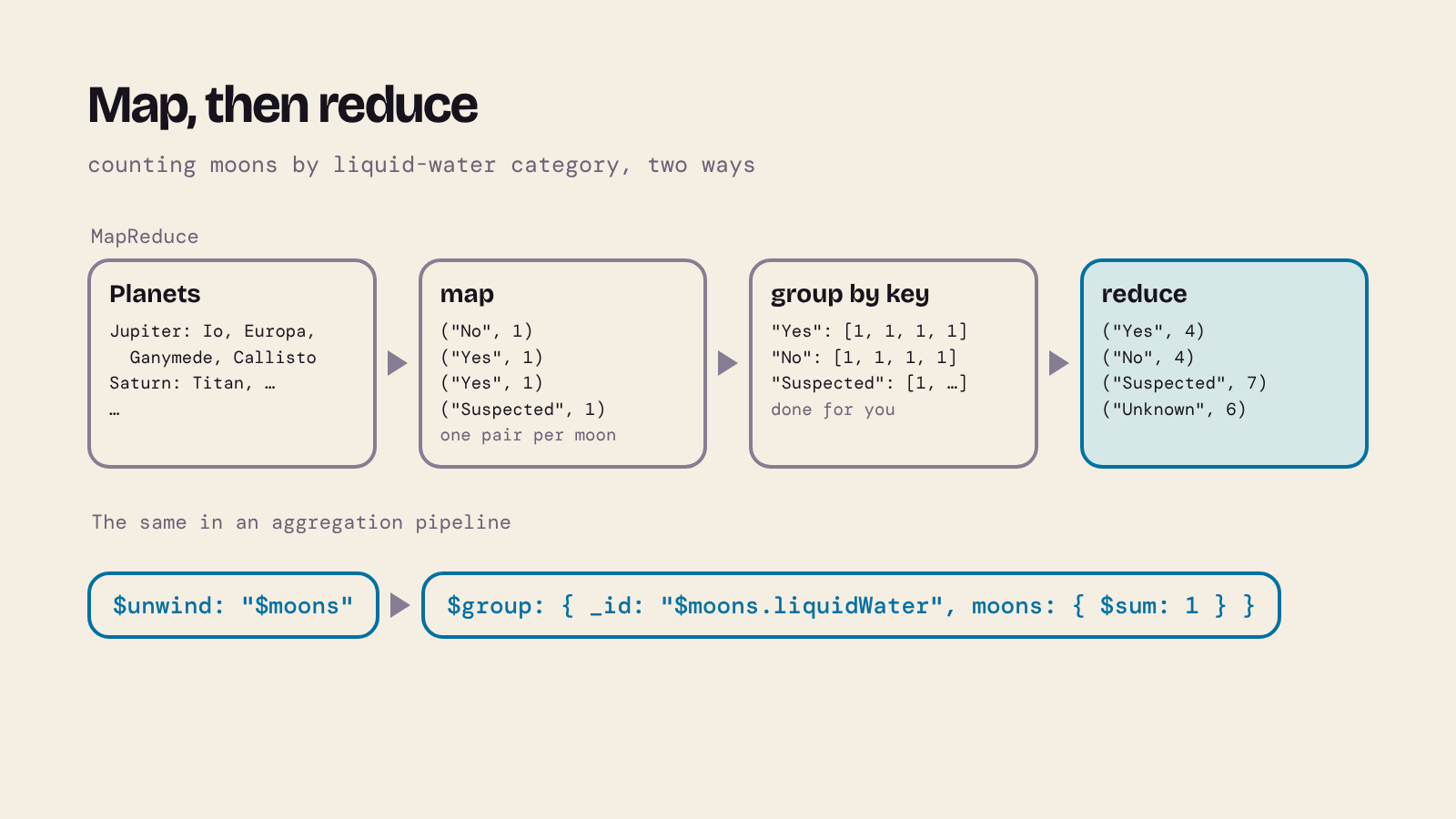
In part 1 we met MapReduce: a map step that runs where the data is and turns each record into key/value pairs, and a reduce step that combines all the values for one key. Counting our moons by water category is a classic example. As an aggregation pipeline, $unwind does the mapping (one document per moon) and $group the reducing:
use solar_embedded
db.planets.aggregate([
  { $unwind: "$moons" },
  { $group: { _id: "$moons.liquidWater", moons: { $sum: 1 } } },
  { $sort: { moons: -1, _id: 1 } }
])
[
  { _id: 'Suspected', moons: 7 },
  { _id: 'Unknown', moons: 6 },
  { _id: 'No', moons: 4 },
  { _id: 'Yes', moons: 4 }
]
(21 moons now, with Despina.) MongoDB also has a mapReduce command, where you write the two functions yourself in JavaScript. It still runs in MongoDB 9.0, but it has been deprecated since MongoDB 5.0, and mongosh tells you so:
db.planets.mapReduce(
  function () { this.moons.forEach(m => emit(m.liquidWater, 1)); },
  function (key, values) { return Array.sum(values); },
  { out: { inline: 1 } }
)
DeprecationWarning: Collection.mapReduce() is deprecated. Use an aggregation instead.
See https://mongodb.com/docs/manual/core/map-reduce for details.
{
  results: [
    { _id: 'Unknown', value: 6 },
    { _id: 'Yes', value: 4 },
    { _id: 'No', value: 4 },
    { _id: 'Suspected', value: 7 }
  ],
  ok: 1,
  '$clusterTime': {
    clusterTime: Timestamp({ t: 1795057436, i: 2 }),
    signature: {
      hash: Binary.createFromBase64('AAAAAAAAAAAAAAAAAAAAAAAAAAA=', 0),
      keyId: Long('0')
    }
  },
  operationTime: Timestamp({ t: 1795057436, i: 2 })
}
Same counts, but MongoDB's advice is to use an aggregation pipeline instead, which is faster and easier to write (MongoDB Manual: Map-Reduce).
Hadoop. You'll often see MapReduce mentioned alongside Apache Hadoop, the best-known open-source framework built around the idea. Hadoop's core modules are HDFS (a distributed file system that spreads huge files over many machines), YARN (which schedules jobs and shares out a cluster's resources) and Hadoop MapReduce (which runs map and reduce jobs on YARN) (Apache Hadoop). It's built for batch processing of very large files rather than for looking up individual records, so it's a different tool from MongoDB. Related projects such as Apache Spark, a general compute engine that can run on Hadoop data, offer more flexible ways to process it, but the map-then-reduce pattern is still everywhere, including in MongoDB's $unwind and $group.
15. Scaling out: replica sets and sharding
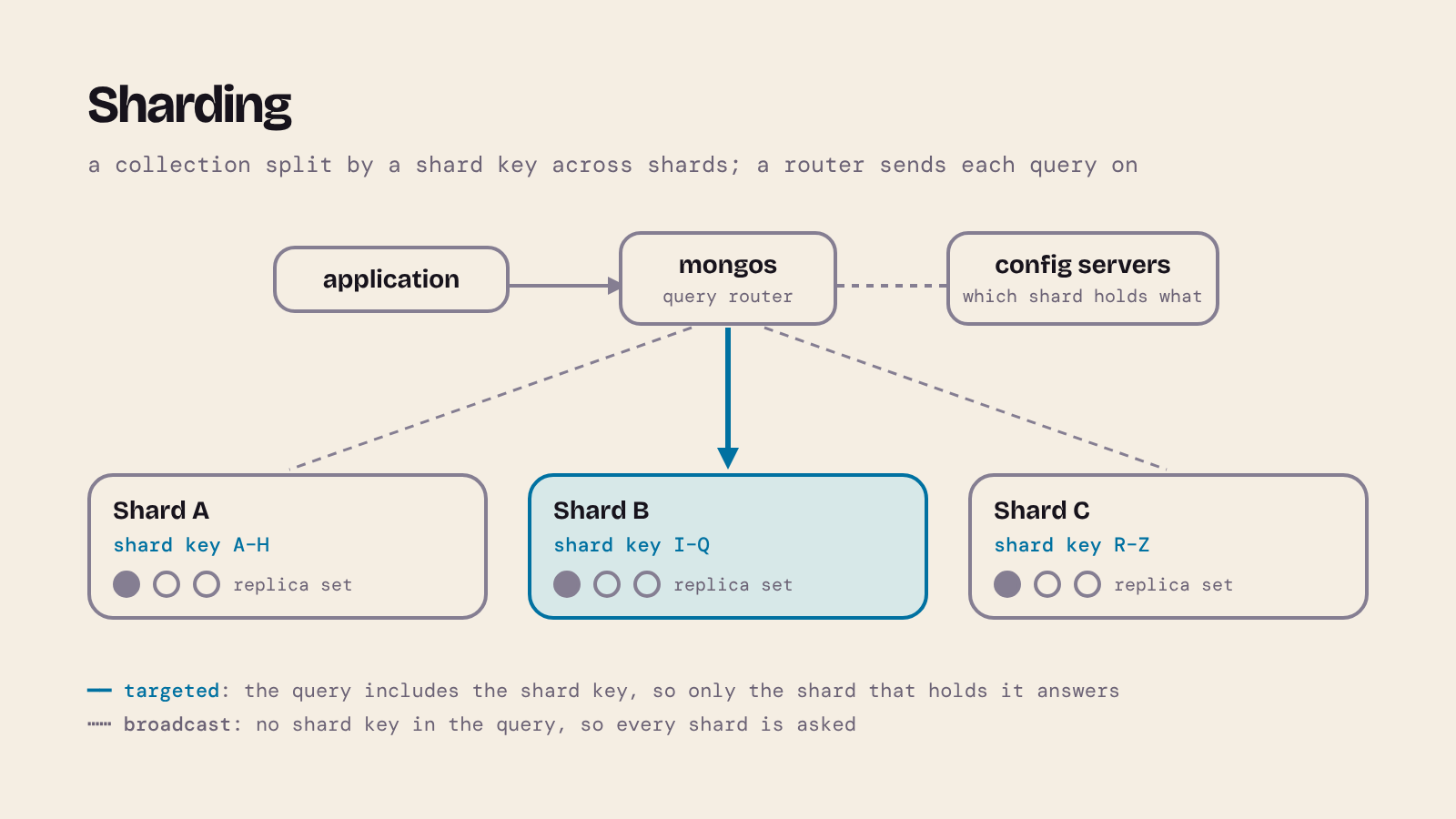
Part 1 showed the two tools every distributed database uses: replication (copies) and partitioning (splitting). MongoDB builds both in.
- A replica set is a group of
mongodservers that keep the same data. One is the primary and takes the writes; the others are secondaries that copy them. If the primary fails, an eligible secondary calls an election and becomes the new primary (MongoDB Manual: Replication). Our one-member set has no copies, but it's the same machinery. - Sharding is MongoDB's horizontal partitioning. A collection is split by a shard key (one or more indexed fields) into ranges of values, either of the values themselves (ranged sharding) or of a hash of them (hashed sharding), and the ranges are spread over several shards, each of which is a replica set. Applications talk to a router,
mongos, which sends a query that includes the shard key to just the shards that hold it (a targeted operation) and a query without it to all of them (a broadcast operation) (MongoDB Manual: Sharding).
This is where documents pay off. Because a document carries its related data with it, a query for one planet and its moons reads one document on one shard, with no join across machines. Choosing the shard key is the most important decision: it decides which queries are targeted, and a key with few different values (such as liquidWater, with only four) can't be split finely enough. Our eight planets would never need sharding, of course; it's for collections too big or too busy for one server.
16. MySQL can store documents too
The choice isn't all or nothing. MySQL has a native JSON column type, which checks that what you store is valid JSON and lets you query inside it. In the Astronomy database:
CREATE TABLE PlanetDocs (doc JSON NOT NULL);
INSERT INTO PlanetDocs (doc) VALUES
  ('{"_id": "Mars", "diameter": 6792,
     "moons": [{"name": "Phobos", "liquidWater": "No"},
               {"name": "Deimos", "liquidWater": "No"}]}'),
  ('{"_id": "Jupiter", "diameter": 142984,
     "moons": [{"name": "Io", "liquidWater": "No"},
               {"name": "Europa", "liquidWater": "Yes"},
               {"name": "Ganymede", "liquidWater": "Yes"},
               {"name": "Callisto", "liquidWater": "Suspected"}]}');
Invalid JSON, such as an unquoted key, is rejected:
INSERT INTO PlanetDocs (doc) VALUES ('{ _id: "Venus" }');
ERROR 3140 (22032): Invalid JSON text: "Missing a name for object member." at position 2 in value for column 'PlanetDocs.doc'.
->> extracts a value as text, and JSON_LENGTH() counts the elements of an array:
SELECT doc->>'$._id' AS planet, JSON_LENGTH(doc->'$.moons') AS moons
FROM PlanetDocs;
+---------+-------+
| planet  | moons |
+---------+-------+
| Mars    |     2 |
| Jupiter |     4 |
+---------+-------+
2 rows in set
JSON_TABLE() turns the array of moons back into rows you can filter like a table, the MySQL equivalent of $unwind:
SELECT jt.planet, jt.moon
FROM PlanetDocs,
     JSON_TABLE(doc, '$' COLUMNS (
         planet VARCHAR(25) PATH '$._id',
         NESTED PATH '$.moons[*]' COLUMNS (
             moon        VARCHAR(100) PATH '$.name',
             liquidWater VARCHAR(10)  PATH '$.liquidWater'
         )
     )) AS jt
WHERE jt.liquidWater = 'Yes';
+---------+----------+
| planet  | moon     |
+---------+----------+
| Jupiter | Europa   |
| Jupiter | Ganymede |
+---------+----------+
2 rows in set
This works well for a few flexible attributes inside an otherwise relational design (product options, settings, data from an outside API). If most of your data is documents and you need to spread it over many servers, a document database is the better fit.
17. Strengths, weaknesses and choosing
| Relational (MySQL) | Document (MongoDB) | |
|---|---|---|
| Structure | fixed columns, declared in advance; changes need ALTER TABLE |
flexible: documents in one collection can differ; rules optional (validation) |
| Relationships | foreign keys, enforced; joins are the normal way to work | embedding, or references the database doesn't check; $lookup when you need a join |
| Duplication | normalised: each fact stored once | often copied on purpose to avoid joins, so copies can drift apart |
| Questions you didn't plan for | easy: any join or grouping, in SQL | harder: the design follows the queries you expected |
| Reading a whole record | several tables joined | often one document |
| Fit with program code | rows mapped to objects (often by an ORM) | documents look like the objects in your program |
| Transactions | the default for everything | always atomic within one document; across documents, available but costlier |
| Scaling out | possible (part 1), but hard | replica sets and sharding built in |
| Query language | SQL, a standard shared by many products | MongoDB's own query API and aggregation pipeline |
A short checklist:
- What shape is your data? Uniform rows with many relationships suit tables. Self-contained records of varying shape, read as a whole, suit documents.
- How will it be queried? If you know the main access patterns, you can design documents around them. If people will keep asking new questions across entities, SQL is more forgiving.
- Which guarantees do you need? If correctness depends on constraints across many records (money, stock, bookings), the relational model does the work for you.
- Do you need to distribute? Most applications fit on one server. If yours doesn't, or must stay available across data centres, that's when MongoDB's built-in sharding and replication count most.
Many real systems use both: a relational database for orders and payments, a document database for a product catalogue or user activity, or a JSON column where a little flexibility is enough.
18. Check your understanding
- What's wrong with this as JSON?
{ name: 'Io', liquidWater: "No", } - Embed or reference? (a) The layers of a planet's atmosphere. (b) Space missions, each of which visited several planets. (c) Every observation ever recorded of each planet by a telescope network.
- Which moons in our data does
db.moons.find({ name: /^T.*n$/ })return? - In
solar_embedded, Uranus's moons are Titania, Oberon, Umbriel and Ariel, all "Suspected". What does this change?db.planets.updateOne({ _id: "Uranus", "moons.liquidWater": "Suspected" }, { $set: { "moons.$.liquidWater": "Yes" } }) - Write the MongoDB version of
SELECT HasLiquidWater, COUNT(*) FROM Moons GROUP BY HasLiquidWaterfor themoonscollection insolar_referenced. - In the referenced design, deleting a planet left its moons behind. Name two ways to stop that happening.
Answers
- Three things: the key
nameisn't in double quotes,'Io'uses single quotes, and there's a trailing comma. Valid JSON is{ "name": "Io", "liquidWater": "No" }. - (a) Embed: it belongs to one planet, it's small and it's read with the planet. (b) Reference: missions and planets are many-to-many, and embedding would copy each mission into several planets. (c) Reference: the list grows without limit and would eventually pass the 16 MiB document limit.
- Titan and Triton: names that start with "T" and end with "n". Titania ends with "a".
- Only Titania changes to "Yes". The positional
$updates the first matching element in each document;$[m]witharrayFilterswould change all four. db.moons.aggregate([{ $group: { _id: "$liquidWater", moons: { $sum: 1 } } }])(add{ $sort: { moons: -1 } }to order it).- Embed the moons in their planet, so they're deleted with it; or have the application delete or check the moons (ideally in a transaction) before deleting a planet. MongoDB has no foreign keys to do it for you.
19. Further reading and sources
- MongoDB Manual: SQL to MongoDB mapping chart, Data modelling, Query predicates, Positional
$and$[<identifier>], Aggregation pipeline, Collation, Schema validation, Transactions, Limits, Release notes for MongoDB 9.0. - Bray, T. (ed.) (2017) The JavaScript Object Notation (JSON) Data Interchange Format, RFC 8259, and Ecma International, ECMA-404.
- MySQL 9.7 Reference Manual: The JSON data type, JSON table functions, FOREIGN KEY constraints.
- Dean, J. and Ghemawat, S. (2004) "MapReduce: Simplified data processing on large clusters", OSDI 2004. Google Research.
- Apache Hadoop project page.
- Kleppmann, M. and Riccomini, C. (2026) Designing Data-Intensive Applications, 2nd edn. O'Reilly. Covers relational and document models, and much more, in depth.
- NASA: Planetary Fact Sheet, Neptune moons, Pluto facts.
Related posts on this blog: Distributed databases: partitioning, replication and CAP (part 1), Exploring the Cosmos (the planets database in MySQL), Mastering Database Normalisation (why relational designs avoid the duplication documents allow) and Install MySQL on OSX Using Homebrew.
This is my own tutor material, not official University of London course material.
About the author
- Head of eLearning at the University of Cambridge Language Centre, full-stack developer and AI engineer, and online tutor on the BSc Computer Science from Goldsmiths, University of London, on Coursera. I started out in neuroscience research before moving into web development, and have spent over twenty years building digital learning at Cambridge. This blog is my supplementary material for students on the BSc: set-up guides, explanations of the ideas that trip people up, and worked examples. New here? Click Website above for my Start here page and module guides.
Comments
Join the discussionNo comments yet. Be the first to comment.
Databases and Advanced Data Techniques (CM3010)
University of London - Module Specifications for CM3010 - Databases and Advanced Data Techniques